Last Tuesday, I asked an AI model to evaluate an inventory discrepancy across 4,200 warehouse SKUs. In four seconds, it returned eleven paragraphs of dense, polished prose.
It looked thorough. It was completely useless.
To find out whether our vendor lead times had actually slipped, I had to spend twelve minutes digging through polite filler. AI generation speed is no longer the bottleneck. Our reading bandwidth is.
The reading tax of generative AI
When large language models first arrived, everyone focused on generation velocity. You typed a prompt, and complete essays cascaded down your monitor.
Writing became cheap. Verification became expensive.
Computer scientist Andrej Karpathy pointed out this exact problem. As autonomous agents take on heavier analytical tasks, human work shifts from authoring to supervision. If a supervisor spends half the day parsing decorative adjectives, the productivity gains vanish.
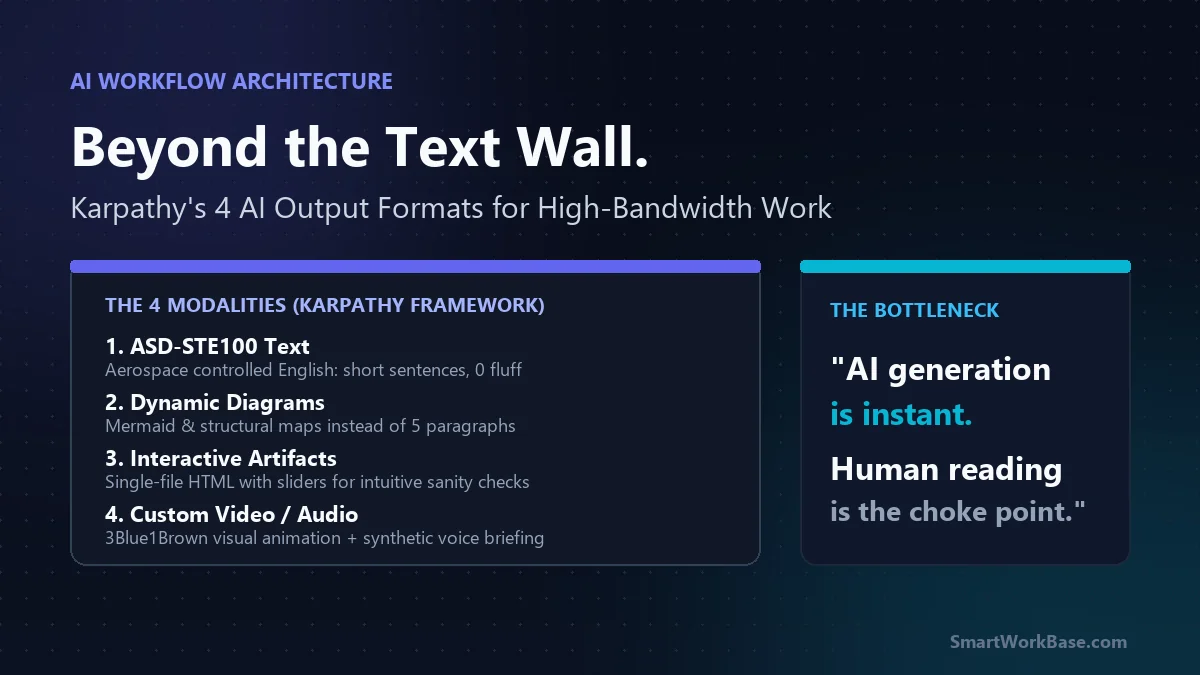
Karpathy proposed four specific output formats to replace the default text wall. I spent two weeks testing each format across supply chain data, technical specs, and daily planning. Here is what actually worked.
Format 1: ASD-STE100 (The 80% rule)
In aerospace maintenance, ambiguity causes fatal crashes. If a mechanic misinterprets a turbine maintenance manual, an aircraft engine fails at thirty thousand feet.
To prevent misreading, the aerospace industry developed ASD-STE100, known as Simplified Technical English. It enforces strict rules: short sentences under twenty words, active voice, and an approved dictionary where each word has only one meaning.
Karpathy noted that asking an AI model to write in ASD-STE100 instantly strips out conversational padding. The output becomes direct, sharp, and impossible to misunderstand.
Full ASD-STE100 can feel rigid. Karpathy suggested a pragmatic adjustment: tell the model to write “80% of the way to ASD-STE100.” All empty phrases disappear, leaving clean, verifiable facts.
Format 2: Diagrams and spatial maps
Certain concepts should never be explained with paragraphs. System architectures, order fulfillment sequences, and error handshakes are visual by nature.
When an AI explains a three-tier API integration using text, your brain must convert words back into a mental map. One missed preposition ruins your entire understanding.
Instead of prose, I now ask for a Mermaid flowchart or an ASCII topology map. A clean diagram compresses five minutes of tedious reading into three seconds of pattern recognition.
Your eyes process spatial relationships instantly. Text forces sequential parsing. Always choose the diagram for structural logic.
Format 3: Interactive HTML artifacts
Formulas are easy to write and exhausting to read. When I ask an AI to explain a safety stock calculation with fluctuating supplier lead times, text summaries fall flat.
Instead of reading static equations, I prompt the model to generate a single-file HTML artifact with interactive input sliders. In seconds, I receive a working browser widget.
I drag the supplier delay slider from two days to seven days. The safety stock curve jumps immediately. Watching the numbers react on screen builds intuitive understanding that static text cannot match.
Seeing beats reading. Testing beats analyzing.
Format 4: Custom explainer video and audio
Karpathy described custom explainer videos as the ultimate format for high-bandwidth understanding. The inspiration comes from Grant Sanderson’s visual math channel, 3Blue1Brown.
Imagine generating a 3-minute animation script rendered with Python, paired with a clear synthetic voiceover. Instead of reading a technical whitepaper during a commute, you watch an exact visual breakdown tailored to your query.
While fully autonomous video rendering on local hardware is still maturing, pairing AI text summaries with realistic text-to-speech tools already saves valuable hours. Listening at double speed turns documentation review into a passive morning routine.
Audio bypasses screen fatigue. It frees your eyes for physical tasks.
🔧 Copyable Prompt: The 80% ASD-STE100 Filter (open me)
Follow these three rules:
1. Write 80% towards the ASD-STE100 (Simplified Technical English) standard.
2. Keep sentences under 18 words each. Use active voice and present tense.
3. One idea per sentence. If a relationship has multiple steps, present it as a short numbered list.
Tip: Append this prompt to any complex technical document or vendor contract to cut reading time by half.
How I changed my default prompting habits
I stopped letting AI output generic blocks of text. The default conversational mode of modern LLMs is optimized for polite chit-chat, not executive decision-making.
Before typing a prompt, I determine the best modality. If I need to understand a multi-stage process, I request a Mermaid diagram. If I need to test formula assumptions, I request an HTML artifact.
When I do need written text, I demand the 80% ASD-STE100 constraint. My daily reading volume has dropped significantly, while my comprehension accuracy improved.
AI generation will only get faster. Protecting your attention requires changing how you ask for answers.
Frequently Asked Questions
What is ASD-STE100 and why do AI models recognize it?
ASD-STE100 is an international specification for technical documentation in aerospace and defense. Because frontier models have ingested technical training corpuses including aerospace manuals and translation benchmarks, they recognize the standard and can constrain their syntax accordingly.
Why specify 80% towards ASD-STE100 instead of 100%?
Full compliance with ASD-STE100 requires strict conformance to a rigid approved lexicon of roughly 1,000 words. Asking for 80% retains the benefits—short sentences, active voice, and minimal filler—without forcing the model into an awkward, robotic vocabulary limit.
When should you request an interactive HTML artifact instead of text?
Request an interactive HTML artifact whenever your problem involves numerical sensitivity, formulas with multiple variables, or parameter tuning. Manipulating interactive sliders in a browser offers immediate intuition that dozens of static calculations cannot provide.