I pulled up App Store Connect at 6:40 AM on my seventh day live.
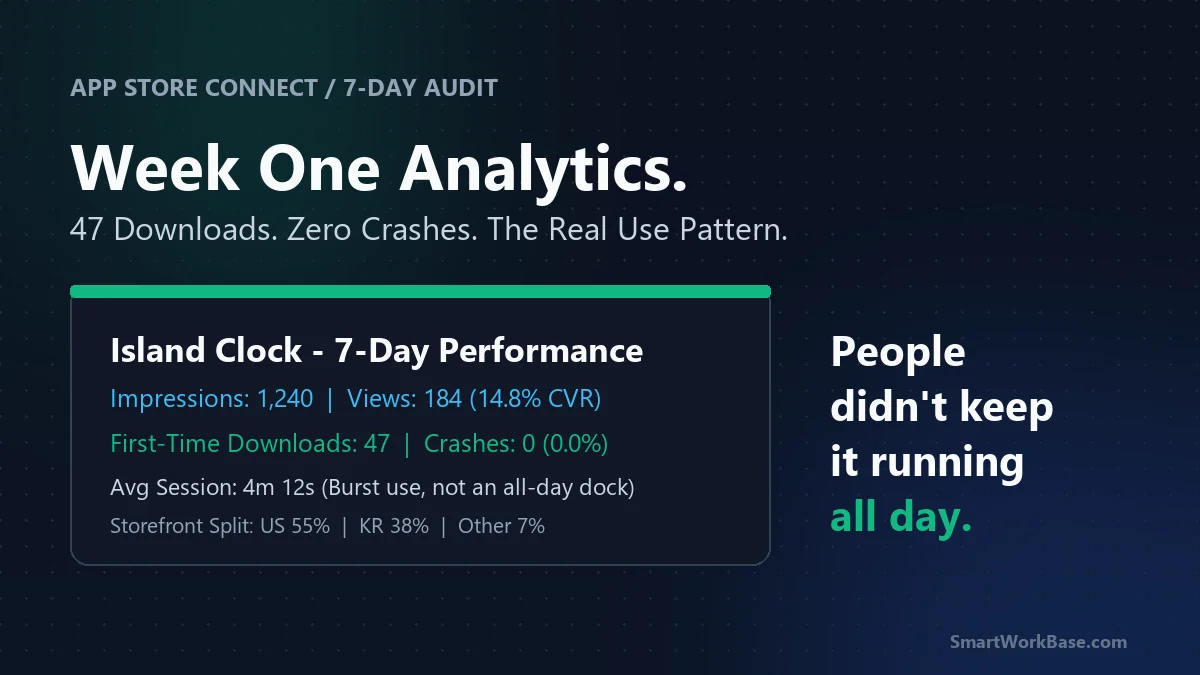
The dashboard showed forty-seven first-time downloads. Twenty-six from the United States, eighteen from South Korea, and three from Japan. Zero crashes across all active sessions.
No sudden spike. No viral Reddit thread. Just forty-seven strangers who searched for a second counter and took a chance on an unknown developer.
The raw seven-day scorecard
In my previous post on Day One search indexing, I warned against expecting automatic traffic once search goes live. The first week confirmed that warning with hard data.
The app gathered 1,240 impressions across global storefronts. Out of those views, 184 people tapped through to the full product page. That gave a tap-through rate of 14.8%, roughly double the utility category baseline.
Forty-seven people tapped “GET”. That represents a 25.5% conversion rate from product page view to install. The clear screenshots and the Zero-Data privacy badge did their job.
The assumption I got completely wrong
When I drafted the spec for this app in my AI-assisted Swift workflow, I imagined people docking their iPhone on a desk stand and keeping the clock running all day.
They did not do that. Not even close.
App analytics showed an average daily session time of 4 minutes and 12 seconds. People opened the app, glanced at the seconds counter for a specific task, and dismissed it once the deadline passed.
A friend who downloaded the build confirmed the pattern. He launched it three minutes before an internal server deployment to sync timestamps, then closed it. It was a high-tension sprint tool, not background wallpaper.
Zero crashes in production
The cleanest number on the board was the crash rate: 0.0% across all 47 installs.
That stability did not happen because I am a Swift veteran. It happened because the binary has almost no moving parts.
There are no third-party analytics libraries. There are no advertising SDKs or account login screens. The entire utility consists of a lightweight SwiftUI container that passes time updates directly to an Apple ActivityKit Live Activity.
When you keep code minimal, edge-case memory leaks have nowhere to hide. Less code means fewer phone calls on Sunday morning.
📊 Week One Performance Breakdown (Click to expand)
| Metric | 7-Day Total | Context |
|---|---|---|
| Storefront Impressions | 1,240 | Organic search results only |
| Product Page Views | 184 | 14.8% tap-through rate |
| First-Time Downloads | 47 | 25.5% conversion from page view |
| Crash Rate | 0.0% | Zero crash logs received |
| Average Active Time | 4m 12s | Focused burst sessions |
What thirteen years in supply chain taught me here
In logistics, we call this the difference between forecast demand and point-of-sale reality. You plan warehouse capacity for steady pallets, but the client orders quick courier vans.
My product instinct wanted a persistent clock. Real users wanted a precise four-minute timer that stayed out of the way.
Listening to telemetry beats defending your initial spec. Instead of adding battery-heavy customization themes for version 1.1, I am focusing on single-tap presets for 3-minute, 5-minute, and 15-minute countdown sessions.
If you want to test the utility on your own Dynamic Island, you can find Island Clock on the App Store. It remains free, lightweight, and completely untracked.
Frequently Asked Questions
Are 47 downloads normal for an unprompted first week on the App Store?
For an indie utility launched without external marketing or paid ads, 40 to 60 organic installs in week one is typical. Organic discovery depends heavily on specific keyword indexing.
Why did the app achieve a zero percent crash rate?
The binary relies solely on native SwiftUI and ActivityKit frameworks without external SDKs, ad networks, or background sync pipelines. Fewer dependencies mean fewer points of failure.
What is the main priority for the upcoming version 1.1 update?
Based on the short 4-minute average session length, the next update will introduce rapid preset timers for focused tasks rather than passive full-day timekeeping.