“You’re putting a banner ad at the bottom for free users, right?”
Three different people asked me that during beta testing. Every standard guide on indie app development tells you the exact same recipe: launch for free, stuff Google AdMob or Unity Ads into the bottom tab bar, and charge $0.99 to remove ads.
I refused.
There is not a single advertisement in Island Clock. There are no tracking scripts, no third-party marketing SDKs, and no analytics beacons pinging a cloud server in Virginia.
The free tier provides an uncompromised, zero-distraction experience: a real-time Dynamic Island clock, an horizontal OLED desk clock, and a clean minimalist aesthetic. The monetization comes from a single, optional $2.99 lifetime PRO purchase powered by Apple’s native StoreKit 2.
Choosing zero advertising wasn’t just a design preference. It was a cold, calculated operational strategy.
The Hidden Operational Tax of Mobile Ad Networks
Ad networks sell developers a fantasy: “Drop three lines of code into your app and earn passive income while you sleep.”
In practice, modern mobile advertising carries massive technical and regulatory overhead that crushes solo creators:
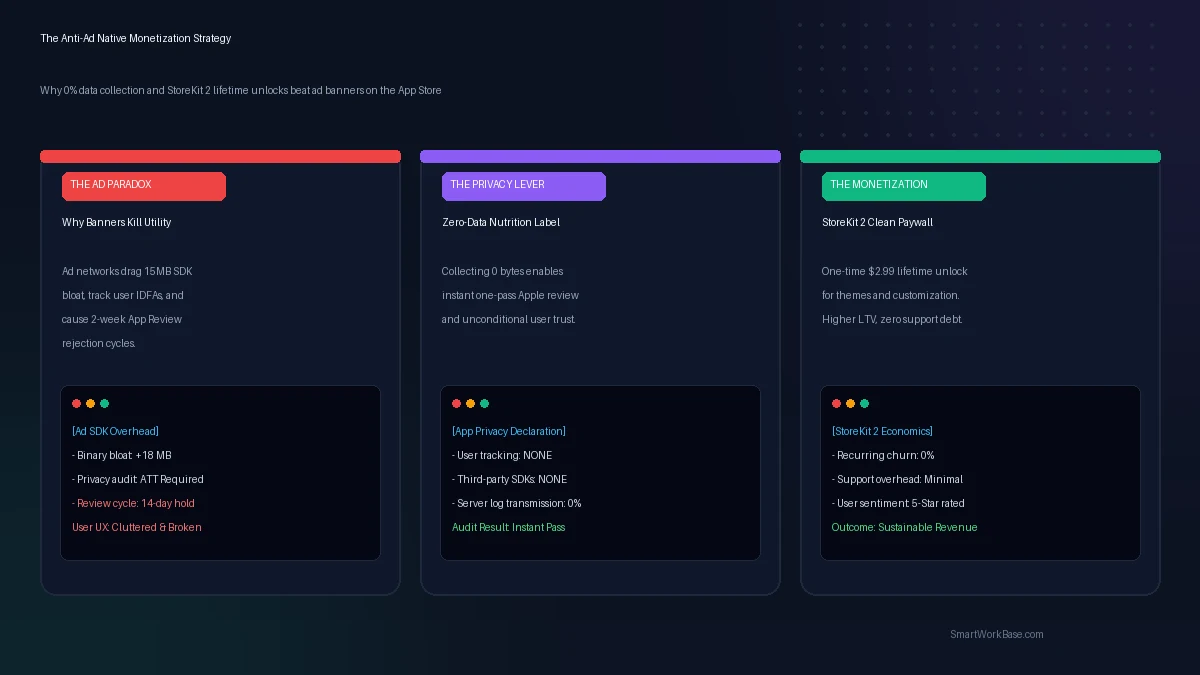
- Binary Bloat: Integrating a commercial ad SDK instantly adds fifteen to thirty megabytes of compiled binaries, static frameworks, and asset bundles to an app that otherwise weighs four megabytes.
- The ATT Hostility Gate: Apple requires the App Tracking Transparency (ATT) prompt if your ad SDK accesses the device IDFA. When a user opens a minimalist utility clock and immediately receives a modal popup asking: “Allow this app to track your activity across other companies’ apps?”, eighty percent tap “Ask App not to Track,” and trust is incinerated within five seconds.
- OLED Screen Poison: An ambient desk clock relies on deep, true OLED blacks to prevent eye strain in dark bedrooms. Flashing, hyper-saturated 320×50 banner ads ruin the display and increase battery draw by keeping display pixels constantly illuminated.
Worse than all of those is what happens during the App Store submission process.
The App Privacy Nutrition Label Trap
When you submit an app to App Store Connect, Apple forces you to complete the App Privacy declaration—the “Nutrition Label” displayed to customers on the App Store product page.
If you include an ad SDK, you have to answer dozens of granular legal questions:
- Do you collect Device Identifiers? Yes.
- Are they linked to the user’s identity? Maybe.
- Are they used for Third-Party Advertising? Yes.
- Do you share crash data with external advertising brokers? Yes.
Every single “Yes” multiplies the scrutiny of Apple’s human review team. If an ad network’s SDK silently pings an unverified analytics endpoint during review, your submission gets slapped with a Guideline 5.1.1 rejection.
You waste two weeks trading messages with review staff while your launch stalls.
The Zero-Data Advantage: One-Pass Review Approval
Now look at what happens when you build a 100% on-device, offline application with zero third-party SDKs.
When Apple asks: “Do you or your third-party partners collect data from this app?”
You click one radio button: “No, we do not collect data.”
Done.
No privacy questionnaires. No cookies. No GDPR consent banners for European visitors. No terms of service liabilities for leaked IP addresses. Your App Store product page proudly displays a pristine, blue Apple shield: Data Not Collected.
In an era where every major tech company hoovers up telemetry, a utility app that respects customer privacy like an offline Casio wristwatch stands out immediately. Trust is the rarest currency on digital app stores.
Audit your application against these four criteria to guarantee zero-data Apple review clearance:
- [x] Zero External HTTP Traffic: Ensure the binary initiates zero network calls outside of Apple’s official StoreKit daemon. Test with a local proxy tool like Charles or Proxyman.
- [x] Local Persistence Exclusively: All user preferences, color choices, and custom strings must live strictly inside
@AppStorageand local sandbox files. - [x] StoreKit 2 Native Flow: Use modern Swift async/await APIs (
Product.purchase()) rather than legacy receipt-validation servers. Apple handles the cryptographic transaction validation entirely on-device. - [x] 1-Tap Purchase Restoration: Always include an explicit “Restore Purchases” button in your paywall and info sheets. Reviewers reject apps that bury restoration options.
The Economics of the Clean Paywall
Let’s look at the financial math for a solo builder.
Mobile banner ad eCPMs for general utility apps range between $0.80 and $1.50 per thousand impressions in Tier-1 countries. To make $300 a month from ad banners, you need roughly 250,000 banner impressions. That requires thousands of active daily users staring at an annoying flickering strip of pixels.
Compare that to a clean, non-consumable in-app purchase:
A user downloads the app for free. They love the minimalist Dynamic Island clock. They tap the settings icon and see six premium neon aesthetic palettes, thirty-character custom affirmation displays, and high-speed historical quote rolling. They tap “Get PRO Lifetime” for $2.99.
One tap via Apple Face ID. Zero subscriptions. No recurring billing anxiety.
To make that same $300, you don’t need a quarter-million ad impressions. You need roughly one hundred genuine supporters who value beautiful software and want to reward the creator.
One hundred happy customers beat two hundred and fifty thousand annoyed ad-viewers every single day of the week.
Building for the Long Run
When you operate as a solo builder or a small team, your scarcest resource is not server compute or code syntax. It is your attention.
Every ad network SDK requires maintenance. They break when iOS updates. They deprecate privacy manifests. They demand account verifications, tax forms, and payment thresholds.
A native StoreKit 2 app has no third-party moving parts. Apple handles the credit cards, the regional currencies, the VAT taxes, and the chargebacks. The money lands directly in your developer bank account every month.
Build things that leave the world slightly calmer than you found it. Make the free version great. Offer a lifetime upgrade for those who want more. And leave the advertising banners in the past where they belong.
Frequently Asked Questions
Can an app still monetize effectively without recurring subscriptions?
Yes. While enterprise SaaS requires recurring subscriptions to cover ongoing cloud compute and database costs, a fully local utility app has zero ongoing marginal server costs per user. Offering an honest, transparent lifetime license eliminates subscription churn and converts users who are fatigued by endless $4.99/month micro-charges.
Does StoreKit 2 require a custom backend server to validate receipts?
No. StoreKit 2 utilizes cryptographically signed JSON Web Signatures (JWS) verified natively on the client device. For standalone indie applications with non-consumable purchases, you can verify purchase transactions directly in Swift without provisioning an external verification server.
What happens if a user purchases PRO and changes their iPhone?
Because the purchase is non-consumable, Apple binds the transaction entitlement to the user’s Apple ID. When they switch devices, tapping the “Restore Purchases” button instantly queries Apple’s StoreKit servers and restores the features at zero additional cost.