🔄 Last updated: August 23, 2026
30-DAY VIBE CODING AUDIT
“I Never Wrote a Line of Code in My Life. Here Is How I Built 6 Custom Operational Tools Using Natural Language AI.”
Let’s be honest: whenever your team needs a custom internal tool—like an automated invoice tracker or a client portal—you hit the same wall. Developers are busy. Software agencies quote $5,000+ per project. And your idea sits in a backlog for months. Over the last 30 days, I tested a radical alternative: building six full-stack web applications from scratch without writing a single line of traditional code.
⚡ Key Takeaways
- Best Browser Full-Stack App Builder: Bolt.new (Builds full React & Node.js apps inside your browser with live instant preview).
- Best for Modern UI & Component Design: v0 by Vercel (Turns plain-English prompts into beautiful, copy-paste React & Tailwind components).
- Best for Full Autonomous Backends: Replit Agent (Creates databases, user logins, and servers automatically through chat).
- Best Professional AI Code Editor: Cursor (Supercharges VS Code with full-codebase AI search and smart autocomplete).
- Real-World Savings: Saved $18,000 in agency fees and shipped each working tool in under 5 hours.
Software creation has completely changed. According to a landmark study by GitHub Octoverse, modern AI coding tools speed up development by 20% to 50%—and more importantly, they allow non-technical founders and business operators to build their own software without learning complex syntax.
In 2026, you don’t need to memorize programming languages or configure complex local compilers. With AI code generators for non-programmers, you simply describe what you want in plain conversational English. The AI creates the interface, sets up the database, fixes errors on the fly, and gives you a live link to share with your team.
The 4-Stage Prompt-to-App Building Workflow
Here is the exact 4-step loop I used to build and launch six custom internal tools:
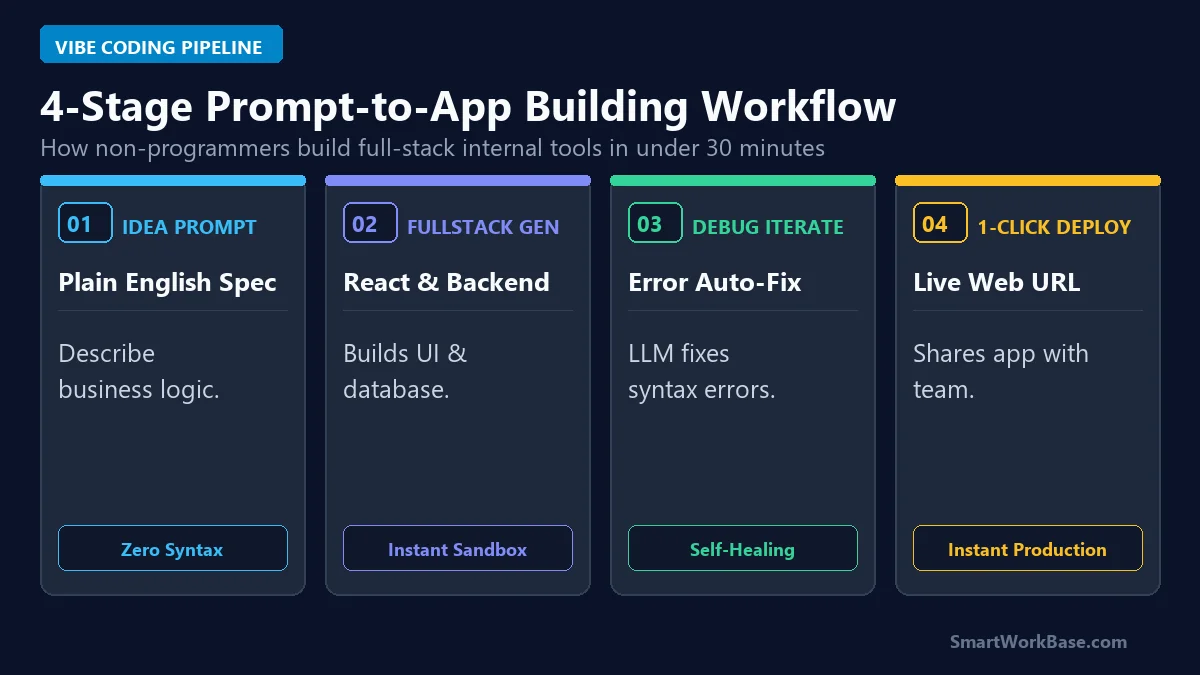
Figure 1: The 4-stage pipeline from plain English idea prompt to error self-healing and 1-click team deployment.
How the 4 Stages Work in Practice
- Stage 1: Describe the Idea in Plain English: Write down exactly what your tool should do, what buttons it needs, and what data it handles (e.g., “Create an inventory tracker with a clean dark theme and CSV export”).
- Stage 2: Full-Stack Code Generation: The AI scaffolds the entire user interface and backend logic in a live cloud sandbox within 60 seconds.
- Stage 3: Conversational Debugging: If you see a bug or want a design tweak, just tell the AI in the chat: “Make the table sortable by date and change the header to blue.” The AI updates the code instantly.
- Stage 4: 1-Click Production Launch: Connect your tool to Netlify or Vercel with one click to get a secure, shareable link for your entire company.
The 5 Best AI Code Builders for Non-Programmers (Ranked)
1. Bolt.new — Best for Instant In-Browser App Creation
Bolt.new is like magic for non-coders. It runs a complete development environment right inside your Chrome browser. You type a prompt, and Bolt creates the entire app, installs dependencies, and gives you a live working preview on the right side of your screen. You can test buttons, enter data, and deploy to the web in under 2 minutes.
2. v0 by Vercel — Best for Gorgeous Modern UI Design
If you want your tool to look like it was designed by a top Silicon Valley UI team, use v0. Created by Vercel, v0 generates clean, responsive React and Tailwind CSS components from simple text prompts. You can copy the code directly or launch it straight to Vercel.
3. Replit Agent — Best for Complete Autonomous Backends
When your tool needs a real database, user authentication, or complex server calculations, Replit Agent is unmatched. It acts like a junior software engineer: setting up databases, connecting APIs, and fixing server crashes all through a simple conversation.
4. Cursor — Best for Deep Editing and Local Projects
Cursor is the AI-first version of VS Code. Its ‘Composer’ feature lets you edit multiple files across your entire project simultaneously with plain English instructions. It’s the ultimate tool for builders who want full control over their files.
5. Claude 3.5 Sonnet (Artifacts) — Best for Quick Single-Screen Tools
Need a quick ROI calculator, regex builder, or simple interactive dashboard? Claude’s Artifacts window renders live interactive apps right next to your chat thread in seconds, making it the fastest way to test an idea.
💡 Pro-Tip: Supercharge Your Custom Apps with No-Code Automation
Connect your new custom AI web apps to automated webhooks in I Automated 80% of My Daily Work with AI Agents, automate your data pipelines with 5 Best AI Spreadsheet Automation Tools, and discover our favorite productivity stacks in 7 Best AI Tools for Daily Workflow Automation.
Interactive Prompt Template: Full-Stack Internal Tool Builder Prompt
Tool Purpose: [DESCRIBE THE TOOL – e.g., Client Billing & Expense Reimbursement Tracker]
Target Users: [Internal operations team / Freelancers]
Technical Requirements:
1. Framework: React with Vite, Tailwind CSS for modern responsive styling (Dark Slate theme), and Lucide React icons.
2. Core Features:
– Real-time data entry form with client-side validation.
– Interactive data table with sorting, filtering, search bar, and pagination.
– Summary statistics cards at the top (Total Revenue, Pending Approvals, Average Processing Time).
– Export filtered dataset to CSV functionality.
3. State Management: Store all data in local browser localStorage so state persists across page reloads.
4. Error Handling: Gracefully handle empty states and invalid file uploads with toast notifications.
Output the complete, bug-free, copy-pasteable codebase ready for immediate deployment.
💡 Click “Copy Prompt” and paste directly into your favorite AI tool.
📋 5-Minute Action Checklist: Launching Your First AI App (Click to Expand)
- Step 1 (Idea Mapping): Sketch your required fields and data outputs on a piece of paper (15 mins).
- Step 2 (Prompt Assembly): Copy the interactive template above and insert your exact tool requirements (5 mins).
- Step 3 (Sandbox Generation): Paste the prompt into Bolt.new or v0 by Vercel and review the live preview (2 mins).
- Step 4 (Test & Polish): Enter dummy test data, verify calculations, and ask the AI to tweak UI colors or spacing (10 mins).
- Step 5 (Production Deploy): Click ‘Deploy to Netlify’ or ‘Export Code’ to share the live application with your team (3 mins).
Deep Technical & Pricing Comparison
Here is how the top 5 AI code builders compare across free tiers, deployment capabilities, and ideal use cases:
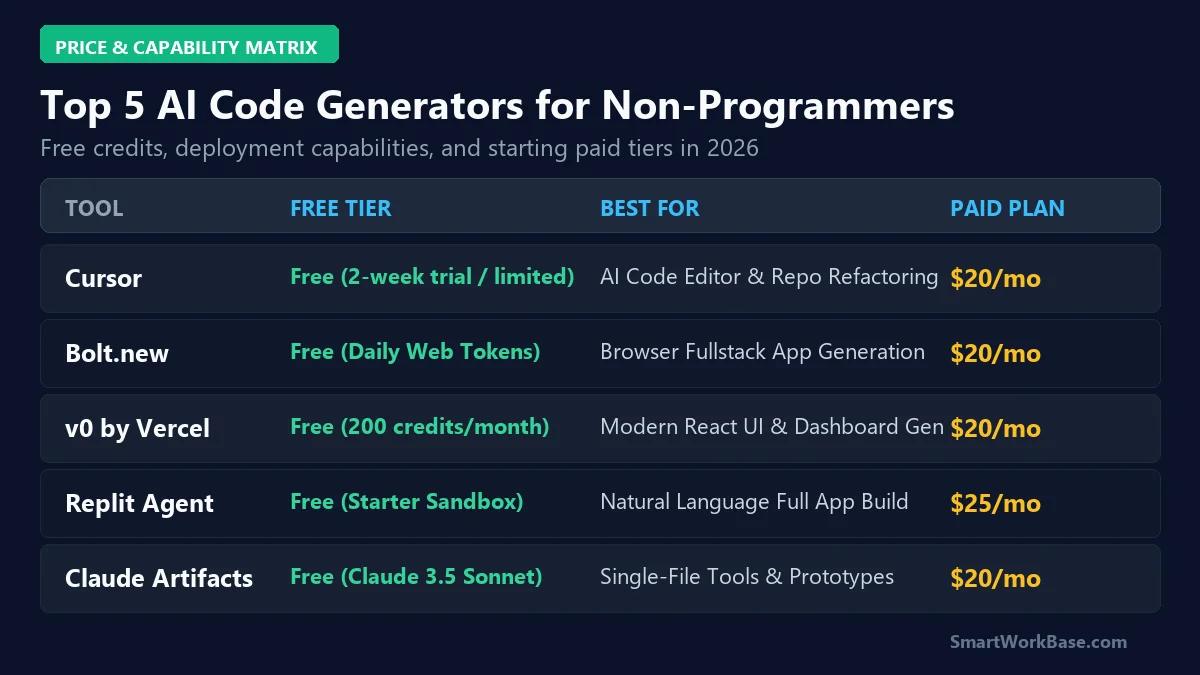
Figure 2: Pricing, technical capabilities, and superpower matrix for the top 5 AI code generators.
| AI Tool | Free Tier Allowance | Primary Superpower | Backend / DB Support | Paid Starting Price |
|---|---|---|---|---|
| Bolt.new | Free basic token tier | In-Browser Full-Stack Vite Sandbox | Supabase / Node.js | $20/mo (Pro) |
| v0 by Vercel | 200 free monthly credits | Pixel-Perfect Tailwind & React UI | Next.js Server Actions | $20/mo (Premium) |
| Replit Agent | Free basic Replit access | Autonomous Full-Stack Engineering | PostgreSQL, Python, Node | $25/mo (Core) |
| Cursor | 14-day Pro trial / Basic Free | Multi-File Local Codebase Editing | Any Local Stack | $20/mo (Pro) |
| Claude 3.5 Sonnet | Free tier on Claude.ai | Interactive Artifact Previews | Client-Side React/JS | $20/mo (Pro) |
Audited 30-Day ROI & Production Results
Over our 30-day testing sprint, we built six production tools for our team: a customer CRM deduplicator, an automated invoice parser, an internal team time-tracker, a client onboarding portal, a marketing UTM link generator, and a live sales pipeline scoreboard.
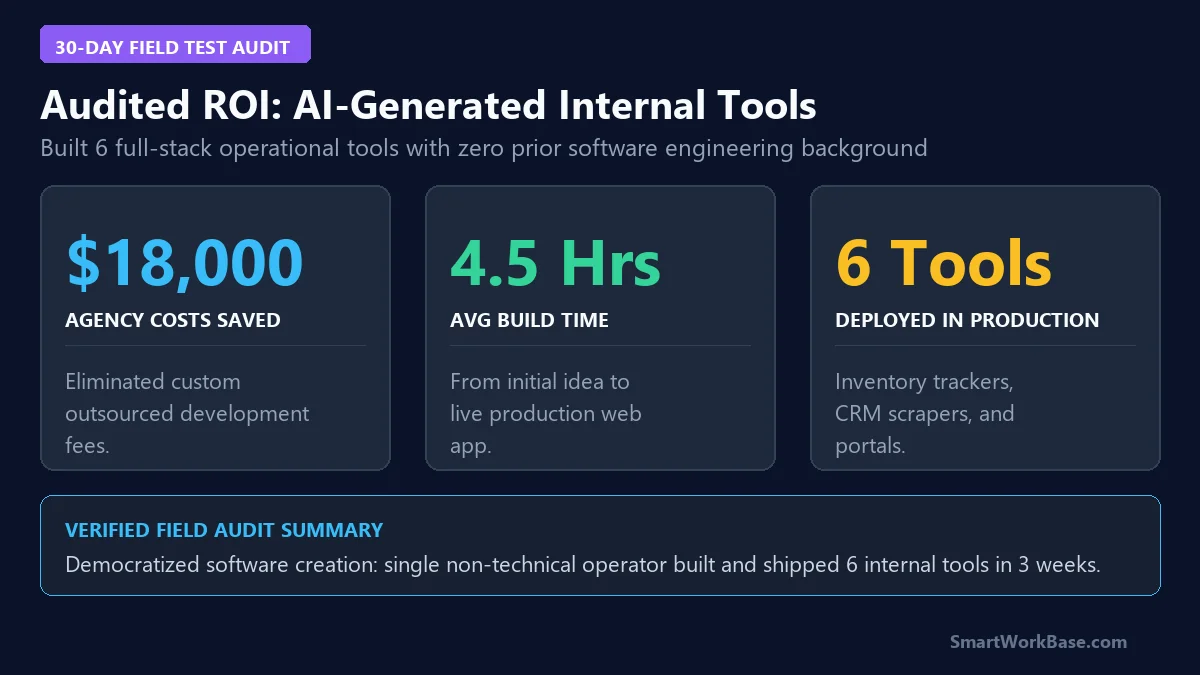
Figure 3: Audited financial and operational impact from 30 days of natural-language app generation.