The mistake cost us $4,200, and it happened in plain sight.
On Tuesday, August 12th, an ocean carrier flagged four 40-foot containers at the Port of Los Angeles with an urgent customs documentation hold. The automated webhook fired cleanly at 09:14 AM, routing an alert directly into our department’s #ops-alerts Slack channel.
Nobody reacted. Nobody opened the manifest. Nobody called the customs broker.
By Friday afternoon, the containers had exceeded their free storage window. Daily demurrage charges hit like a freight train: $350 per container per day. Four days of delay totaled $4,200 in pure penalty fees.
When our director demanded an explanation during the Monday morning post-mortem, I opened the Slack channel to investigate.
The emergency alert was there, exactly where it was supposed to be. But sitting directly above it were forty-two automated bot messages:
[07:00 AM] Daily carrier scrape completed (14 files parsed)[07:30 AM] Supplier B EDI inventory feed synced successfully[08:00 AM] Weather forecast updated for Chicago intermodal hub[08:15 AM] Morning database cache refreshed in 1.4s
Every single planner on the desk had right-clicked the channel weeks earlier and selected Mute Channel. The human brain cannot endure forty false alarms a day. It treats constant noise as silence.
The Sin of “Celebratory” Automations
Engineers and automation builders love celebratory alerts. When you spend three hours building a Python pipeline or a Make scenario, you want to see a cheerful green checkmark appear in your phone notifications confirming your code ran.
It feels satisfying. It is also operational poison.
A notification should never confirm that the sun came up. It should only fire when the roof is actively on fire and requires a specific human hand to turn a valve.
If an automation finishes cleanly, it should vanish without a sound. Success is the baseline expectation, not breaking news.
The 3-Threshold Notification Rule
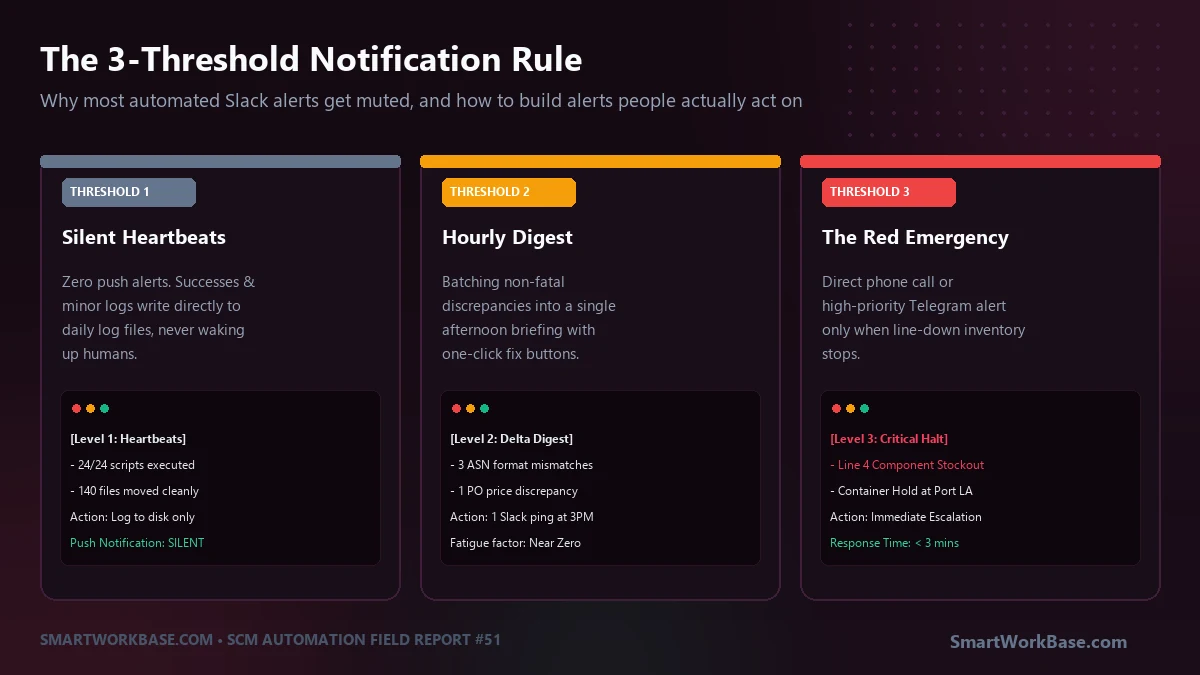
To eliminate alert blindness, we categorized every automated trigger across our logistics operations into three strict operational tiers:
Threshold 1: Silent Heartbeats (Zero Push Alerts)
Routine executions, successful file moves, and hourly synchronization scripts belong in disk logs, never in human chat channels. They write a single line to a local execution.log file with a timestamp and exit code 0. If you want to confirm the system ran, you check the log file. No sound, no banners, zero interruptions.
Threshold 2: The Afternoon Delta Digest (1 Ping Per Day)
Non-urgent discrepancies—such as a carrier quoting a rate $12 higher than the benchmark tariff, or a supplier invoice missing a secondary PO reference—do not warrant an immediate smartphone ping. Instead, a lightweight script accumulates these minor discrepancies throughout the morning and sends a single, bundled digest to Slack at 3:00 PM. Planners review the entire batch in five focused minutes.
Threshold 3: The Operational Red Line (Immediate Wake-Up)
Only events that directly threaten revenue, production line continuity, or customer delivery dates earn the right to trigger an immediate push notification. A customs hold, an inventory stockout halting assembly, or an API credential failure halts the pipeline and sounds a loud Telegram alarm. Because this tier fires fewer than twice a week, when a phone buzzes, every planner instantly stops typing and looks.
Use this simple operational routing pattern to filter automated notifications before they reach human channels:
def dispatch_operational_alert(event_type, message, metadata=None):
    """
    Filters events through the 3-Threshold Notification Rule.
    Prevents alert fatigue while ensuring zero dropped emergencies.
    """
    # THRESHOLD 1: Silent Success
    if event_type == "SUCCESS":
        with open("daily_heartbeat.log", "a") as f:
            f.write(f"[{datetime.now()}] HEARTBEAT OK: {message}\n")
        return  # Zero push notifications

    # THRESHOLD 2: Non-Critical Discrepancy (Digest Queue)
    elif event_type == "DELTA":
        append_to_afternoon_digest_queue(message, metadata)
        # Processed in batch at 15:00 KST daily

    # THRESHOLD 3: Operational Emergency (Immediate Push)
    elif event_type == "CRITICAL_HALT":
        payload = {
            "text": f"🚨 *CRITICAL HALT*: {message}\nDirect Action Required!",
            "priority": "HIGH"
        }
        send_telegram_emergency_push(payload)
        send_urgent_slack_broadcast(payload)
Old Spray-and-Pray Alerts vs. The 3-Threshold System
| Metric | Legacy Alert Setup | 3-Threshold Architecture |
|---|---|---|
| Daily Push Notifications | 40 to 60 pings/day | 1 afternoon digest + rare emergency |
| Channel Mute Rate | 100% of staff muted the channel | 0% (Notifications kept active) |
| Critical Response Time | 4 to 48 hours (Buried) | Under 3 minutes |
| Signal-to-Noise Ratio | 2% signal / 98% noise | 99% Actionable Signal |
When everything is an alert, nothing is an alert. Mute your bots so your team can hear reality.
Field Q&A
How do I define what qualifies as a Threshold 3 emergency?
Use a simple dollar or line-down test: “If nobody touches this within ninety minutes, will the company lose more than $1,000 or will a factory line halt?” If the answer is no, it is not an emergency. Route it to the afternoon digest.
What if a developer wants to monitor that their background worker is still alive?
Use “dead man’s snitch” monitoring services (like Healthchecks.io or Better Stack). The script pings an external URL quietly every hour. You only receive an alert if the ping *fails* to arrive on schedule. You never notify for success; you only notify for silence.
What is the best channel for Threshold 3 alerts: Email, Slack, or SMS?
Never email. Corporate inboxes are already overwhelmed with vendor newsletters and internal chatter. Dedicated Telegram bot notifications or direct SMS alerts (via Twilio or PagerDuty) ensure the phone actually makes an audible sound that pierces through daily office distraction.