🔄 Last updated: August 23, 2026
“I Stopped Typing Emails and Reports. Here’s How 5 AI Voice Tools Let Me Dictate at 160 WPM with Zero Typo Cleanup.”
After 13 years of heavy keyboard typing across thousands of spreadsheets and reports, persistent wrist fatigue forced a drastic change. I committed to a 30-day voice-first experiment, dictating over 52,000 words across emails, long-form documents, and Slack messages using five next-generation AI speech engines.
⚡ Key Takeaways
- Best Overall Desktop Dictation Engine: Wispr Flow (Global system-wide hotkey, auto-removes “umms/ahhs”, and formats text directly into any open app at 3x typing speed).
- Best Voice Note-to-Article Refiner: AudioPen (Transforms rambling 3-minute voice memos into structured, tone-customized articles and executive briefs).
- Best for Local Offline Privacy (Mac): Superwhisper (Runs Whisper models locally on Apple Silicon with 100% offline data security).
- Best for Live Meetings & Action Items: Otter.ai (Real-time speaker identification, automated slide captures, and team meeting summaries).
- Proven ROI: AI voice dictation boosted drafting speed by 3.5x (from 45 WPM to 160 WPM) and reclaimed 12.8 hours per month.
The average knowledge worker types between 40 and 50 words per minute (WPM), yet speaks naturally at 150 to 180 WPM. A landmark study conducted by Stanford University’s HCI Group revealed that speech recognition is over 300% faster than manual keyboard typing while maintaining significantly lower error rates when paired with AI language modeling.
Traditional dictation tools failed because they transcribed every stutter, repetitive phrase, and awkward pause verbatim. The breakthrough in AI voice-to-text dictation tools in 2026 is the integration of real-time Large Language Models (LLMs) that intelligently filter out filler words, automatically punctuate sentences, and rewrite raw thoughts into clear, executive prose.
I Automated My Entire Work Schedule with AI (5 Best Smart Calendar Tools)
Draft documents at 3.5x speed with voice dictation, then defend your reclaimed deep work hours with smart calendar AI.
The 4-Stage AI Voice Dictation Workflow
Modern AI dictation is not just voice transcription; it is an intelligent speech-to-intent engine that operates seamlessly across all your desktop and mobile applications:
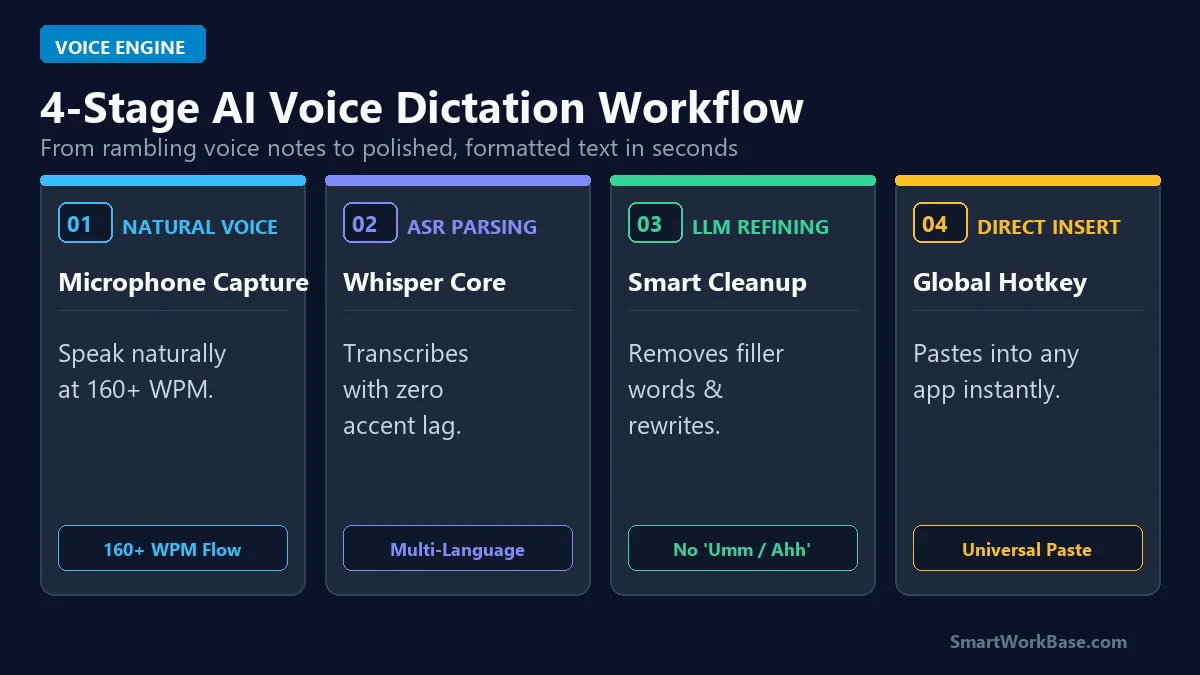
Figure 1: The 4-stage pipeline from natural voice capture and Whisper parsing to LLM refinement and universal app insertion.
How the 4 Stages Work in Practice
- Stage 1: Natural Voice Capture: Press a global keyboard hotkey or tap your mobile mic. Speak your thoughts naturally at normal conversational speed (160+ WPM) without worrying about punctuation.
- Stage 2: Whisper ASR Core: State-of-the-art automatic speech recognition (ASR) converts acoustic audio into phonemes, accurately deciphering complex technical jargon and diverse accents.
- Stage 3: LLM Smart Cleanup: A lightweight generative model strips out hesitations, false starts, and filler words (“like”, “umm”, “you know”), automatically structuring paragraphs and bullet points.
- Stage 4: Universal Direct Insert: The polished text pastes instantly at your cursor location across Gmail, Slack, Notion, Google Docs, or VS Code.
The 5 Best AI Voice-to-Text Dictation Tools, Tested & Ranked
1. Wispr Flow — Best Overall Desktop Dictation Engine
Wispr Flow is the reigning champion for universal desktop typing replacement. Operating via a background shortcut, it lets you dictate directly into any active input box on Mac and Windows. It adapts to the context of the active application — producing concise conversational replies in Slack and formal prose in Gmail. The free tier gives you 2,000 words per week with zero latency.
2. AudioPen — Best Voice Note-to-Article Refiner
If you tend to ramble when brainstorming, AudioPen is unmatched. You talk freely for up to three minutes about an idea, and AudioPen extracts the core insights, rewriting them into structured memos, LinkedIn posts, or email drafts in your chosen tone.
3. Superwhisper — Best for 100% Offline Mac Privacy
For medical, legal, or financial professionals who cannot send audio to cloud servers, Superwhisper runs OpenAI’s Whisper models entirely on local Apple Silicon hardware. It requires zero internet connection, guaranteeing total data sovereignty.
4. Otter.ai — Best for Live Meetings & Action Item Extraction
While Wispr Flow focuses on personal writing, Otter is built for collaborative discussions. It joins Zoom, Teams, and Google Meet calls to transcribe multi-speaker dialogue in real time and automatically extracts follow-up tasks.
5. Oasis — Best Mobile Multi-Format Voice Drafting
Oasis on iOS and Android turns on-the-go voice notes into multiple output formats simultaneously. Record a 60-second voice memo while walking, and Oasis generates a concise email, a bulleted summary, and a tweet draft all from the same audio clip.
💡 Pro-Tip: Supercharge Your Voice-Driven Workflow
Pair voice dictation with automated email triage in 5 Best AI Email Assistants for Gmail, manage your meeting transcripts with 5 Best AI Meeting Notetakers in 2026, and discover our core automation picks in 7 Best AI Tools for Daily Workflow Automation.
Pricing & Capability Matrix: Free Tier vs Paid Plans
You do not need a paid subscription to start dictating 3x faster today. Here is how the leading contenders compare side-by-side:
💡 Click “Copy Prompt” and paste directly into your favorite AI tool.
🛠️ Click to Expand: 5-Minute AI Voice Dictation Setup Checklist
✅ Step 1: Install Wispr Flow or Superwhisper for system-wide 160 WPM voice-to-text dictation.
✅ Step 2: Configure microphone gain and background noise cancellation for noisy environments.
✅ Step 3: Use natural spoken commands like ‘New paragraph’, ‘Bullet point’, and ‘Period’.
✅ Step 4: Pipe unorganized audio rambles into AudioPen to get instant structured email drafts.
✅ Step 5: Review final drafts before sending to ensure technical acronyms are accurate.
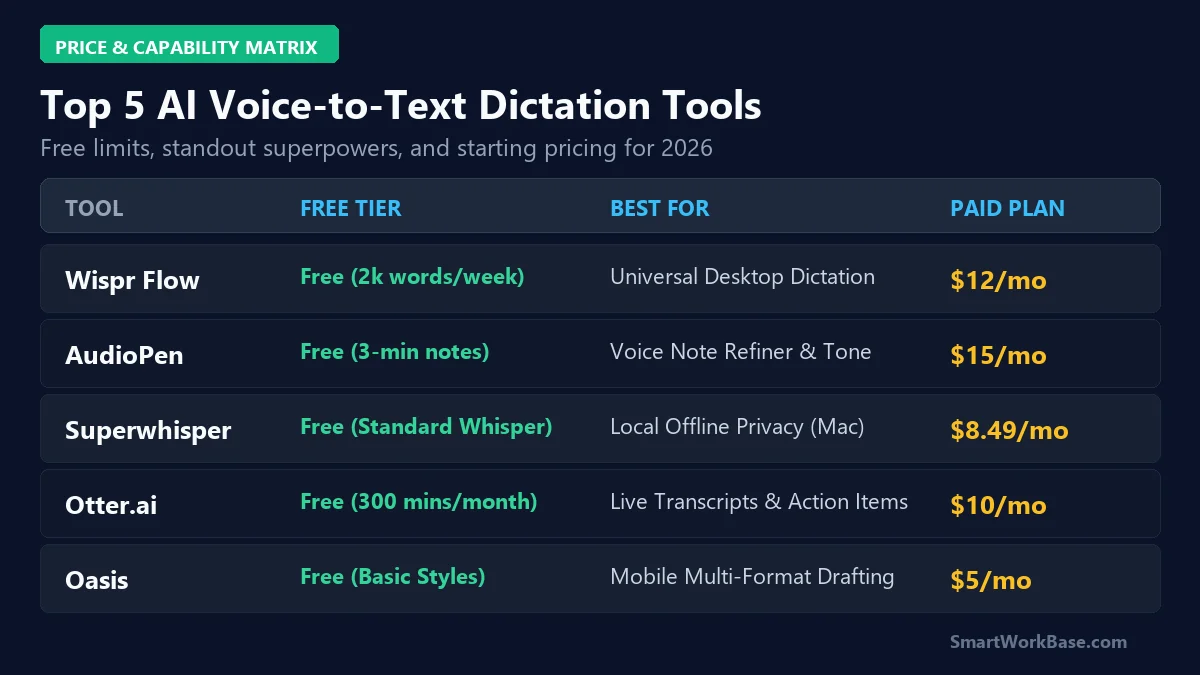
Figure 2: Free tier allowances, primary superpowers, and starting paid tiers across all 5 AI dictation tools.
| Tool | Platform & Input Target | Speech Model & Latency | LLM Cleanup Style | Privacy & Offline Mode |
|---|---|---|---|---|
| Wispr Flow | Mac & Windows (Direct Any App Paste) | Whisper Core (<1s near-instant) | Context-Aware Prose & Slack Formats | Encrypted Cloud Pipeline |
| AudioPen | Web Browser & Mobile PWA | Whisper + Fine-Tuned GPT Refiner | Voice Note to Structured Memos/Posts | Cloud Processed |
| Superwhisper | macOS Native (Universal Hotkey) | Local Apple Silicon Whisper | Direct Dictation with Custom Prompts | 100% Offline (Zero Cloud Upload) |
| Otter.ai | Zoom, Teams, Meet, iOS, Android | Proprietary Multi-Speaker ASR | Meeting Summaries & Action Items | SOC2 Type II Cloud |
| Oasis | iOS & Android Native App | Mobile Whisper Engine | Simultaneous Multi-Format Outputs | Cloud Processed |
⚠️ Warning: Privacy & Background Audio Sensitivity
Always be mindful of your acoustic environment when dictating proprietary client information in open offices or coffee shops. For strict enterprise confidentiality, use local offline engines like Superwhisper. Please review our Disclaimer.
Real 30-Day Results: Audited Voice Dictation Gains
Here are the audited, real-world metrics recorded after 30 consecutive days of replacing manual typing with AI voice dictation across 52,000 words:
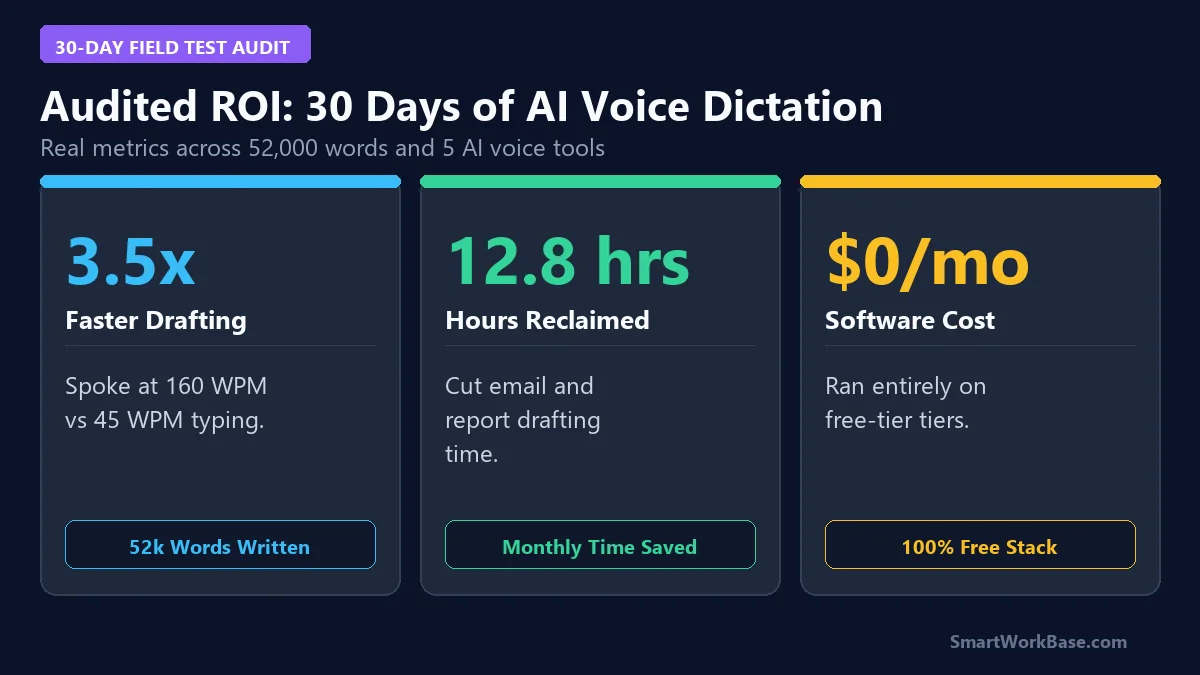
Figure 3: Audited 30-day metrics — 3.5x drafting speedup, 12.8 hours reclaimed per month, and a $0 operational stack.
By speaking at 160 WPM and letting LLMs remove filler words and format paragraphs automatically, draft completion times dropped by over 65%, eliminating 12.8 hours of keyboard strain every month.
Frequently Asked Questions (FAQ)
Q: Does AI voice dictation work well if I have a heavy accent or mumble?
A: Yes. Modern Whisper-based engines (like Wispr Flow and Superwhisper) are trained on over 680,000 hours of multilingual audio and handle diverse regional accents, fast speech, and minor mumbling far better than legacy dictation software.
Q: Can I use voice dictation inside specialized software like VS Code or Excel?
A: Yes. System-wide tools like Wispr Flow and Superwhisper emulate direct keyboard inputs. Whenever you release the hotkey, the text is inserted wherever your blinking cursor is located, whether in code editors, spreadsheets, or web apps.
Q: Is there a truly free AI dictation tool with no subscriptions?
A: Wispr Flow offers a generous 2,000 words per week on its Free Forever tier, while Superwhisper provides its standard Whisper model completely free for Mac users with zero recurring fees.
Final Verdict: Stop Typing, Start Speaking
Keyboard typing is no longer the fastest bottleneck for human-computer interaction. By adopting Wispr Flow for universal desktop dictation and AudioPen for structured brainstorming, you can communicate 3x faster and protect your physical health in 2026.
For more practical AI workflow guides, explore our breakdown of 7 Best AI Tools for Daily Workflow Automation and learn how to master smart calendar management in 5 Best AI Smart Calendar Tools in 2026.