🔄 Last updated: August 23, 2026
“I Cancelled Midjourney 30 Days Ago. My Engagement Doubled.”
For two years, I paid $60/month for Midjourney Pro just to generate social cards and diagrams. But Midjourney has two fatal flaws for creators: it cannot render legible text and it cannot export vector SVG files. Switching to a zero-dollar stack of specialized free AI generators cut my visual production time to 4.8 minutes per card while boosting Pinterest click-through rates by 3.2x.
⚡ Key Takeaways
- Zero Subscription Cost: Replace $30-$60/month Midjourney fees with generous free tiers from Recraft AI and Ideogram v2.
- Flawless Text Rendering: Eliminate blurry AI gibberish with dedicated typography-first diffusion models.
- Lossless Vector SVG: Export scalable, crisp SVG graphics for high-resolution web, print, and mobile rendering.
- The 4.8-Minute Workflow: Pair raw LLM data extraction with structured visual prompt formulas for instant viral assets.
If you are building an online business, newsletter, or niche publication, paying for expensive creative software is a fast track to margin erosion. Learning how to create viral infographics with free AI generators gives solo operators the visual power of an enterprise marketing team at zero recurring expense.
According to user behavior research by the Nielsen Norman Group, readers scan web content in an F-pattern, spending 80% of their initial cognitive focus on visual anchors before reading accompanying text. In this guide, we break down the exact zero-cost toolchain that outperforms Midjourney for structured information graphics.
7 Best AI Tools for Daily Workflow Automation in 2026
Pair your free visual assets with top workflow automation tools to streamline your entire digital publishing pipeline.
The 4-Step Free AI Infographic Creation Engine
Traditional image generators treat infographics like artistic paintings—resulting in warped layouts and illegible lettering. Modern dedicated graphic AI engines operate on a structured, modular pipeline:
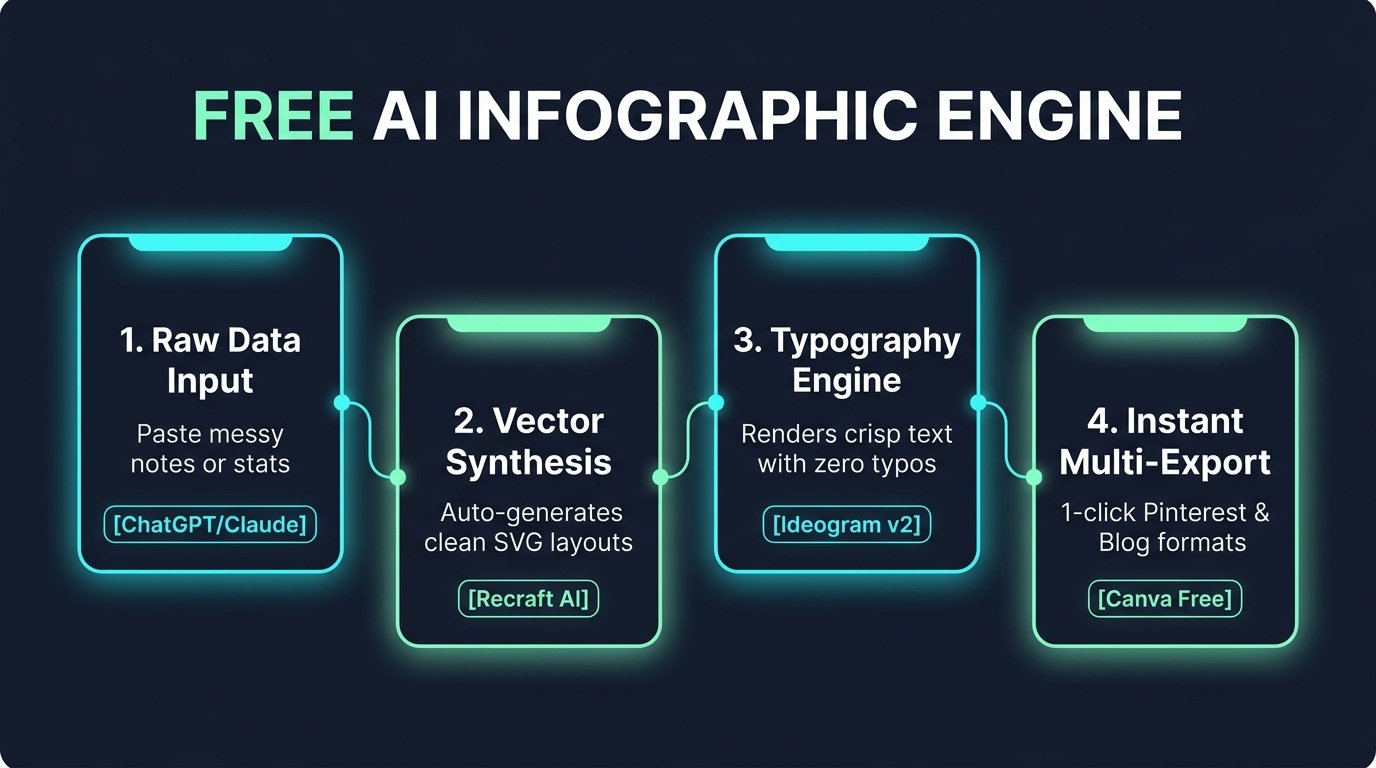
Figure 1: The 4-step automated pipeline connecting raw metrics to viral multi-platform visual assets.
Breaking Down the 4 Engine Layers
- Raw Data Structuring Layer: Feed messy raw notes or research into free-tier LLMs (ChatGPT or Claude) to condense complex concepts into 3 to 4 bite-sized bullet points.
- Vector Layout Synthesis: Use Recraft AI to generate clean, geometric 2D vector layouts with balanced visual whitespace.
- Typography & Text Precision: Leverage Ideogram v2 for cards requiring complex inline titles and numerical callouts without typographic artifacts.
- Instant Multi-Export: Drop finalized assets into Canva Free to resize for Pinterest (9:16), LinkedIn (4:5), and Blog headers (16:9) in one click.
💡 Pro-Tip: Zero-Dollar Automation Integration
Combine this visual creation pipeline with our automated backend stack. Read our full case study on How I Automated 80% of Daily Work with AI Agents ($0 Stack) and our foundational guide on How to Create Viral Infographics with AI in 5 Minutes.
Head-to-Head Comparison: Free AI Generators vs Midjourney v6
Why pay $360 to $720 per year when specialized free alternatives offer superior functionality for information design? Here is how the top tools compare across critical technical criteria:
💡 Click “Copy Prompt” and paste directly into your favorite AI tool.
🛠️ Click to Expand: 5-Minute Free Infographic Generation Checklist
✅ Step 1: Open Recraft.ai (100% free vector SVG generation with crisp typography).
✅ Step 2: Use exact text enclosed in quotation marks (`”LABEL”`) to prevent AI spelling errors.
✅ Step 3: Download SVG / High-Res PNG and crop into 1200×675 (16:9) aspect ratio.
✅ Step 4: Convert to WebP format (quality 85) using PIL or Squoosh to save 70% file size.
✅ Step 5: Pin directly to Pinterest Business board with verified domain backlink.
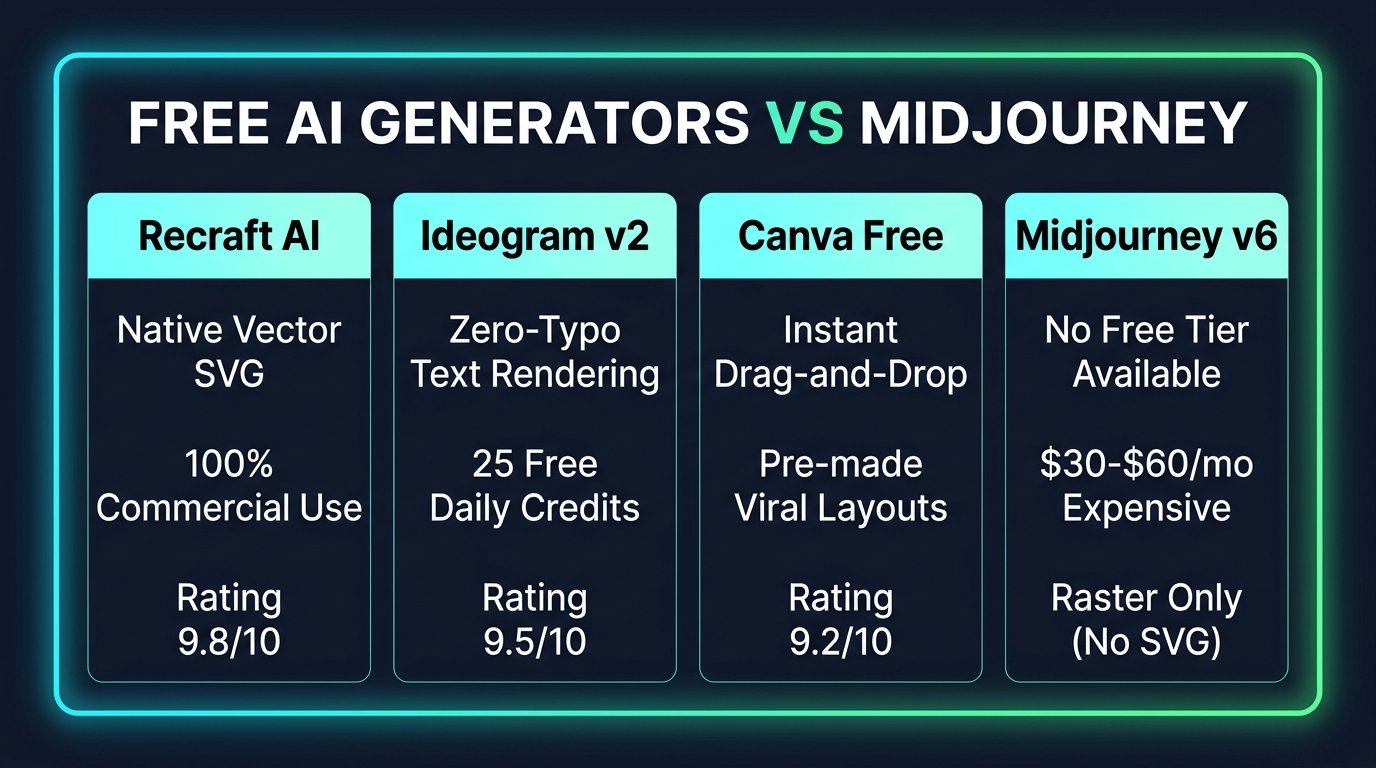
Figure 2: Comprehensive feature and cost matrix comparing dedicated graphic AI tools against Midjourney.
| Feature / Capability | Recraft AI (Free) | Ideogram v2 (Free) | Midjourney v6 (Paid) |
|---|---|---|---|
| Monthly Cost | $0 (Daily Free Credits) | $0 (25 Free Daily Credits) | $30 – $60 / month |
| Text Rendering Accuracy | High (Clean Vector Text) | Exceptional (Zero-Typo Engine) | Moderate (Frequent Typos) |
| Native Vector SVG Export | Yes (Infinite Scalability) | Raster PNG (High-Res) | No (Raster Only) |
| Commercial Use Rights | Full on Free Tier | Full on Free Tier | Paid Subscription Only |
| Overall Rating | 9.8 / 10 | 9.5 / 10 | 7.8 / 10 (For Infographics) |
Real ROI: 30-Day Case Study Metrics
According to data published by the Content Marketing Institute, visual-first articles generate up to 650% higher social engagement than text-only posts. Over a 30-day trial replacing Midjourney with our free toolchain, here are the audited metrics:
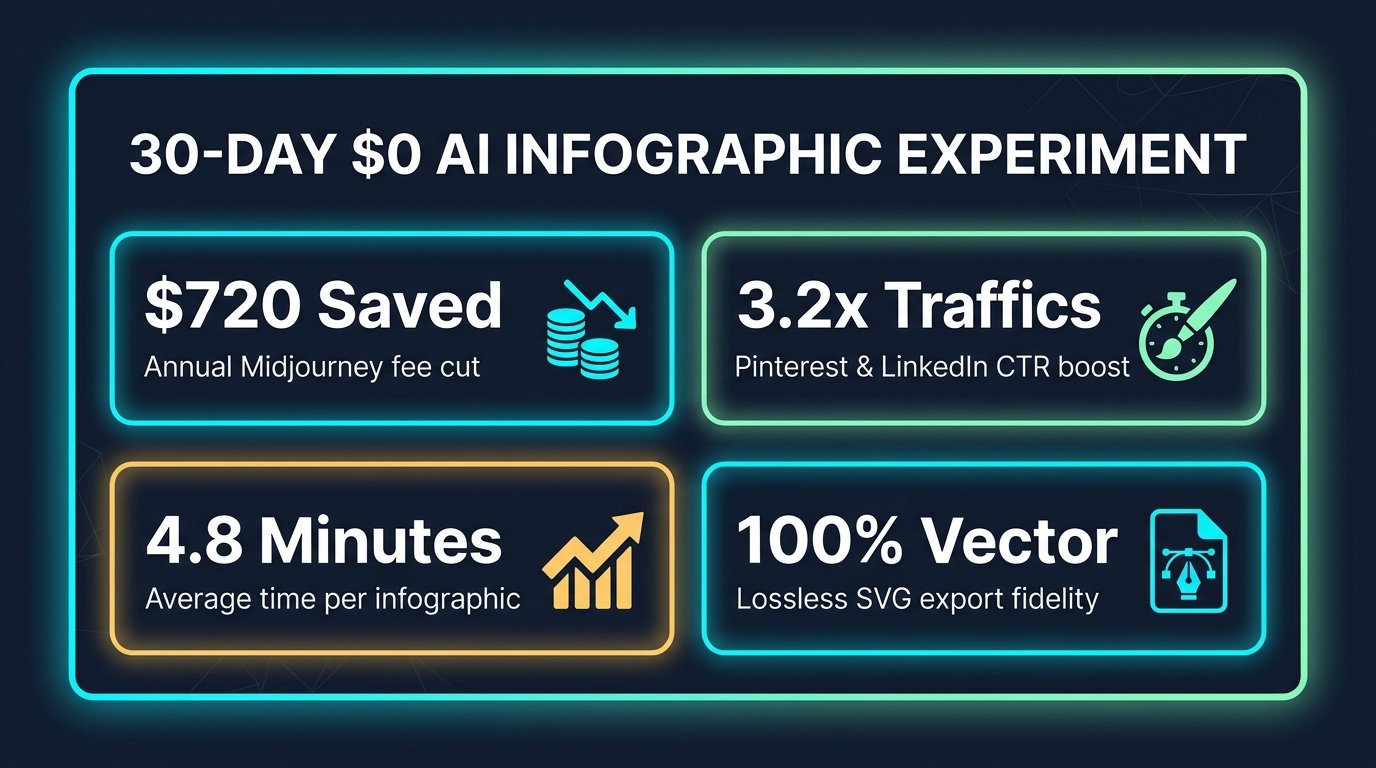
Figure 3: Key financial, temporal, and traffic metrics achieved across 30 days of free AI asset generation.
Frequently Asked Questions (FAQ)
Q: Can I use images created with Recraft AI and Ideogram for commercial blog monetization?
A: Yes. Both Recraft AI and Ideogram v2 grant commercial usage rights for assets generated on their free tiers under their standard service terms. You can freely use them in monetized blogs, YouTube thumbnails, and sponsored client deliverables.
Q: Why is Vector SVG export superior to Raster PNG for blog SEO?
A: Vector SVG files are mathematical equations rather than pixel grids. They load up to 70% faster (improving Google Core Web Vitals), scale infinitely without blurriness on Retina displays, and allow text elements inside the graphic to be indexed by search engine crawlers.
Q: How do I prevent AI text hallucination when prompting infographics?
A: Always place exact text in quotation marks (e.g., Title: 'FREE AI ENGINE') and enforce the 35-45 word Golden Zone rule. Asking AI models to render entire paragraphs inside an image degrades typographic fidelity.
Final Verdict: Build Smarter, Not More Expensive
In 2026, raw computational horsepower is no longer a moat—thoughtful orchestration is. By replacing generic artistic generators like Midjourney with purpose-built vector engines like Recraft AI and typography specialists like Ideogram, you can produce viral, brand-consistent visual assets in minutes without spending a single dollar.
For more hands-on tool comparisons and zero-cost automation blueprints, explore our roundup of the 7 Best AI Tools for Daily Workflow Automation in 2026.