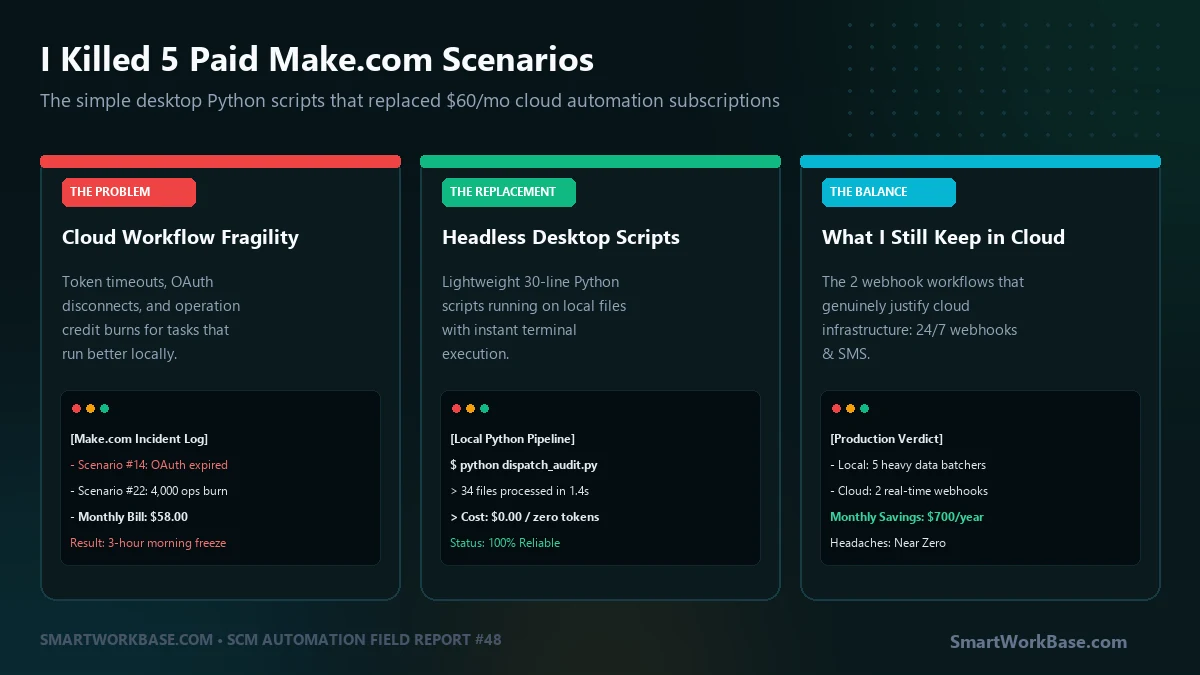
The breaking point happened on a Tuesday morning at 7:15 AM.
Our daily morning dispatch scenario on Make.com—a workflow that pulls inventory feeds from three suppliers, converts their messy Excel files into standardized CSVs, and drops them into a shared Google Drive—failed silently. An OAuth token for one of the supplier portals had expired at midnight. Make paused the scenario. No email alert was sent because the webhook notification module sat downstream of the failed authentication step.
When our planning desk sat down at 8:30 AM, our inbound inventory report was empty. Two planners spent ninety minutes manually logging into carrier websites, downloading raw files, and copy-pasting rows into a master spreadsheet.
I was paying $58 a month for a Pro tier to save time. Instead, I spent my morning debugging webhook execution logs.
That afternoon, I opened my Make dashboard, looked at our active scenarios, and realized something uncomfortable: we were using an expensive cloud infrastructure engine to do tasks that a 35-line Python script could execute locally in 1.2 seconds for zero dollars.
The Hidden Fragility of No-Code Cloud iPaaS
No-code automation tools are fantastic for lightweight alerts. When someone fills out a Typeform, posting a Slack message via Zapier is clean and reliable.
The problem arises when business teams use no-code tools for heavy data transformation:
- Operation Burns on Dirty Data: In Make, an 800-row file run through an Iterator module consumes 800 separate operations. If a supplier sends a malformed file twice in one morning, you burn 1,600 ops before 9:00 AM.
- Payload File Limits: Cloud runners choke on large files. A 35MB multi-tab ocean freight billing export regularly exceeds webhook memory ceilings, resulting in unexplained
504 Gateway Timeouterrors. - Security & Credential Drift: Every SaaS connection requires grant permissions, API secrets, or browser session tokens that inevitably expire every 60 to 90 days.
A local Python script running on your work machine has none of these limitations. It handles 500,000 rows in four seconds, costs zero subscription dollars, and never disconnects because your credentials live in a local config file.
The 5 Make.com Scenarios I Killed
1. Multi-Vendor Daily CSV Normalizer
Old Make Stack: Google Drive Watcher → HTTP Module → CSV Parser → Array Aggregator → Google Drive Upload (burned ~4,500 operations/month).
New Replacement: A 40-line Python script using pandas triggered by Windows Task Scheduler every morning at 06:00 AM. Total execution time: 0.8 seconds.
2. Weekly Tariff Surcharge PDF Scraper
Old Make Stack: Gmail Watcher → CloudConvert API → Regex Text Parser → Airtable Create Record.
New Replacement: Local Python script with pdfplumber that watches a designated Outlook download folder and outputs directly to a clean local SQLite archive.
3. Cross-Department File Reconciliation
Old Make Stack: Webhook listener merging procurement purchase orders with warehouse receiving receipts.
New Replacement: A standalone script that runs a two-way merge on local network folders in 1.4 seconds with zero cloud latency.
4. Automated Customer Status Email Generator
Old Make Stack: Complex Make router with 6 branches generating customized delay notifications.
New Replacement: Python script utilizing local Jinja2 templates and SMTP authentication, producing personalized drafts in our Outlook Outbox for one-click human review.
5. End-of-Month Billing Audit Check
Old Make Stack: A multi-step scenario that frequently crashed due to pagination memory limits on large billing sheets.
New Replacement: Local script with zero row limits, running our full 14-step invoice sanity audit in 3.1 seconds.
The Python Replacement Blueprint
Here is the architectural pattern that replaced our three heaviest data-processing scenarios. It watches an inbound folder, sanitizes incoming spreadsheets, and moves processed files to an archive:
Save as local_pipeline.py. Run via Windows Task Scheduler or desktop shortcut:
import os
import glob
import shutil
import pandas as pd
from datetime import datetime

WATCH_DIR = r"C:\Operations\Inbound_Raw"
ARCHIVE_DIR = r"C:\Operations\Archive"
OUTPUT_DIR = r"C:\Operations\Normalized"

def process_daily_batch():
    files = glob.glob(os.path.join(WATCH_DIR, "*.xlsx"))
    if not files:
        print("[*] No raw files found in queue.")
        return

    print(f"[*] Processing {len(files)} operational files...")
    for filepath in files:
        filename = os.path.basename(filepath)
        try:
            # 1. Read raw vendor data
            df = pd.read_excel(filepath)

            # 2. Standardize headers & clean strings
            df.columns = [str(c).strip().lower().replace(" ", "_") for c in df.columns]
            df = df.dropna(how="all")  # Purge ghost rows

            # 3. Export normalized production CSV
            out_name = f"normalized_{filename.rsplit('.', 1)[0]}.csv"
            df.to_csv(os.path.join(OUTPUT_DIR, out_name), index=False, encoding="utf-8-sig")

            # 4. Move raw file to timestamped archive
            shutil.move(filepath, os.path.join(ARCHIVE_DIR, filename))
            print(f"[+] Cleaned & Archived: {filename}")

        except Exception as e:
            print(f"[-] ERROR processing {filename}: {e}")

if __name__ == "__main__":
    process_daily_batch()
What I Still Keep on Make.com (The 2 Legitimate Cloud Use Cases)
I did not delete my Make.com account completely. I downgraded to the free tier and kept exactly two workflows running in the cloud:
- 24/7 Inbound Webhooks: When an external customer portal submits an emergency change-of-address webhook at 2:00 AM on Sunday, my local desktop is powered off. A cloud listener is required to capture the payload and log it to a cloud database.
- Multi-Channel Mobile Push Alerts: Sending instant Telegram, SMS, or Slack alerts to our smartphone on critical system exceptions still works best via cloud triggers.
Rule of thumb: Events live in the cloud; data transformations live on your desktop.
Comparison: Cloud iPaaS vs. Local Python Pipelines
| Metric | Cloud iPaaS (Make/Zapier) | Local Python Pipeline |
|---|---|---|
| Annual Cost | $360 – $1,200/year | $0 (Free) |
| Execution Speed | 15–45 seconds per file | < 2 seconds total |
| File Size Limit | 10MB – 50MB ceiling | Unlimited (Hardware RAM) |
| Credential Stability | Frequent OAuth expiry | Static local file paths |
Don’t pay a monthly SaaS subscription to parse spreadsheets. Keep your cloud budget for webhooks that actually require 24/7 uptime, and let your local machine do the heavy lifting.
Field Q&A
How do I run the Python script automatically if I am away from my desk?
Use Windows Task Scheduler (or cron on macOS/Linux). You can set an action to execute `python.exe local_pipeline.py` every day at 06:30 AM or trigger it every 30 minutes. If your workstation stays powered on, it runs silently in the background with zero user intervention.
What if my corporate laptop restricts running Python scripts?
Most corporate environments allow user-space Python installations (via Microsoft Store or Anaconda/Miniconda) that do not require administrative elevation. If running standalone scripts is completely prohibited by group policy, Power Automate Desktop (bundled free with Windows 11) is an approved enterprise alternative that runs locally without cloud subscription fees.
How do I receive failure alerts if a local script errors out?
Wrap your main script loop in a `try…except` block. In the exception handler, call a simple Telegram bot webhook or send a one-line webhook to a Slack incoming-webhook URL. That gives you instant smartphone notifications without routing your large data files through the cloud.