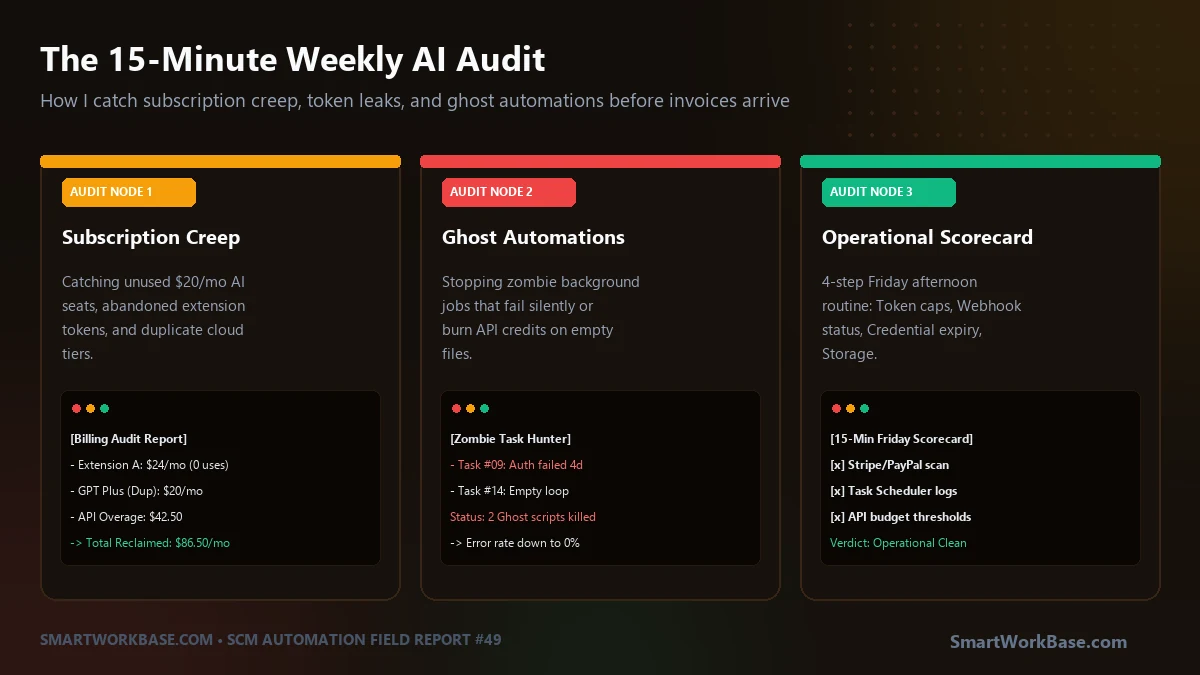
The invoice arrived at 4:15 PM on the first Friday of September.
It was a renewal notice for $24.00 from an AI web-scraping extension I had not touched since June. I stared at the line item. I felt stupid. Twenty-four dollars won’t sink an enterprise supply chain division, but it was the principle. How had it survived three billing cycles without anyone noticing?
I opened my corporate expense ledger and spent the next hour auditing every single tool connected to my work card.
The damage was worse than I expected:
- Two extra Claude Pro team seats ($40/month) assigned to contractor accounts that had been deactivated in July.
- A $20/month PDF extraction service replaced weeks ago by a local Python script.
- An open-ended OpenAI API tier that racked up $38.40 in overages because a junior analyst ran a 400-page supplier tariff document through a raw prompt loop instead of filtering the text first.
That was $122.40 a month. Over a year, that is $1,468 burned on thin air. Pure operational waste.
Worse, the waste was not just financial. It was technical.
The Ghost Automation in the Corner
When I opened Windows Task Scheduler to inspect our background automations, I noticed something worse than wasted money.
A headless script named sync_vendor_tariffs.py—scheduled to run every fifteen minutes—was throwing exit code 0x1. It had been failing silently for three consecutive weeks because our IT team had updated the firewall certificates on August 11th. The script had attempted over 2,000 automated connections into a dead wall.
No crash window. No terminal popup. Just a silent, looping ghost task draining background CPU cycles.
Software automations do not age like wine. They age like fresh milk.
Unless you schedule deliberate human inspections, your automation stack decays into an invisible junkyard of expired API keys, zombie subscriptions, and orphaned webhooks.
The 4 Pillars of the 15-Minute Friday Audit
I banned ad-hoc cleanups. If an audit requires an hour of deep work, you will skip it when freight gets delayed or quarter-end targets hit. It has to take fifteen minutes, or it won’t happen.
Every Friday at 4:30 PM, my calendar triggers a hard 15-minute block. Here are the four checks I run before closing my laptop:
1. Financial Ledger Scan (3 Minutes)
Open your banking dashboard or corporate expense app. Filter transactions strictly by the word “recurring” or merchant category “Software/SaaS.” If a tool was not opened by a human team member in the last 14 days, pause the license immediately. Never “wait until next month to see if we need it.” Downgrade first; re-subscribe only when someone screams.
2. Scheduled Task Heartbeat Check (4 Minutes)
Open Windows Task Scheduler (or inspect your crontab on macOS/Linux). Sort all user-created scheduled tasks by “Last Run Time” and check the “Last Run Result.” Any result other than 0x0 (Success) gets flagged. If a script fails three days in a row without human intervention, kill the task. An automation nobody missed for three days is an automation nobody needed.
3. API Token Budget and Spend Caps (4 Minutes)
Log in to Anthropic Console and OpenAI Platform. Verify two numbers: current month-to-date spend and hard monthly spending limits. If your hard ceiling is set to $100 and you are at $88 by day 12, someone has deployed an unoptimized prompt loop. Adjust the ceiling, revoke stale developer API keys, and rotate secrets older than 90 days.
4. Local Output Buffer Purge (4 Minutes)
Inspect your local output folders (e.g., /temp, /downloads/reports, or daily CSV batch staging directories). Automation scripts generate hundreds of temporary work files that quietly consume SSD storage. A quick one-line cleanup command keeps your local environment lean.
Copy this markdown checklist into your weekly Obsidian note, Notion workspace, or Friday reminder email:
# Weekly AI & Automation Health Audit (Target: 15 Mins)
Date: [ YYYY-MM-DD ] | Auditor: [ Name ]

## 1. Subscriptions & Billing (3 min)
- [ ] Scan corporate card / PayPal for zombie renewals ($20/mo creep)
- [ ] Check active seat counts in ChatGPT / Claude / Midjourney teams
- [ ] Action: Cancel or freeze any tool untouched for 14+ days

## 2. Background Task Heartbeats (4 min)
- [ ] Open Windows Task Scheduler / Cron logs
- [ ] Confirm all daily scripts returned Exit Code 0 (0x0)
- [ ] Action: Quarantine or fix any task failing for > 48 hours

## 3. API Spend & Security (4 min)
- [ ] Check OpenAI / Anthropic dashboard usage graphs
- [ ] Verify hard monthly budget ceilings are intact
- [ ] Action: Revoke orphaned API keys and temporary testing secrets

## 4. Disk & Storage Hygiene (4 min)
- [ ] Inspect automated staging folders (/output, /temp, /exports)
- [ ] Purge temporary CSVs and batch PDFs older than 7 days
- [ ] Action: Run 1-click storage cleanup routine
Manual Sprawl vs. The 15-Minute Audit Routine
Here is what happens when you let tools accumulate versus enforcing a rigid weekly check:
| Audit Dimension | Ad-Hoc (Zero Routine) | 15-Min Friday Audit |
|---|---|---|
| Subscription Waste | $100 – $300/mo undetected | $0 zombie SaaS spend |
| Broken Automations | Discovered during production emergencies | Caught within 5 business days |
| API Security | Permanent keys left in test scripts | Rotated secrets & enforced hard caps |
| Time Required | 4-hour panic audit every 6 months | 15 minutes on Friday afternoon |
You do not need sophisticated enterprise compliance software to run a clean operational stack. You just need fifteen minutes, a timer, and the discipline to pull the plug on tools you haven’t opened all week.
Field Q&A
What if an employee argues they might need an unused AI tool next month?
Cancel it anyway. Modern cloud platforms preserve account data and configuration settings for at least 30 to 90 days after subscription cancellation. If they actually need the tool next month, reactivation takes thirty seconds. Paying for idle software “just in case” is a bad organizational habit.
How do I automate the storage cleanup part of the audit?
Write a five-line shell or PowerShell command that checks file creation dates in your staging directory and purges files older than seven days. Add it as the final task in your weekly batch schedule, or run it with a single desktop shortcut during your Friday review.
Why not run this audit monthly instead of weekly?
Because monthly cycles allow bad scripts to fail for 30 consecutive days before anyone notices. In supply chain and operations, a broken data sync that runs unnoticed for a month creates hundreds of downstream reconciliation errors. Fifteen minutes once a week keeps the feedback loop tight enough to catch issues before they compound.