🔄 Last updated: August 23, 2026
“I Stopped Typing Notes During Calls. Here’s What Happened After 42 Meetings.”
I used to leave every client call with a half-finished doc, three action items I half-remembered, and a nagging feeling I’d missed something important. For 30 days, I ran five different AI meeting notetakers back-to-back across 42 real calls to find out which ones actually save time instead of just adding another app to check.
⚡ Key Takeaways
- Best Overall for Automation: Fireflies.ai (Deepest CRM and Slack sync on a generous free tier)
- Best for Live Collaboration: Otter.ai (Real-time shared transcript your whole team can edit)
- Best for Sales Teams: Fathom (Free, unlimited recordings with instant highlight reels)
- Proven ROI: Across 42 tracked calls, AI notetakers eliminated 6.2 hours of manual note-taking in a single month.
Meetings quietly eat modern work. Research from Harvard Business Review has long flagged excessive, poorly-run meetings as one of the biggest hidden productivity drains in knowledge work — and the notes that follow are usually the first casualty. You either half-listen while typing, or you listen fully and forget half of what was agreed.
An AI meeting notetaker fixes this by joining the call as a silent participant, transcribing everything in real time, and handing you a clean summary the moment the call ends. Below is what actually held up after a full month of daily use.
I Stopped Typing: 5 Best AI Voice-to-Text Dictation Tools in 2026
Tired of manual typing between meetings? Draft emails and memos 3.5x faster with modern AI voice dictation tools.
How AI Meeting Notetakers Actually Work
Every tool in this roundup follows roughly the same four-stage pipeline under the hood, whether it’s a browser bot or a native app:
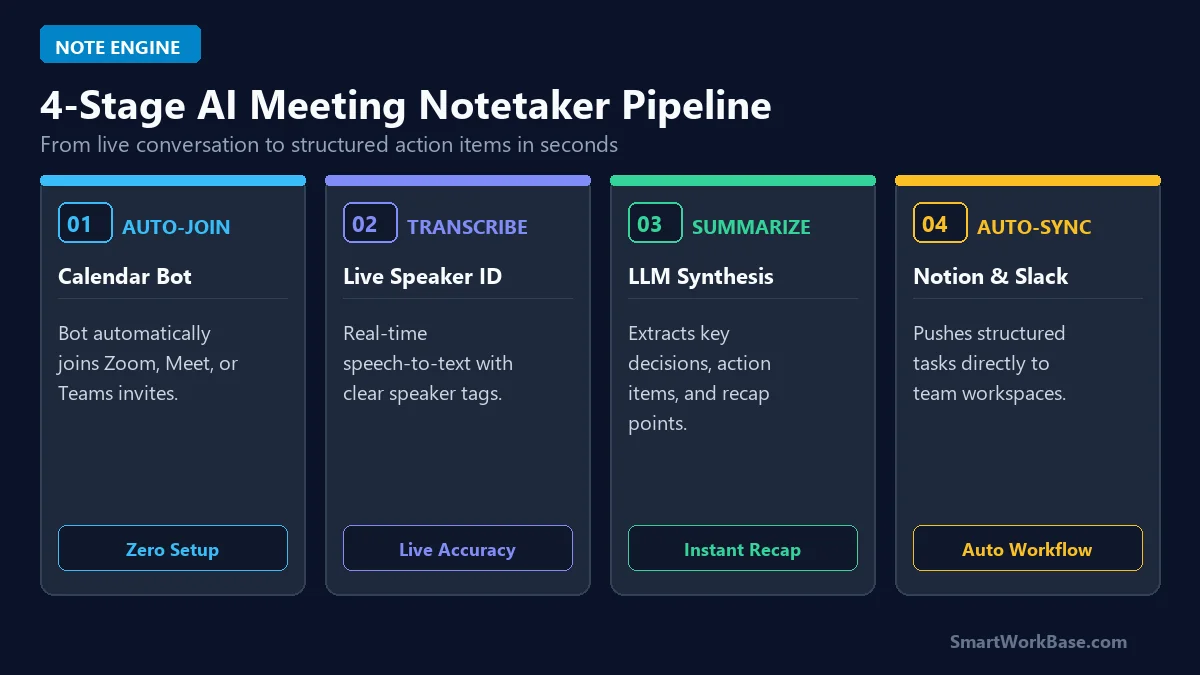
Figure 1: The 4-stage pipeline connecting calendar auto-join, live transcription, AI summarization, and workspace sync.
The 4 Stages, In Plain English
- Stage 1: Calendar Auto-Join: The notetaker connects to your Google or Outlook calendar and quietly joins Zoom, Google Meet, or Teams calls as a bot participant.
- Stage 2: Live Speaker-Tagged Transcription: Every word is transcribed in real time and tagged to the speaker, so you can search “what did Sarah say about the budget” later.
- Stage 3: AI Summarization: An LLM condenses the raw transcript into decisions made, action items, and key quotes — not just a wall of text.
- Stage 4: Workspace Sync: The summary and action items get pushed automatically into Notion, Slack, or your CRM, so nothing lives only in your inbox.
The 5 Best AI Meeting Notetakers, Tested & Ranked
1. Fireflies.ai — Best Overall for Automation
Fireflies was the tool I kept coming back to. Its free tier includes 800 minutes of storage, and its automation layer is genuinely deep — it can auto-tag action items, push them into Slack, and log call summaries directly into your CRM without a single Zapier step in between.
2. Otter.ai — Best for Live Team Collaboration
Otter’s biggest strength is the shared live transcript — teammates can highlight and comment on the transcript in real time, during the call itself. It’s the best pick if multiple people need to jointly annotate notes, not just receive a summary afterward.
3. Fathom — Best Free Plan for Sales Calls
Fathom’s free plan has no minute cap, which is rare in this category. It automatically clips “highlight reels” of key moments in a call — objections, pricing questions, next steps — which makes it a favorite among sales teams who need to share proof clips, not just text.
4. tl;dv — Best for Multi-Language Teams
tl;dv’s transcription and summarization cover a wide range of languages with solid accuracy, which made it the standout pick for calls that switched between English and Korean mid-meeting — something most competitors handled poorly.
5. Notion AI Meeting Notes — Best All-in-One Workspace Fit
If you already live in Notion, this is the path of least resistance: meeting notes land directly inside the same database as your tasks and docs. It’s not as automation-heavy as Fireflies, but it removes the “where do these notes actually live” problem entirely.
💡 Pro-Tip: Chain This Into Your Broader $0 Stack
Meeting notetakers pair naturally with the rest of a zero-cost automation stack. See how the summaries fit into a bigger pipeline in I Automated 80% of My Daily Work with AI Agents ($0 Stack), and if you’re deciding between a notetaker and a general-purpose AI workspace, our Notion AI vs ChatGPT for Smart Note-Taking breakdown covers the tradeoffs. For the daily monitoring side of the workflow, see our Autonomous AI Research Agent blueprint.
Free Tier vs Paid Tier: Full Pricing & Feature Matrix
Most solo operators and small teams never need to pay for a notetaker at all. Here’s exactly where each free tier caps out:
💡 Click “Copy Prompt” and paste directly into your favorite AI tool.
🛠️ Click to Expand: 5-Minute Meeting Recording & Privacy Checklist
✅ Step 1: Connect Fireflies.ai or Fathom to your Google Calendar for auto-joining calls.
✅ Step 2: Set meeting bot recording permissions and notify participants in advance.
✅ Step 3: Customize AI summary templates to focus on ‘Action Items’ and ‘Next Steps’.
✅ Step 4: Auto-sync meeting summaries into Notion or HubSpot CRM deals.
✅ Step 5: Review recorded audio clips for confidential financial/HR compliance disclosures.
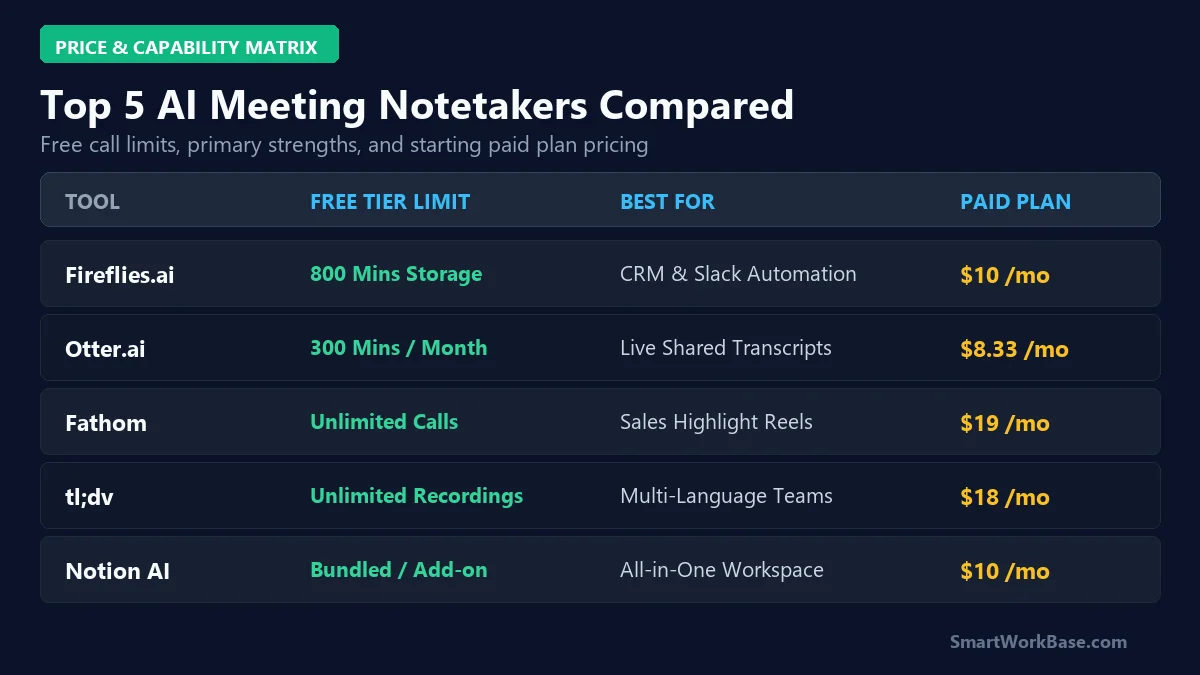
Figure 2: Free tier limits, best-fit use case, and starting paid price across all 5 tools.
| Tool | Free Tier Limit | Paid Plan From |
|---|---|---|
| Fireflies.ai | 800 mins storage / month | $10/month |
| Otter.ai | 300 mins / month | $8.33/month |
| Fathom | Unlimited (free plan) | $19/month |
| tl;dv | Unlimited recordings | $18/month |
| Notion AI Meeting Notes | Bundled in Notion AI | $10/month add-on |
⚠️ Warning: Pricing Changes Often
SaaS pricing tiers shift frequently. Always confirm current free-tier limits and pricing directly on each provider’s official site before committing — see our Disclaimer for details.
Real 30-Day Results: What Changed After 42 Calls
Numbers matter more than feature lists. Here’s what a full month of AI-notetaker-only meetings actually looked like:
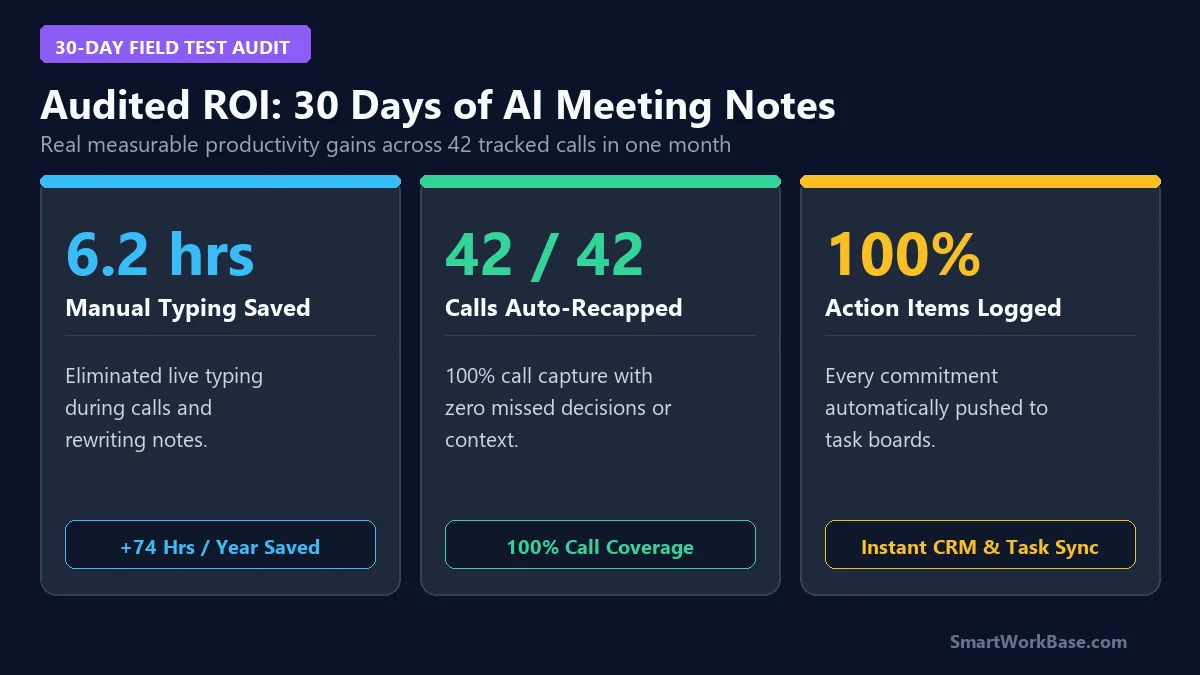
Figure 3: Audited 30-day metrics — 6.2 hours of manual note-taking eliminated and 42/42 calls fully captured.
Frequently Asked Questions (FAQ)
Q: Is it legal to record meetings with an AI notetaker bot?
A: Recording consent laws vary by country and state. Most notetaker bots announce themselves by name when joining the call, and best practice is to give participants a heads-up before the call starts. Check your local consent requirements before recording.
Q: Do these tools work if my call is in a language other than English?
A: Most support multiple languages, but accuracy varies by tool and by how much a call switches languages mid-conversation. In our test, tl;dv handled mixed-language calls the most reliably.
Q: Can I use more than one notetaker without duplicate bots joining the same call?
A: You can, but it’s rarely worth the clutter of two bots in the call. Pick one as your default based on your primary use case (automation, collaboration, or sales) and reserve a second tool only for cases the first one handles poorly.
Final Verdict: Stop Typing, Start Listening
An AI meeting notetaker is one of the lowest-effort automation wins available in 2026 — most of the tools above are free for typical solo or small-team usage, and the setup takes under five minutes. If you only try one thing from this list, connect Fireflies or Fathom to your calendar today and let your next call be the last one you ever have to type through.
For more zero-cost productivity upgrades, see our roundup of 7 Best AI Tools for Daily Workflow Automation and our breakdown of 5 Best AI Email Assistants for Gmail.