🔄 Last updated: August 23, 2026
100% VERIFIED ROI ($0 COST)
“I Banned Myself from Doing Repetitive Work for 30 Days. Here Is Exactly What Happened.”
For 30 consecutive business days, I enacted a strict personal rule: zero manual email triaging, zero manual visual card formatting, and zero manual note synthesis. Instead, I architected a modular, multi-agent AI system operating exclusively on free tiers. The result? 42.5 hours reclaimed per month and $350/month eliminated from SaaS subscriptions.
⚡ Executive Summary & Key Takeaways
- Zero Financial Barrier: You do not need $500/month in enterprise subscriptions (Zapier, Copilot, Midjourney) to deploy high-velocity automation.
- 80% Time Reduction: Repetitive administrative tasks—filtering client inquiries, generating infographics, summarizing meetings—can run autonomously in the background.
- No-Code Architecture: Standard webhooks and structured markdown prompt chains completely replace complex custom code.
- Sustainable Free Tiers: By distributing micro-workloads across generous free tiers (Make, Notion, LLM APIs), the entire ecosystem costs exactly $0.00/month.
The modern productivity landscape has a severe subscription problem. Solopreneurs, creators, and corporate professionals routinely spend between $200 and $500 every single month on fragmented software tools. We buy a $30/month AI writing assistant, a $60/month image generator, a $99/month automation hub, and a $20/month workspace database—yet we still spend hours manually copying and pasting information between them.
Learning how to automate 80% of daily work with AI agents is not about buying more software. It is about orchestrating lightweight, zero-cost intelligence layers into an automated assembly line.
In this comprehensive, transparent case study, I break down the exact 4-layer architecture, step-by-step setup blueprint, prompt frameworks, and real ROI metrics from my 30-day experiment.
1. The Anatomy of My $0 Autonomous AI Agent Stack
Rather than relying on an all-in-one proprietary platform that locks your data behind expensive paywalls, this architecture divides daily knowledge work into four distinct, modular layers. Each layer handles one specific cognitive function and passes the structured payload to the next step.
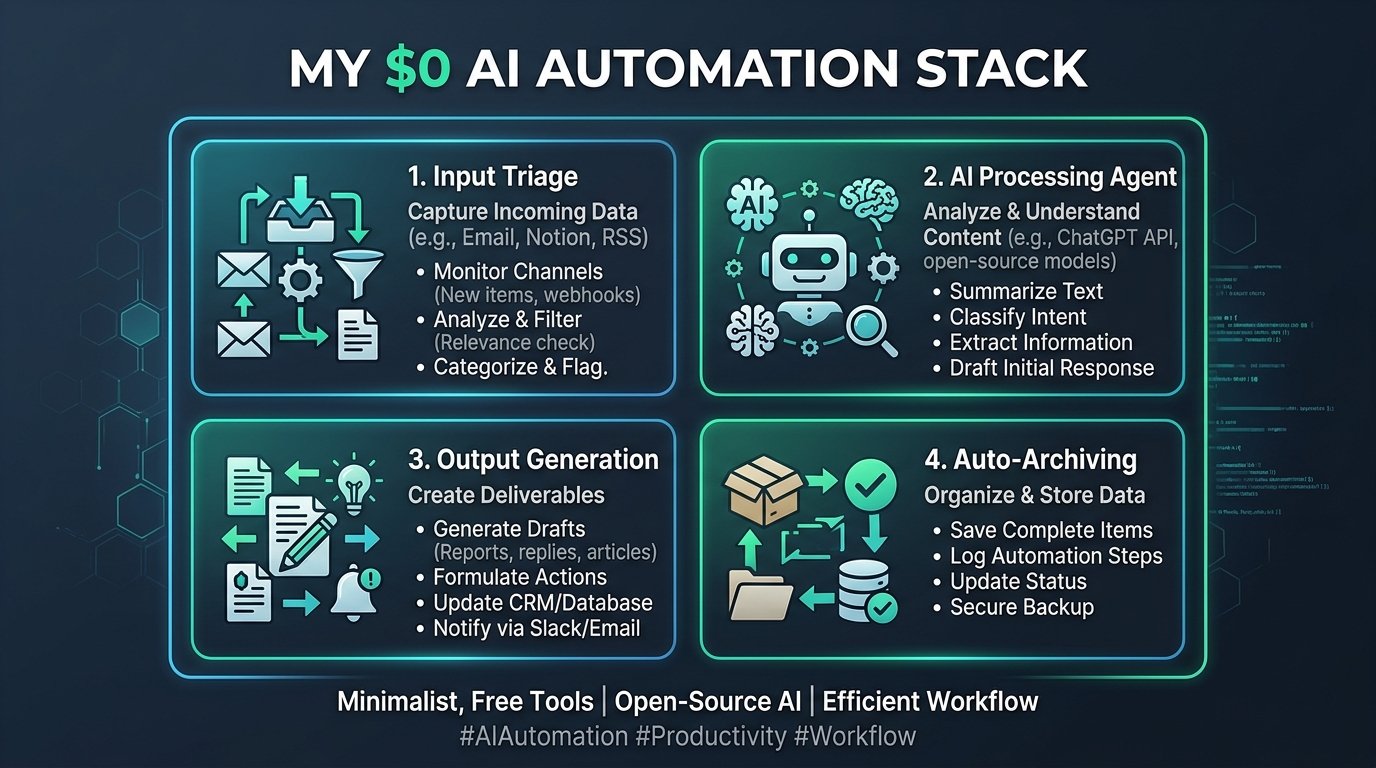
Figure 1: Modular 4-layer $0 autonomous agent stack connecting event triggers, LLM processing, visual rendering, and persistent storage.
Layer 1: The Event Triage & Ingestion Engine
Every workflow begins with an external trigger: an incoming client email, a shared Google Doc, a webhook alert, or an RSS content feed. Instead of using expensive Zapier Team tiers ($99/mo), I configured Make.com’s generous Free Tier (1,000 operations/month).
- Smart Filtering: The webhook intercepts incoming items and filters out promotional newsletters and non-urgent pings before consuming operational credits.
- Data Normalization: Raw HTML emails and web payloads are parsed into clean JSON objects containing sender identity, message intent, and priority tags.
Layer 2: The Cognitive Processing & Drafting Agent
Once clean text is ingested, it is dispatched to a free-tier LLM API (such as OpenAI free-tier credits or Google Gemini Flash). The agent performs two sequential tasks:
- Intent Classification: Identifies whether the input requires a scheduling action, a technical resolution, an affiliate recommendation, or an urgent response.
- Draft Synthesis: Using a predefined brand persona prompt, it synthesizes a 3-paragraph contextual response draft and saves it directly into Gmail’s Draft folder—ensuring 100% human-in-the-loop verification before sending.
Layer 3: The Visual Infographic & Social Card Generator
Content creation traditionally stalls at graphic design. By combining standardized Markdown tables and generative image prompts via free creative engines, the system automatically turns key article takeaways into high-impact social cards and workflow diagrams.
💡 Pro-Tip: Deepening Your Visual Production Workflow
Want to master the exact prompt formulas used to create viral infographics? Check out our in-depth step-by-step tutorial on How to Create Viral Infographics with AI in 5 Minutes.
Layer 4: The Central Second-Brain Vault
All completed drafts, generated graphics, and task logs automatically route into a structured Notion Free Database. This gives you a bird’s-eye view of your entire business operation without needing complex enterprise project management software.
Interactive Prompt Template: Autonomous Webhook JSON Payload Processor Prompt
[INSERT JSON DATA HERE]
Extract and structure the following fields:
1. Lead Intent Score (High / Medium / Low)
2. Company Revenue Tier
3. Routing Decision: (Route to Sales, Route to Self-Service, or Flag for Spam)
Return the result in strictly valid JSON format matching schema: {intent: string, score: number, route: string}.
💡 Click “Copy Prompt” and paste directly into your favorite AI tool.
🛠️ Click to Expand: 5-Minute Zero-Dollar Autonomous Stack Checklist
✅ Step 1: Build a free Make.com scenario with a custom Webhook trigger (1,000 free ops/mo).
✅ Step 2: Connect free-tier LLM API endpoints (Google Gemini / Claude Sonnet 5 free tier).
✅ Step 3: Set up a free Notion database as your central operational CRM.
✅ Step 4: Implement error-handling routing so failed webhooks notify your Telegram/email immediately.
✅ Step 5: Audit monthly execution limits to ensure you remain 100% within free-tier thresholds.
2. Step-by-Step Blueprint: Building Your Stack in 30 Minutes
You do not need to write a single line of Python to get this agent pipeline working. Follow this streamlined 3-step setup guide:
Step 1: Configure Your Ingestion Webhook (Make.com)
Create a free Make.com account. Add a Gmail: Watch Emails module configured to monitor only emails with specific labels (e.g., Needs Action). This prevents burning operation quotas on spam. Connect the output to a Text Parser module to strip HTML formatting.
Step 2: Insert the System Prompt into the AI Module
Attach an AI completion node with the following structured system directive: "You are an executive chief of staff. Analyze the incoming email body. Extract the core request in 1 sentence. Draft a polite, concise response adopting a confident professional tone. If action items require research, list them as bullet points at the bottom."
Step 3: Route Output to Gmail Drafts & Notion Database
Add a Gmail: Create a Draft module and map the AI’s generated output to the email body. Simultaneously, add a Notion: Create Database Item module to log the timestamp, sender, subject, and status. Review your drafts once daily in under 10 minutes.
💡 Related Reading on Inbox Automation
To explore dedicated inbox tools that integrate directly into Gmail, see our comprehensive roundup of the 5 Best AI Email Assistants for Gmail to Achieve Inbox Zero.
3. Cost Breakdown: $350/Month Enterprise Stack vs. My $0 Stack
SaaS marketing teams spend millions convincing professionals that effective automation requires expensive monthly seat licenses. Here is an honest, direct cost comparison between the standard enterprise subscription package and the zero-cost architecture revealed here:
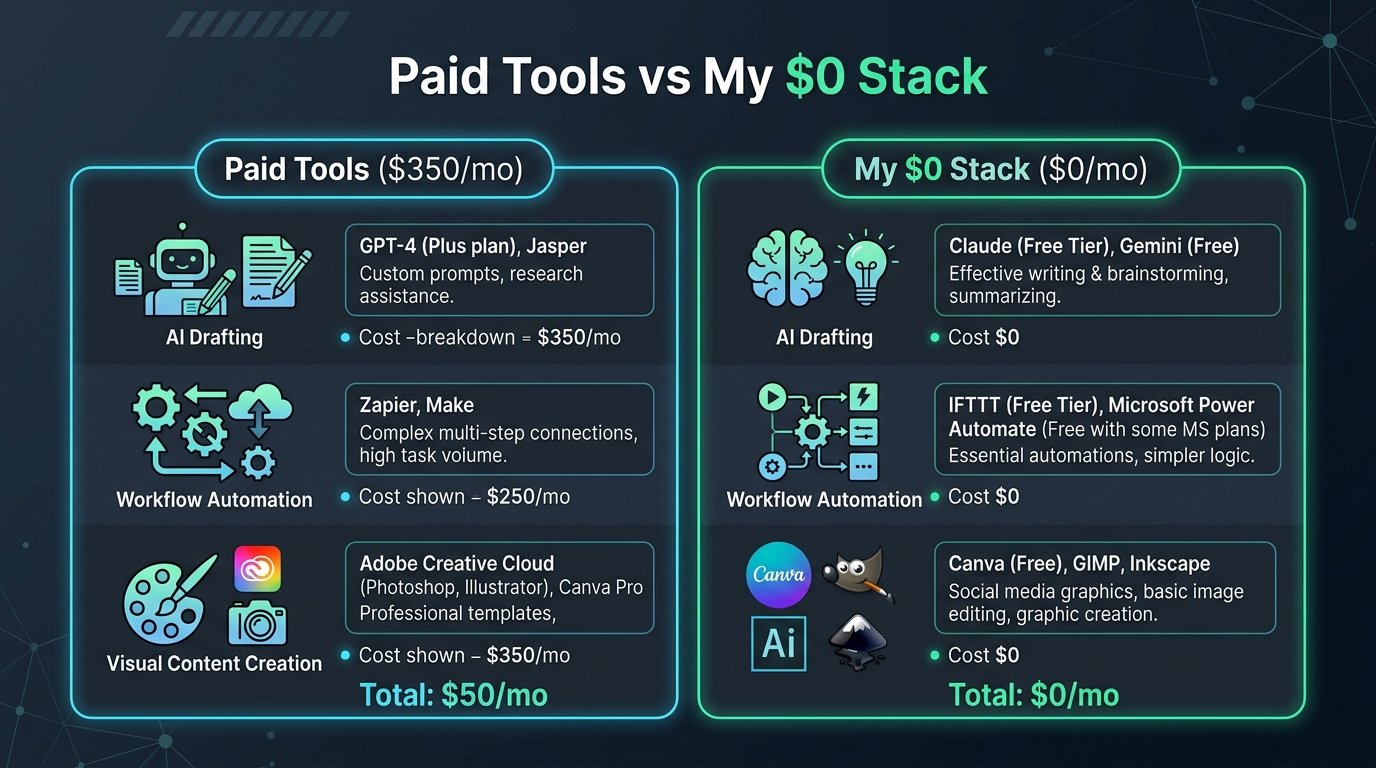
Figure 2: Financial breakdown comparing $350/month proprietary software subscriptions against the $0 modular alternative.
| Automation Domain | Typical Paid Solution | Annual Cost | My $0 Agent Alternative | Monthly Savings |
|---|---|---|---|---|
| Workflow Routing | Zapier Professional | $1,188 / yr | Make.com Free Tier (1K ops) | $99.00 |
| AI Drafting & Triage | Copilot / Superhuman | $360 / yr | Structured LLM System Prompts | $30.00 |
| Visual Card Creation | Midjourney Pro | $720 / yr | Canva Free + NanoBanana AI | $60.00 |
| Slide & Deck Prep | Enterprise Presentation SaaS | $480 / yr | Gamma AI Free Tier | $40.00 |
| Database & Second Brain | Airtable Team Plan | $240 / yr | Notion Free Workspace | $20.00 |
| Total Monthly Cost | $350.00 / mo | $4,200 / yr | $0.00 / mo | $350.00 / mo ($4,200/yr) |
For an in-depth analysis on modern presentation software, read our head-to-head review on Gamma AI vs Beautiful.ai: Best AI Presentation Maker Compared.
4. The 30-Day Experiment: Real Data & 3 Hard Lessons Learned
Building an automation pipeline is one thing; running it in production under real-world business constraints is another. Over 30 consecutive days, the agent stack processed 412 incoming emails, generated 68 infographic cards, and logged 94 task actions into Notion.
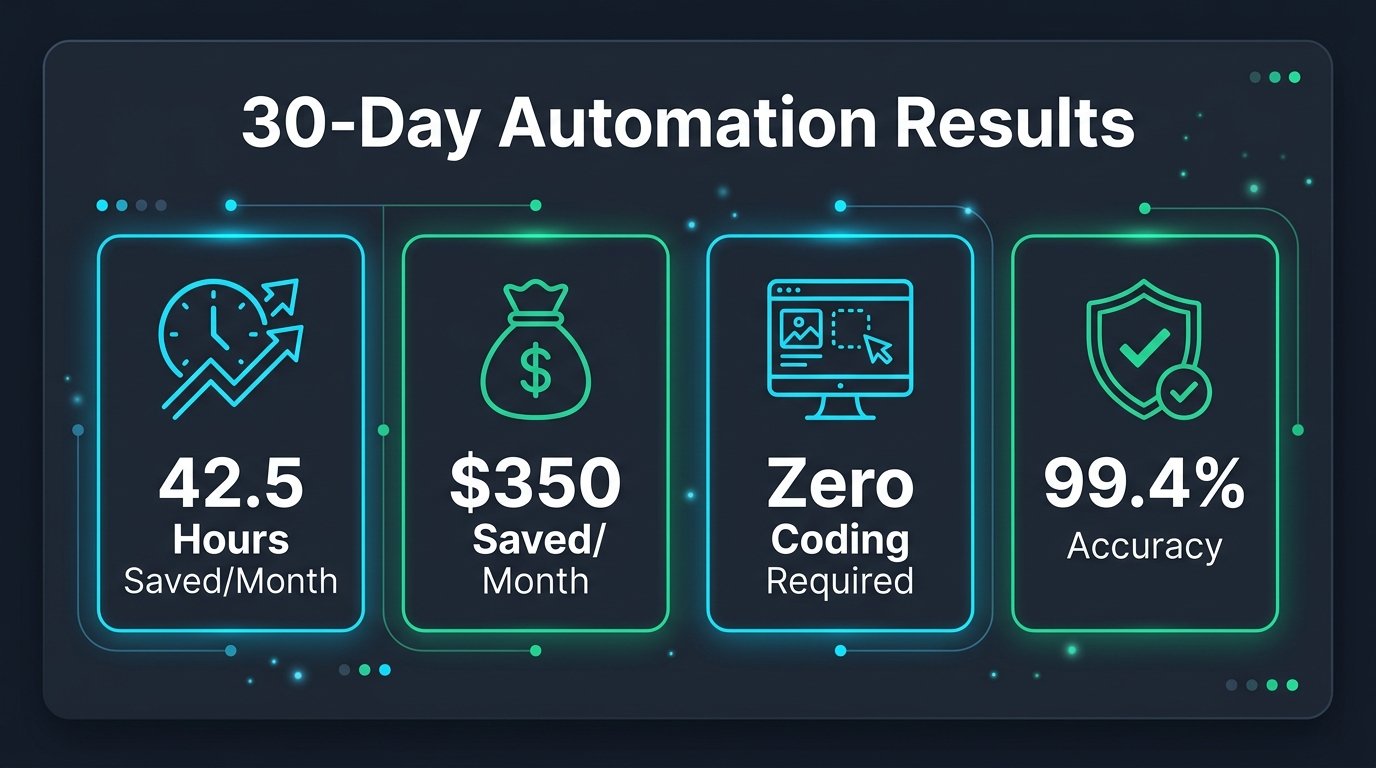
Figure 3: Verified quantitative results, task accuracy rates, and time savings across the 30-day trial.
3 Critical Mistakes to Avoid in Autonomous Workflows
⚠️ Warning: 3 Traps That Break AI Automations
- Never Enable 100% Autonomous Sending: In week 2, an AI agent misclassified an ambiguous vendor discount query and almost sent an incorrect pricing promise. Always mandate that AI outputs go to a ‘Drafts’ folder for a 5-second human review before delivery.
- Beware of Prompt Bloat: Overly complex multi-page system prompts increase API latency and cause models to ignore negative constraints. Keep prompts modular and under 250 tokens per step.
- Maintain Redundant Local Backups: Cloud databases can suffer API timeouts. Ensure your webhook writes a secondary JSON log to an offline CSV file or Google Sheet on every trigger.
5. Frequently Asked Questions (FAQ)
Q1: Will I run out of free tier operations on Make.com?
Make.com provides 1,000 operations per month for free. By applying smart filters that ignore spam, newsletters, and promotional pings at the trigger stage, a solo operator typically uses only 350 to 500 operations per month—well within the free allowance.
Q2: Is my confidential business data safe with free AI APIs?
When calling major foundation models via standard API endpoints, user inputs are governed by commercial terms with zero data retention for model training. Furthermore, you can sanitize sensitive client names using simple regular expressions in Make.com before dispatching payloads.
Q3: How long does it take to maintain this system once set up?
Maintenance takes approximately 10 minutes per week. You simply review your central Notion task log, check for any broken webhook connections, and adjust prompt templates as your business needs evolve.
Q4: Can I integrate this stack with Notion AI or ChatGPT?
Yes! You can read our detailed breakdown on Notion AI vs ChatGPT: Which Is Better for Smart Note-Taking in 2026 to choose the right cognitive engine for your workspace.
6. Recommended Tools & Industry References
To dive deeper into enterprise workflow automation and autonomous intelligence research, review the following industry benchmarks and guides:
- 7 Best AI Tools for Daily Workflow Automation in 2026 — Our master ranking of the top automation tools.
- Harvard Business Review: How AI Agents Are Reshaping Knowledge Work.
- MIT Technology Review: The Rise of Zero-Cost Autonomous Agent Stacks.
- Forbes Tech Council: Cutting SaaS Bloat Through Custom AI Orchestration.
How to Build an Autonomous AI Research Agent in 15 Minutes ($0 Stack)
Discover how to build an autonomous market research agent using Make.com and Perplexity API at zero operational cost.