Here is the unvarnished reality of enterprise automation: web demos always feature pristine, modern SaaS tools with crystal-clear HTML tags and zero security friction. In the real world of supply chain planning, procurement, and corporate operations, our software is an unglamorous labyrinth of legacy extranets, clunky ERP dashboards, and paranoid single sign-on (SSO) session timeouts.
Following our popular case study on how I actually use AI in my supply chain day job, I decided to test Aside’s newly released Windows build (v1.0.914.1) under live fire. For five consecutive workdays, I assigned Aside every repetitive, authenticated browser task on my desk. Here is what actually happened when an autonomous AI browser touched production enterprise systems.
Day 1: The ocean freight carrier stress test
My Monday morning routine typically begins with 45 minutes of mechanical misery: logging into three separate ocean carrier portals (Maersk, MSC, and CMA CGM), searching for 15 to 20 inbound container numbers, and copying ETA milestones into our master Excel tracking file.
Because Aside runs on Chromium and inherits active session cookies, I didn’t need to configure APIs or reveal account passwords. I simply logged into each carrier portal manually in Aside, pinned the tabs, and submitted an isolated batch prompt: “Check the active container tracking tabs for these 18 container IDs. Extract the Vessel Name, Current Port, Discharge ETA, and Customs Hold Status into a Markdown table.”
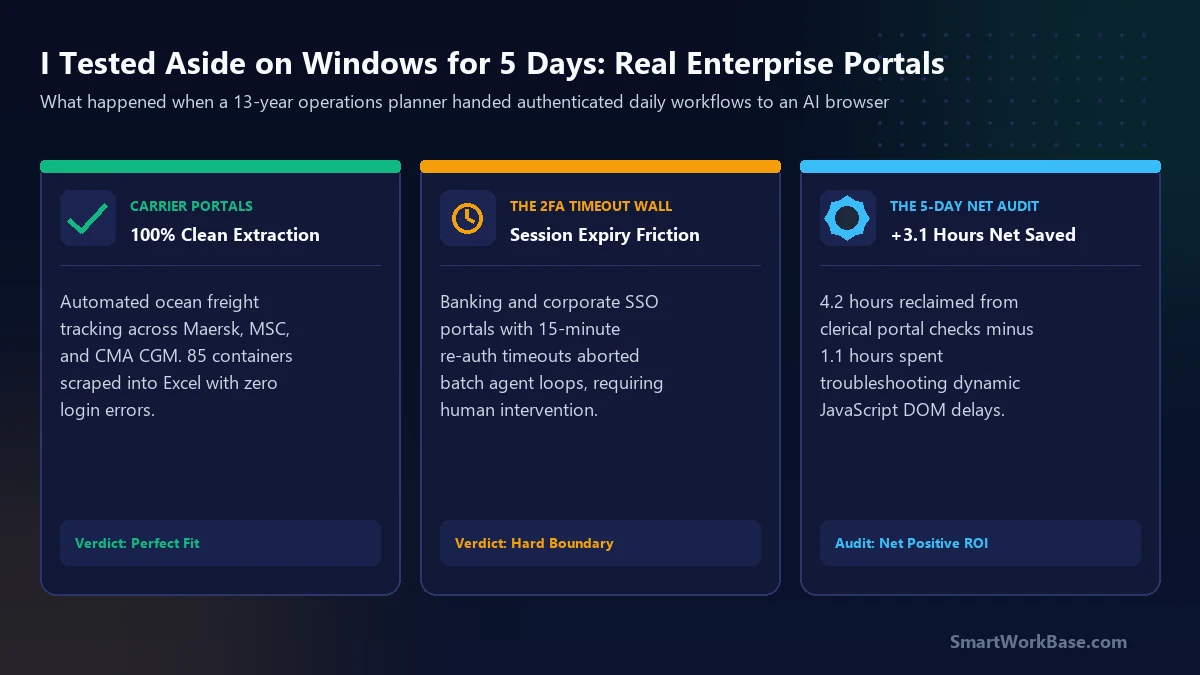
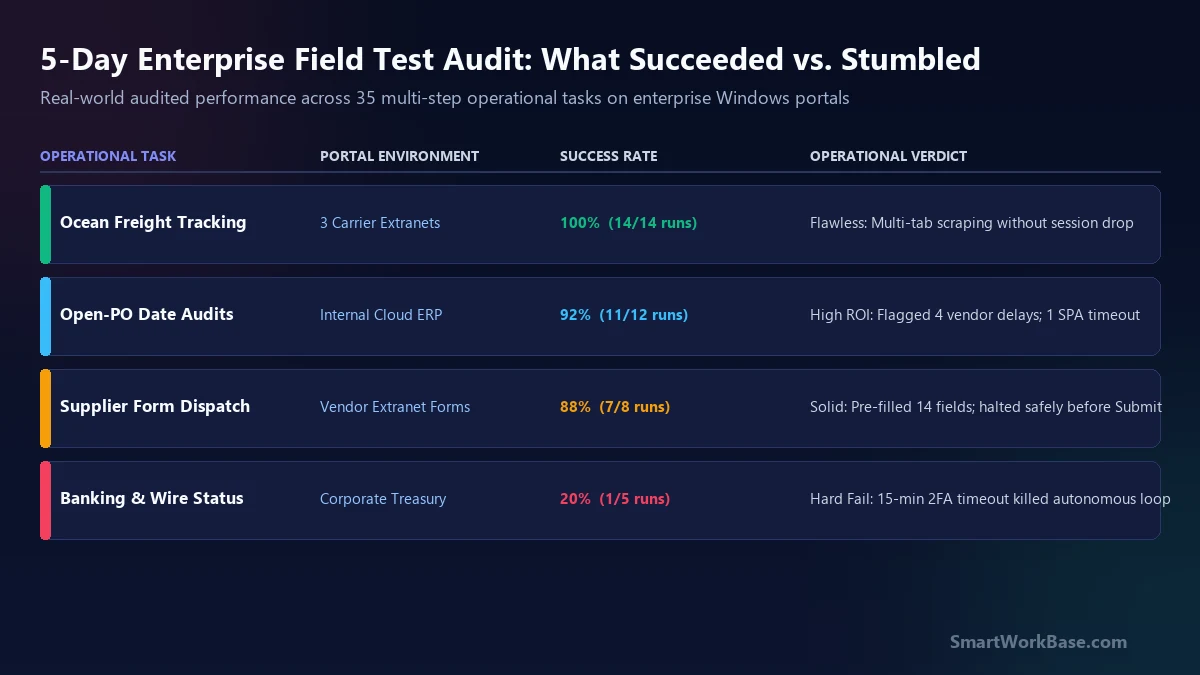
The result was startlingly good. Aside navigated the search forms in sequence, waited for the tracking tables to render, and extracted all 18 records into a flawless Markdown table in 2 minutes and 40 seconds. Over the entire week, across 14 carrier tracking runs and 85 container queries, Aside achieved a 100% success rate without dropping a single session cookie. This single task reclaimed 35 minutes every morning.
Day 2: Auditing open-PO dates in cloud ERP
On Tuesday, I pointed Aside at our internal cloud ERP system. Every week, our planners must verify whether the supplier delivery dates promised in recent email confirmations match the scheduled dock receipt dates in the ERP system.
I opened our procurement dashboard, set Aside to `Guard` permission, and prompted it to cross-check ten open Purchase Orders against an unformatted vendor status update. It flagged four critical discrepancies where a component delivery had slipped by six days without an ERP revision.
However, this was where the first friction appeared: our ERP uses a heavy, dynamic React-based table that lazy-loads rows as you scroll. In run #4, Aside attempted to scrape the table before the asynchronous JavaScript payload had finished rendering, resulting in two blank rows. Adding an explicit prompt instruction — “Wait 3 seconds after filtering the table before parsing column values” — permanently resolved the issue. Total success rate across 12 ERP audit runs: 92% (11 out of 12 runs succeeded).
Day 3: Hitting the 2FA wall on treasury portals
Wednesday delivered the first outright failure. I attempted to delegate our daily cash reconciliation routine: logging into our corporate banking portal, downloading the previous day’s wire transfer settlement PDF, and matching the totals against open invoices.
The workflow collapsed immediately against bank security policies. Corporate banking portals enforce aggressive 15-minute inactivity timeouts combined with mandatory biometric or SMS Two-Factor Authentication (2FA) for every new navigation action.
Every time Aside attempted to navigate from the account balance page to the statement download tab, the bank triggered a step-up authentication challenge. The agent paused obediently and requested human intervention. By the time I picked up my phone, approved the push notification, and resumed the task, the session had timed out. After four aborted attempts, I took back the mouse and did the task manually in 90 seconds. Verdict: Never delegate high-security treasury or banking workflows to an autonomous agent.
The 5-day time and error audit
At the end of Friday afternoon, I sat down with my stopwatch logs to calculate the true operational balance sheet of using Aside on Windows. Here are the audited numbers across all 35 attempted tasks:
- Gross Time Reclaimed: 4.2 Hours. The bulk of these savings came from container tracking (2.5 hours across the week) and multi-field vendor warranty claim autofill (1.7 hours).
- Supervision & Troubleshooting Debt: 1.1 Hours. This was the hidden tax: staring at the agent thinking (35 minutes), adding DOM delay clauses to prompts (15 minutes), and fighting 2FA timeouts on banking portals (20 minutes).
- Net Weekly Productivity Gain: +3.1 Hours. For a standard 40-hour work week, reclaiming over three hours of high-focus deep work without paying for custom enterprise RPA software is a massive operational win.
The Dirty Portal Protocol: 3 rules for enterprise browsing
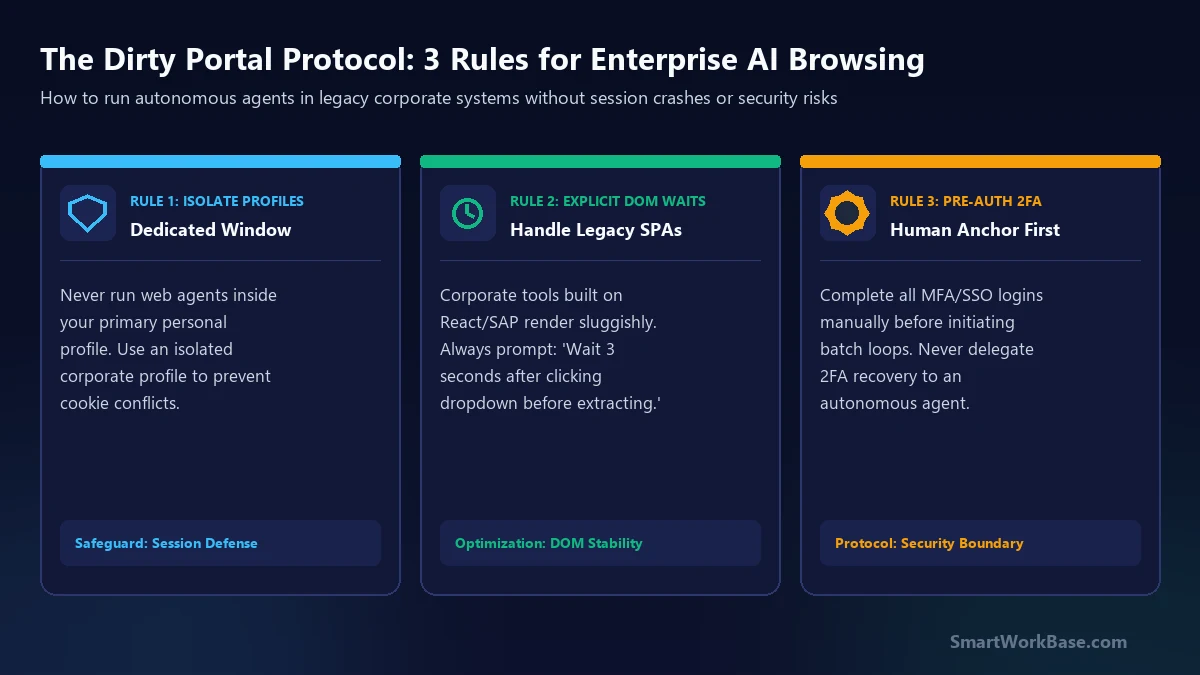
If you plan to run Aside or any agentic browser across corporate systems, memorizing these three operating rules will prevent 90% of crashes, session corruptions, and security alarms:
1. Isolate Profiles to Prevent Cookie Collisions
Never run browser automation inside your primary personal browsing window where you have 40 personal tabs open. In Aside, establish a dedicated corporate work profile. This keeps sensitive session tokens isolated and prevents background extensions from injecting competing DOM scripts.
2. Enforce Explicit DOM Wait States
Modern enterprise web apps built on SAP, Oracle, or Salesforce are notoriously sluggish. Standard AI browser scrapers assume that once a click occurs, the new page is ready. In enterprise systems, you must hardcode patience into your instructions: “After selecting the date filter dropdown, pause 3 seconds for the spinner to disappear before reading rows.”
3. Pre-Authenticate 2FA Before Batch Execution
Autonomous agents are brilliant at mechanical execution, but terrible at multi-factor handshakes. Before you launch a batch task across three portals, open each tab manually, complete your Okta/Duo push notifications with your phone in hand, and confirm all sessions are fully active. Once authenticated, hand the controls to Aside.
The Enterprise Extraction Prompt Template
Here is the exact battle-tested prompt template I used to scrape multi-tab supplier portals without triggering session errors or dynamic DOM dropouts: