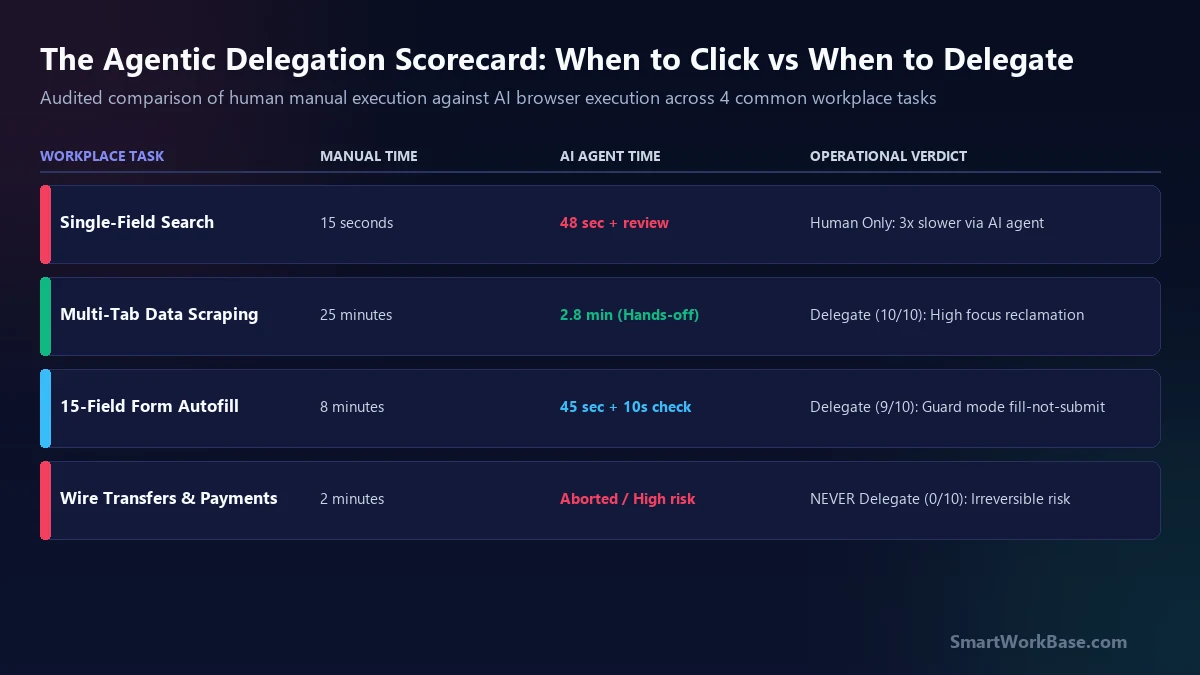
Here is the blunt conclusion after two weeks of deep testing: an autonomous AI browser is not a magic wand that eliminates work. It is a specialized mechanical lever. When used on the wrong tasks, it actually multiplies your cognitive fatigue. If you delegate a 30-second web search to an AI browser, you spend 55 seconds staring at the cursor wondering if it will click the right dropdown, completely destroying your train of thought.
Following our candid self-audit on how much time I actually spend talking to AI tools, this final report dissects the hidden costs of agentic browsing — the cognitive friction, the pricing math, and the security boundaries that every professional operator must establish.
The supervision paradox: the babysitting tax
The single most dangerous illusion in workplace automation is assuming that any task performed by an AI represents “time saved.” In reality, human attention is governed by context-switching friction.
When you perform a routine 20-second clerical action yourself — such as checking an invoice status or copying a tracking code — your brain operates on muscle memory. It requires near-zero executive focus. But when you delegate that exact same 20-second task to an AI browser, an insidious psychological shift occurs:
- You cannot fully switch to deep work, because the agent might halt and ask for clarification in 15 seconds.
- You sit and watch the agent highlight elements, deliberate over DOM trees, and slowly simulate mouse clicks.
- A 20-second manual chore turns into a 60-second vigil of passive, low-grade anxiety.
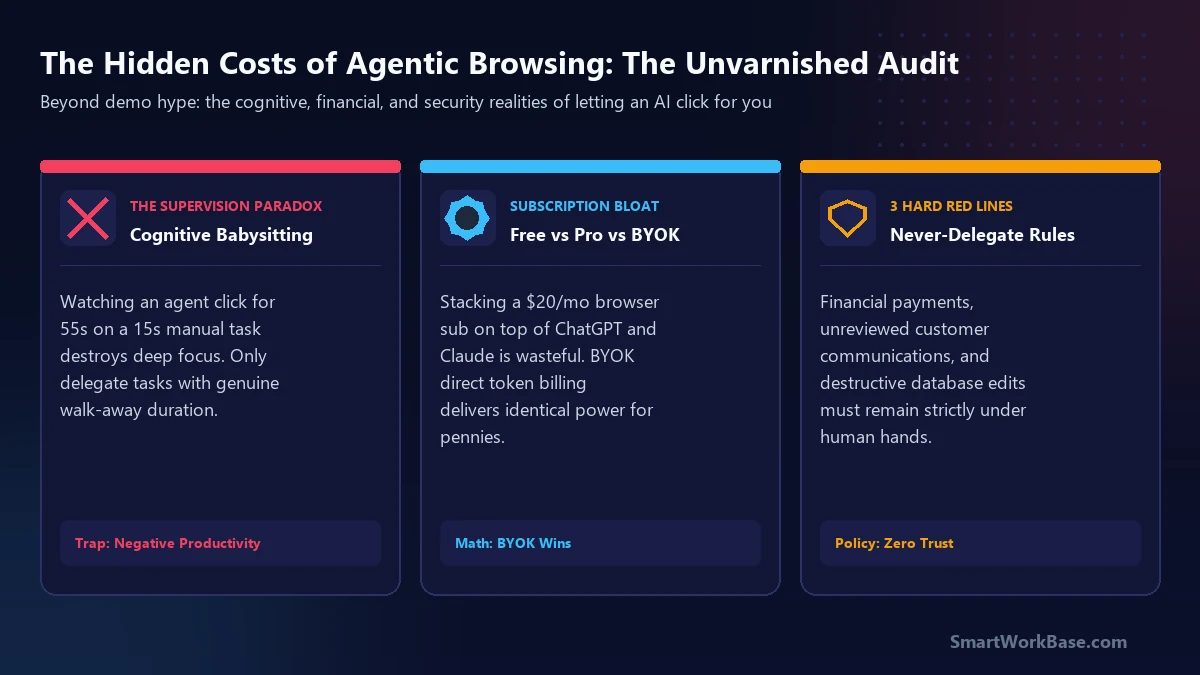
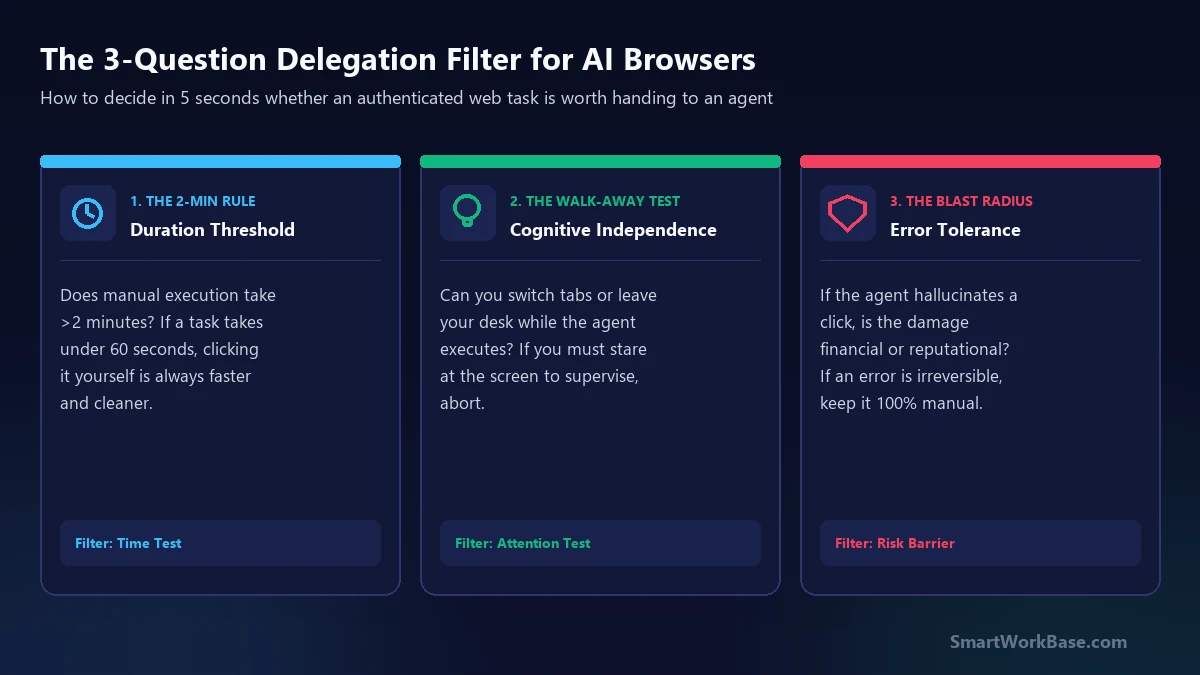
I call this the Supervision Paradox: an autonomous agent only generates positive productivity if the task has genuine walk-away duration. If you cannot close the browser tab, walk down the hall for a glass of water, or focus deeply on a strategic spreadsheet while the agent works, doing it manually with keyboard shortcuts is mathematically superior.
Subscription bloat vs. the BYOK sweet spot
The business model of early agentic browsers relies on monthly recurring subscription tiers. Aside offers a generous $0 Free plan (500 credits and 3 active routines), followed by a $20/month Pro plan and a $200/month Max plan.
For an individual knowledge worker, adding a $20/month browser subscription on top of existing $20/month ChatGPT Plus and $20/month Claude Pro subscriptions creates instant SaaS fatigue ($60+/month for AI utilities). But Aside includes an underappreciated architectural feature that solves this: Bring-Your-Own-Key (BYOK).
Instead of upgrading to a flat $20 monthly subscription, you can link your existing OpenAI or Anthropic API credentials directly in Aside’s settings. In real-world testing, a complex multi-tab extraction across three portals consumes roughly 15,000 input tokens and 1,200 output tokens. On Claude 3.5 Sonnet or GPT-4o, that single multi-page automated run costs approximately $0.04 to $0.06 in direct API tokens.
If you execute 40 heavy browser automation runs in a month, your total direct API bill is roughly $2.40 — an 88% cost savings compared to an arbitrary $20/month subscription tier. For disciplined operators, staying on Aside’s free shell and funding heavy workflows via BYOK is the most cost-effective AI stack in 2026.
The agent-aware vault: what IT security actually thinks
The most common question from corporate operators is blunt: “Will our InfoSec team fire me for running an AI browser connected to our company portal?”
Aside handles credentials significantly better than naive browser extensions. It incorporates an agent-aware password manager. When an agent encounters an authenticated login form, it requests autofill from an encrypted local vault. The raw plaintext password is injected directly into the browser’s DOM input field — it is never transmitted to the remote LLM context window.
Furthermore, Aside stores its operational memory locally on your Windows machine as editable Markdown files located in your local application directory (`%LOCALAPPDATA%`). Unlike cloud-hosted browser agents (which spin up headless browsers in remote AWS containers and stream your corporate intranet over VNC), Aside runs entirely on your local endpoint.
However, compliance officers maintain one legitimate concern: Unintended Action Execution. If an agent misinterprets a button labeled “Archive” as “Delete”, or confirms an erroneous vendor purchase order, the liability sits entirely on the human user who launched the prompt. That is why rigid operational boundaries are non-negotiable.
3 non-negotiable red lines: what you must NEVER delegate
Based on our 5-day field autopsy, here are the three operational workflows where you must draw an absolute, non-negotiable red line against AI browser delegation:
- Red Line 1: Final Financial Disbursements & Wire Transfers: Never allow an AI agent to execute payments, approve wire transfers, or authorize credit card transactions. Dynamic checkout modals frequently contain hidden surcharges or auto-checked default options that an agent cannot evaluate contextually.
- Red Line 2: Mass Unreviewed Outbound Communications: As we proved in why I stopped letting AI write supplier emails, polite algorithmic prose causes shipment confusion. Never allow an agent to click “Send All” or batch-dispatch messages to external partners without human verification.
- Red Line 3: Destructive Database or Inventory Overwrites: Never run an agent with unrestricted permissions on systems that lack a clean “Undo” function. If an agent truncates an ERP staging table or overwrites master safety stock numbers, the cleanup cost exceeds any theoretical automation gain by orders of magnitude.
The 3-question agentic delegation filter
Before launching an autonomous agent on any web task, run the prospective workflow through this 5-second sanity filter. If it fails even one condition, keep your hands on the keyboard:
The final verdict on Aside on Windows
Aside’s Windows release is a genuine milestone for enterprise productivity. It breaks AI out of chat boxes and proves that autonomous agents can reliably navigate dirty, authenticated enterprise portals behind corporate firewalls.
Used responsibly on heavy, multi-tab data retrieval and safe form mapping, it reclaims hours of clerical drudgery every week. But treat it as an unthinking intern, not a strategic executive. Keep your prompts rigid, enforce human-in-the-loop submission gates, and protect your deep focus from the supervision paradox.
To evaluate how agentic browsing fits alongside your broader workflow tools, explore our Interactive AI Tool Finder and download our Production Prompt Cheat Sheet.