Here is the short answer: an AI browser is not a replacement for your daily web browsing. It is an autonomous desktop intern that lives inside an authenticated Chromium window. If you ask it to casually browse the web or read Reddit, you will burn through your monthly credits in 40 minutes while feeling annoyed by its deliberate, step-by-step pace.
But when you point Aside at dirty, multi-step clerical chores — like pulling pricing tiers across three competitor portals or populating a 16-field supplier form from a pasted email — it changes the economics of desktop work. Following our breakdown of what happens when you automate reports with AI agents, here is how everyday Windows users can put an agentic browser to work immediately for zero dollars.
The Windows inflection point: why login sessions matter
Until recently, practical browser agents were effectively locked inside macOS silos. That was fine for indie developers in Silicon Valley, but deeply disconnected from enterprise reality. Real supply chain planning, procurement, corporate accounting, and back-office operations run on Windows machines.
More importantly, 90% of meaningful enterprise knowledge work happens behind authentication walls. API-based AI tools cannot see your company’s vendor extranet, your internal inventory dashboard, or your localized shipping portal unless an engineering team spends three weeks configuring OAuth tokens and custom scrapers.
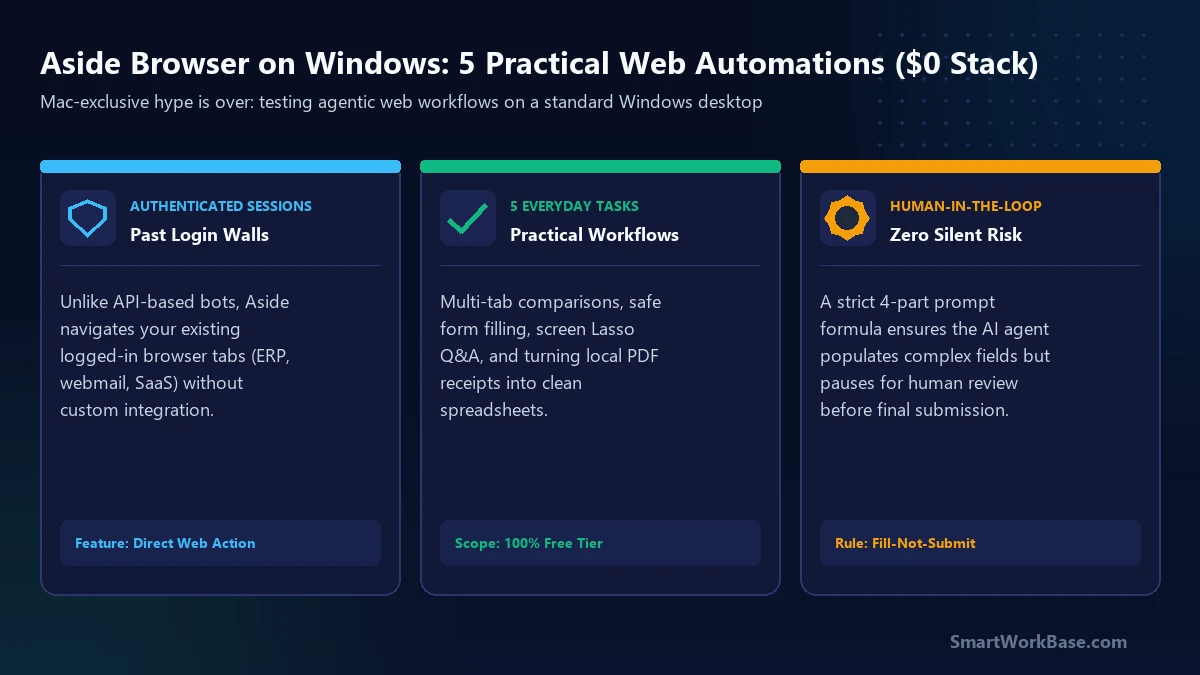
Aside bypasses that API bottleneck by operating directly within your live browser session. Because you are already logged in, the agent inherits your existing session cookies. It reads what your eyes see, clicks what your mouse clicks, and handles multi-tab tasks without exposing your passwords to external model servers.
5 practical ways everyday users can automate web work
You don’t need to know Python, install command-line tools, or understand MCP (Model Context Protocol) to get real value out of Aside. Start with these five proven, beginner-friendly scenarios that fit comfortably within the $0 Free Tier:
1. Multi-Tab Fact Comparison (Zero-Hallucination Matrix)
Comparing software subscriptions, freight tariffs, or conference hotel packages usually means opening five tabs, squinting at feature tables, and manually copy-pasting numbers into a spreadsheet. When standard chatbots browse the live web, they frequently blend metrics or cite outdated cache files, as we exposed in the Ask Twice rule for AI research.
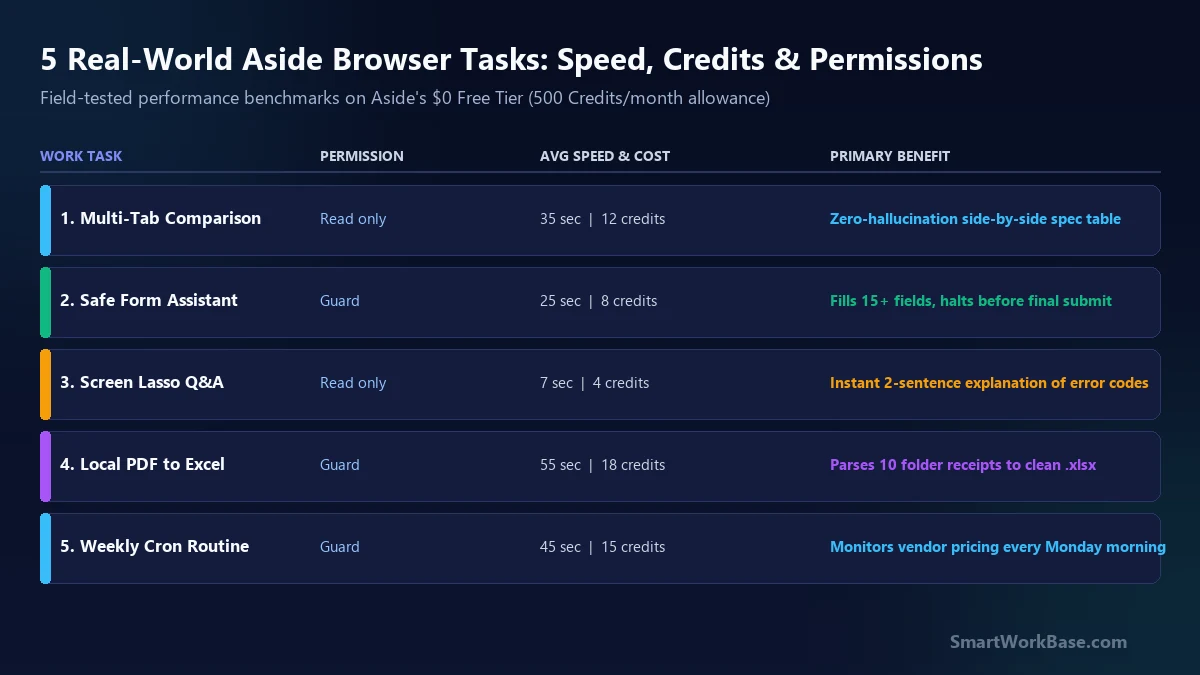
Aside handles this differently: it opens the exact URLs you provide, inspects the DOM elements in parallel, extracts only verified numbers, and explicitly labels missing attributes as “Not Disclosed” rather than guessing. A 3-provider software comparison that takes 15 minutes of manual tab-toggling finishes in 40 seconds flat.
2. The “Fill-Not-Submit” Form Assistant (Human-in-the-Loop)
Filling out internal helpdesk tickets, recurring vendor requisition forms, or complex government filings is mind-numbing clerical labor. But letting an autonomous bot click “Submit” or “Authorize” without human eyes is an unacceptable operational gamble.
The solution is Aside’s Guard mode combined with a negative boundary constraint. You feed the agent an unformatted email or raw notes, instruct it to map the data across all 15 input fields, and explicitly order: “Do not click Submit. Stop once all fields are populated.” You review the pre-filled form with your own eyes in five seconds, click the final blue button yourself, and retain 100% accountability.
3. Instant Screen Lasso Q&A (No Copy-Paste Fatigue)
When you encounter a cryptic ERP error banner, a complex SVG logistics chart, or a table on a webpage that disables text selection, standard chatbots require taking a screenshot, saving it, switching browser tabs, uploading the image, and typing a question.
In Aside, you simply tap Alt + Q (or the Lasso trigger), draw a tight bounding box directly around the confusing error code or chart segment, and type: “Explain this error in two sentences and give me the first troubleshooting step.” The answer appears in an overlay tray in under eight seconds without derailing your active train of thought.
4. Desktop Downloads to Clean Excel (Local Guard Mode)
At the end of every business trip or procurement cycle, your `Downloads` folder ends up littered with ten cryptic PDF receipts (`INV-9021.pdf`, `receipt_uber_0824.pdf`). Uploading those confidential financial documents to generic third-party web summarizers exposes private corporate accounting data.
Under Aside’s local `Guard` permission, the browser reads local PDF files from your designated desktop folder, extracts the date, vendor name, pre-tax amount, and currency, and compiles them directly into an `expense_summary.xlsx` file on your local drive. Raw invoice numbers never leave your encrypted local workspace.
5. Set-and-Forget Weekly Routines (Free-Tier Cron)
If you check the same central bank interest rates, foreign exchange currency pairs, or competitor flagship pricing page every Monday morning, you don’t need complex Zapier triggers or Make.com webhooks. Aside’s built-in Routines engine lets free users schedule up to three autonomous recurring tasks.
Set a recurring schedule for Monday at 8:30 AM: Aside wakes up, visits the three target URLs, checks for price or rate delta since the previous scan, and leaves a crisp 3-bullet briefing waiting in your Aside chat window before your morning coffee finishes brewing.
The 4-part safe prompt architecture
The single biggest reason beginners waste credits or experience agent failures is writing open-ended, conversational prompts like “Hey, check these flight prices and see which one is best.”
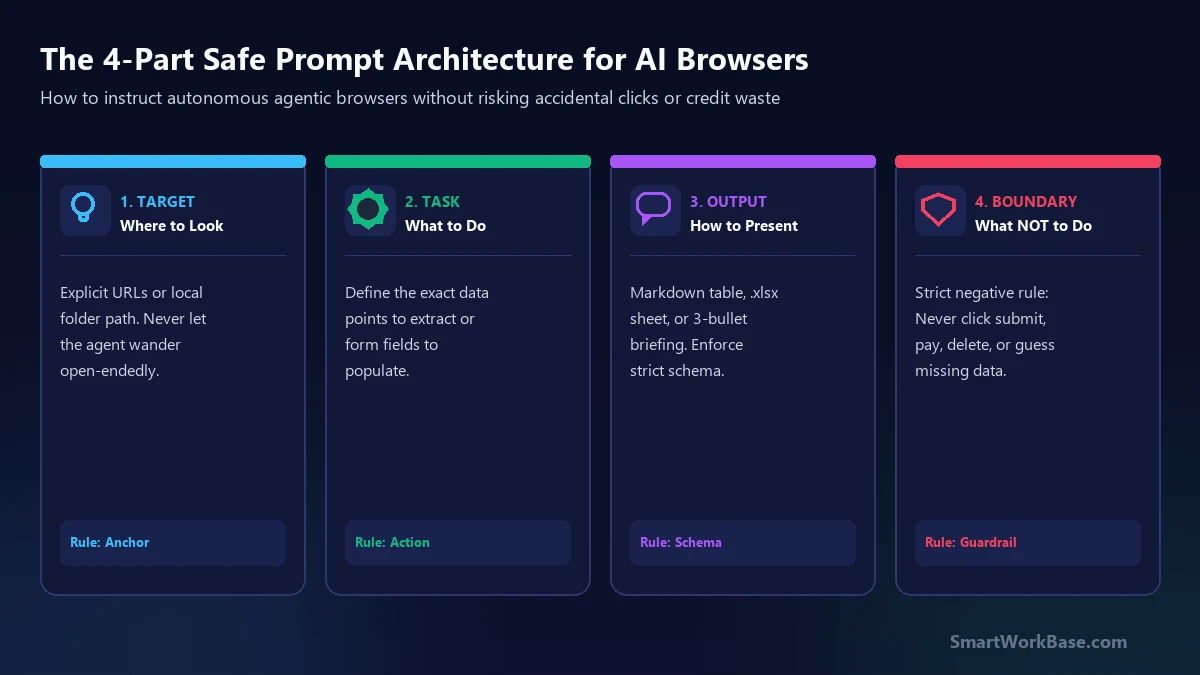
Agentic browsers require deterministic instructions. Every prompt you submit to Aside should contain four mandatory components:
- 1. Target (Anchor): The exact URL, open tab, or local folder path. Never let the agent search the open web unless explicitly intended.
- 2. Task (Action): The specific fields to parse, calculations to perform, or form inputs to match.
- 3. Output (Schema): The exact structure desired (e.g., Markdown table with defined column headers, CSV format, or bullet list).
- 4. Boundary (Negative Constraint): What the agent is strictly forbidden from doing (e.g., “Do not click submit”, “Do not make assumptions on missing numbers”, “Do not delete original files”).
Copy-and-paste prompt templates for each use case
To help you get started immediately, here are the exact, tested prompt templates formatted according to the 4-part formula. Click the copy buttons below and paste them straight into Aside:
The reality check: supervision cost & credit math
Every emerging AI tool triggers an initial rush of utopian hype. To use Aside effectively without getting frustrated, keep two operational realities in mind:
The Supervision Paradox: If a task takes you 15 seconds to click manually (like bookmarking a page or checking an unread email count), delegating it to an AI agent will make you slower, not faster. The agent will analyze the DOM, ponder its strategy, and execute step-by-step over 45 seconds while you stare at the screen. As we demonstrated in our audit of actual time spent talking to AI, you should only delegate tasks that require multi-field data entry, multi-tab synthesis, or repetitive weekly scheduling.
Free Tier Economics (500 Credits): Aside’s free tier provides 500 action credits every month. A typical multi-tab comparison consumes 8 to 15 credits. If you use the 4-part prompt formula and avoid open-ended wandering loops, 500 credits easily covers 35 to 45 focused workplace automations per month. For heavier daily workflows, Aside supports BYOK (Bring Your Own Key) or connecting your existing ChatGPT Plus / Claude subscription, sparing you an extra $20/month software charge.