Here’s the short answer: the habit is called the Two-Path Total Check. Before any report leaves my inbox, I get the one number that matters — a grand total, a headcount, a days-of-supply figure — two separate ways, using two different formulas or groupings. If they don’t match exactly, I don’t send the report. I don’t round. I stop and find out why.
I learned this years before ChatGPT or Claude existed, and after everything I tested for my last post on AI-written Excel formulas, I trust it more now than I did back then. AI is genuinely good at writing the formula you ask for. It is not built to doubt the number it just handed you. That gap is exactly what this habit fills.
Where I picked up the habit
In my second month as a junior planner, I sent out a monthly inventory summary to about a dozen people, including two directors. The total was off by roughly 4,000 units.
The cause was almost embarrassingly small: a filter on the raw data tab had been left on from someone else’s earlier work, so my SUM formula was quietly skipping a chunk of rows. The formula wasn’t broken. It was doing exactly what it was told, on the wrong slice of data.
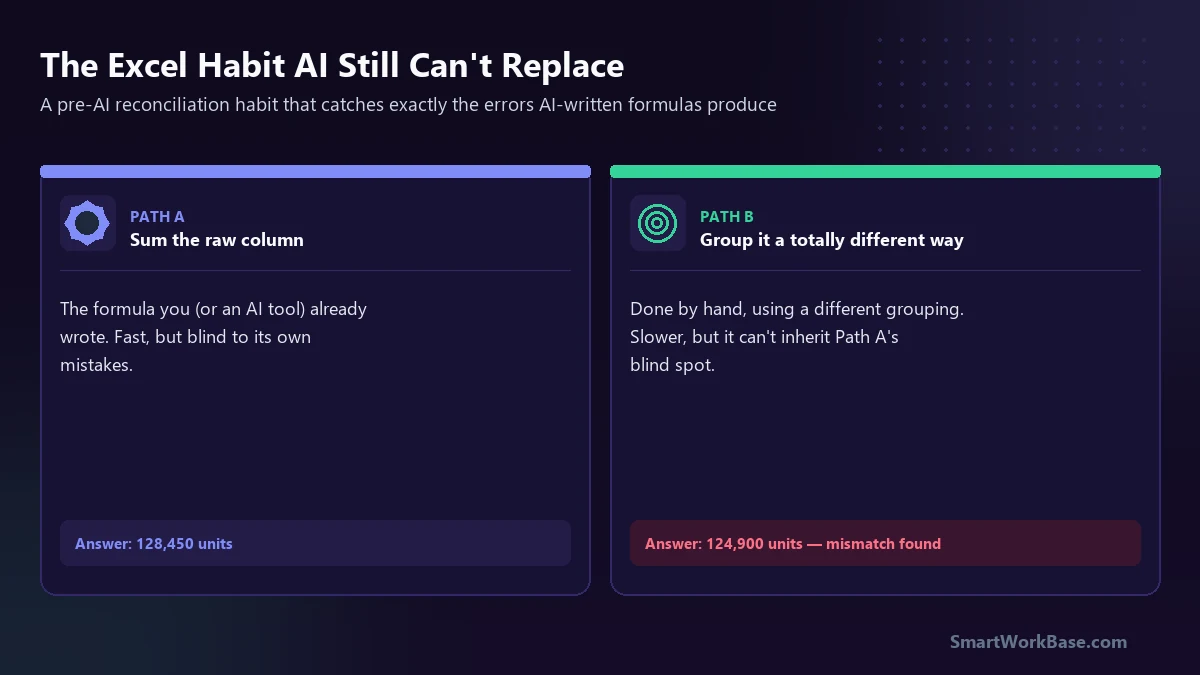
My manager at the time didn’t tell me to be more careful, or to double-check my formula. She told me to always get the same number two different ways before it leaves my hands. Not a spell-check. A completely separate calculation, built so it couldn’t inherit the first one’s blind spot.
What the Two-Path Check actually looks like
It’s less a formula and more a rule about how you’re allowed to trust a number. In practice, it comes down to three things:
- Path A is whatever already exists: the SUM formula, the AI-generated XLOOKUP, the pivot table someone else built last quarter. Fast, and the default source of truth.
- Path B has to be structurally different: not the same formula copied to another cell, but a genuinely different route to the same number — a different grouping, a manual filter, a count instead of a sum.
- Disagreement is the whole point: if Path A and Path B land on different numbers, that mismatch is the signal. Something upstream is wrong, and I need to find it before anyone downstream acts on the report.
The version from my old job used pivot tables and manual filters, because that’s what we had. The version I use now often has an AI tool write Path A in seconds. But Path B stays manual, on purpose — more on why in a moment.
Why AI formulas don’t do this on their own
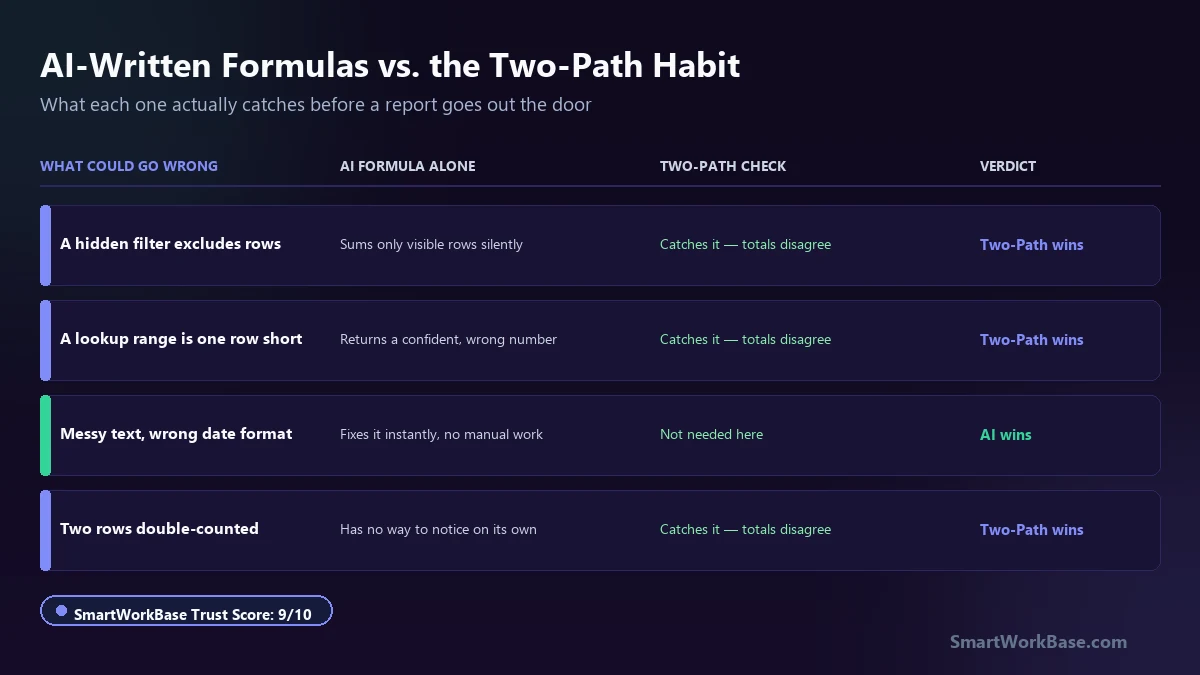
In my last post, the formulas that tested well — REGEX-based text extraction, straightforward XLOOKUPs — were genuinely reliable. But the failures weren’t random. They clustered around exactly the kind of thing a formula can’t see about itself: a hidden filter, a lookup range that’s one row short, a dynamic array quietly returning a #SPILL error two columns over.
An AI tool executes the request you gave it with total confidence, whether the request was well-formed or not. It has no independent way to check its own output against a different method, because you didn’t ask it to. That verification step has to come from somewhere else — which is exactly why Path B stays manual.
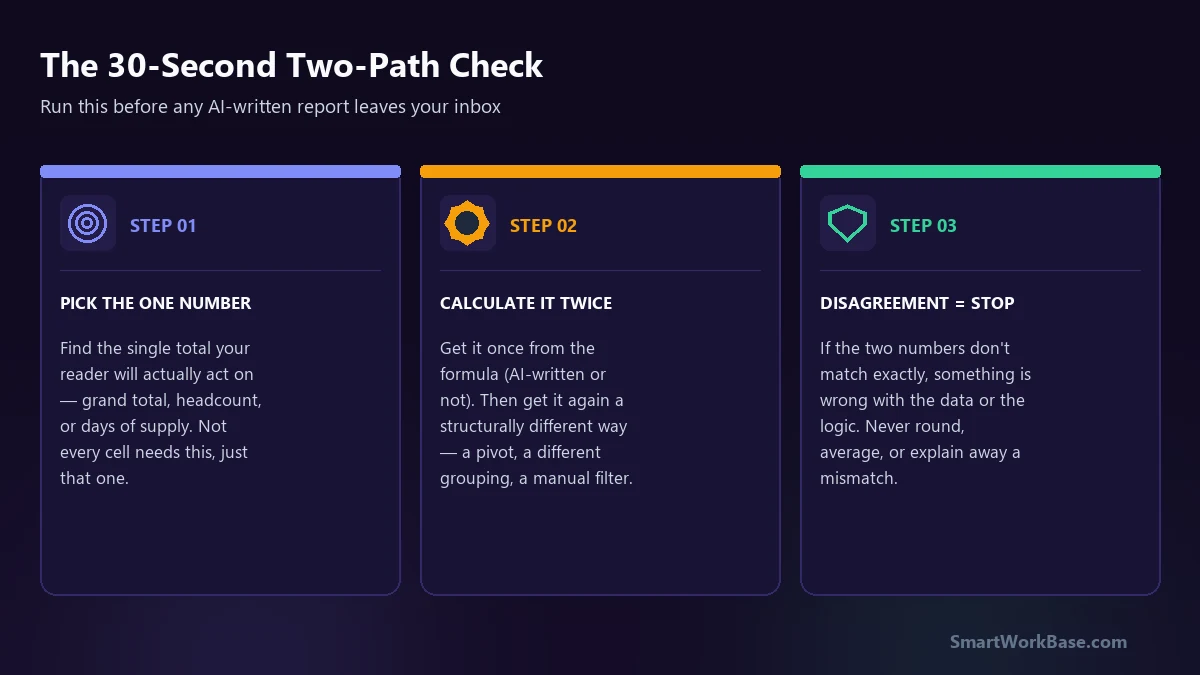
Run this before any AI-assisted report leaves your inbox:
- Pick the one number that matters: the total your reader will actually act on, not every cell in the sheet.
- Get it once from the existing formula — AI-written or not.
- Get it again, a structurally different way — a pivot table, a different grouping, a manual filter. Don’t let the same tool write both.
- If the two numbers don’t match exactly, stop. Find the cause before the report goes anywhere.
Where I do let AI help
This isn’t an anti-AI habit. Let AI draft the first formula, clean up messy text, or explain why an existing formula is behaving strangely — it’s faster at all of that than I am, and I use it for exactly those things every day.
What I don’t do is let the same tool that wrote Path A also produce Path B. If both come from the same source, they can share the same blind spot, and the check stops meaning anything. The value of the habit comes entirely from Path B being built a genuinely different way.
If you’re trying to figure out where AI actually earns its place in a workflow like this, our AI Tool Finder and Free AI Prompt Cheat Sheet are both built from the same real-world testing as this post. But for the one number your report actually depends on, do the second calculation yourself.
Frequently Asked Questions (FAQ)
Isn’t this just basic auditing practice, not something new?
Can I just ask AI to write Path B as well, to save time?
Does this apply outside of Excel or supply chain work?
The Excel AI Formulas I Actually Trust (And the 3 That Cost Me 4 Hours of Cleanup) →
50 real datasets audited for exactly the kind of silent errors this habit is built to catch.