Here is the direct conclusion up front: AI does not effortlessly hand you 15 free hours every week. When I tracked every single session in ChatGPT and Claude across two full work weeks, I logged a staggering 38.5 hours of AI interaction—nearly 4 hours every single day. Half of that time delivered extraordinary leverage, but the other half was spent fighting prompt loops, verifying fabricated numbers, and indulging in high-tech procrastination.
Every tech influencer promises that generative AI will automate your entire workflow in three clicks. What nobody mentions is the subtle “prompt fatigue” that creeps in when you spend 40 minutes tweaking adjectives instead of writing them yourself. Here is the unvarnished data from my 14-day tracking experiment.
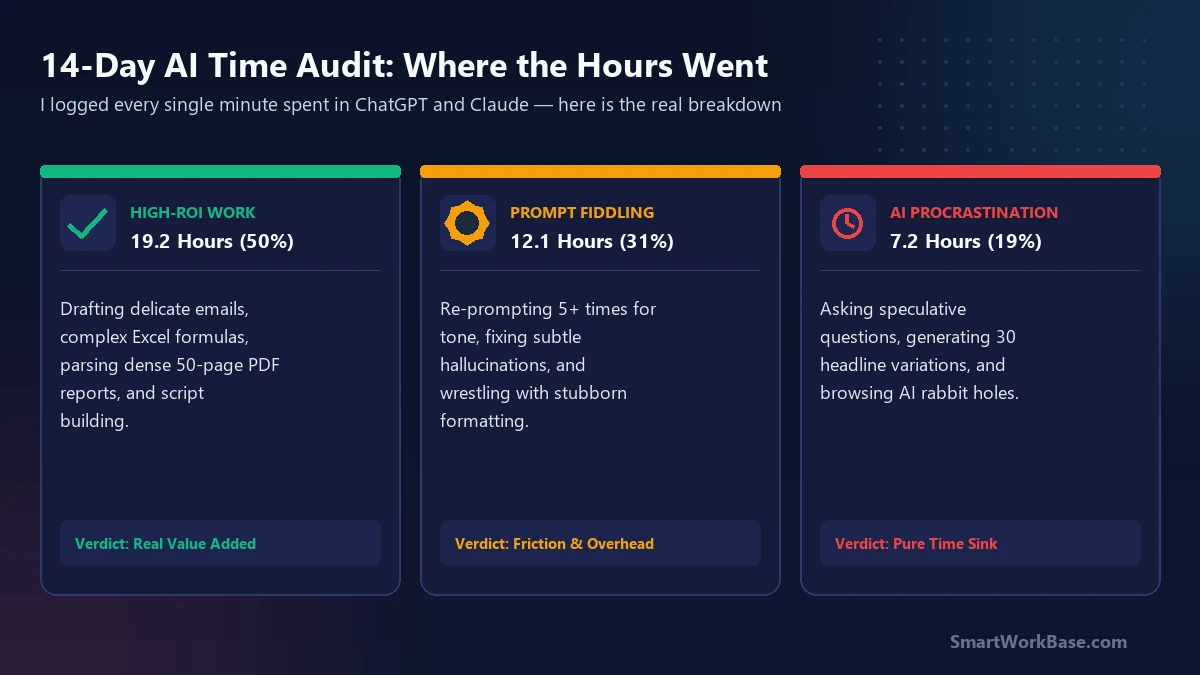
How the 14-day audit was structured
As a supply chain planner and technical writer, I live in spreadsheets, ERP reports, and email threads. For two weeks (10 business days), I used a dedicated desktop timer to track every interaction with Claude 3.5 Sonnet, ChatGPT-4o, and Gemini.
Every time I opened an AI tab, I logged the exact start time, task category, and end time. I categorized each session into three distinct buckets:
- High-ROI Deep Work: Direct production of work deliverables (first-draft writing, Excel formula writing, complex data restructuring, parsing 50-page PDF supplier audits).
- Prompt Fiddling & Debugging: Re-prompting more than twice to fix subtle tone issues, reformatting stubborn outputs, or verifying suspicious numbers.
- AI Procrastination: Asking speculative “what-if” questions, generating dozens of alternative headlines, and chatting with LLMs instead of starting difficult tasks.
“Review the following raw work log from my day. Identify: 1) Which tasks yielded genuine time savings (>30 min), 2) Where I engaged in prompt iteration loops with diminishing returns, and 3) The exact 3 tasks I should execute manually tomorrow to eliminate tool friction.”
The 3 buckets: Where the 38.5 hours went
1. High-ROI Deep Work: 19.2 Hours (50%)
When AI worked well, it was breathtakingly effective. It cut the drafting time for a 12-page vendor supplier evaluation from 6 hours down to 90 minutes. In my workplace chatbot tests, Claude 3.5 consistently drafted polished negotiation emails in under two minutes.
In total, these 19.2 hours produced an estimated 45 hours worth of traditional manual output—delivering an unmistakable net productivity gain.
2. Prompt Fiddling & Correction: 12.1 Hours (31%)
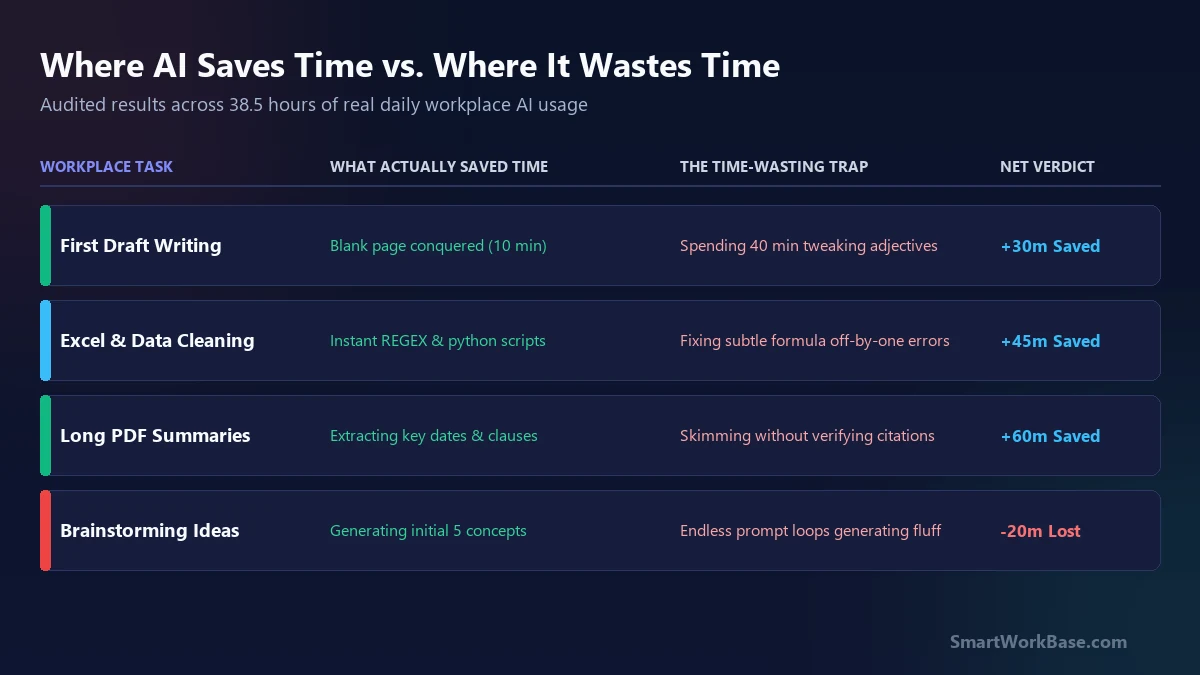
This was the biggest eye-opener. Over 12 hours were spent wrestling with the tools. I caught myself asking Claude to adjust an email’s tone six times, only to realize I could have edited the second draft manually in 30 seconds.
In spreadsheet modeling, ChatGPT would generate a complex formula that looked 95% correct, but had an off-by-one error in a nested array. Debugging an AI’s math often took twice as long as building the logic from scratch.
3. AI Procrastination & Novelty: 7.2 Hours (19%)
Generative AI is the most seductive procrastination engine ever built. Because typing into a prompt box feels like “working,” it is easy to justify spending 45 minutes exploring hypothetical scenario plans that have zero chance of being executed.
The 3 golden rules that stopped the time leaks
After reviewing the audit data at the end of the two weeks, I instituted three non-negotiable operational rules for my daily workflow:
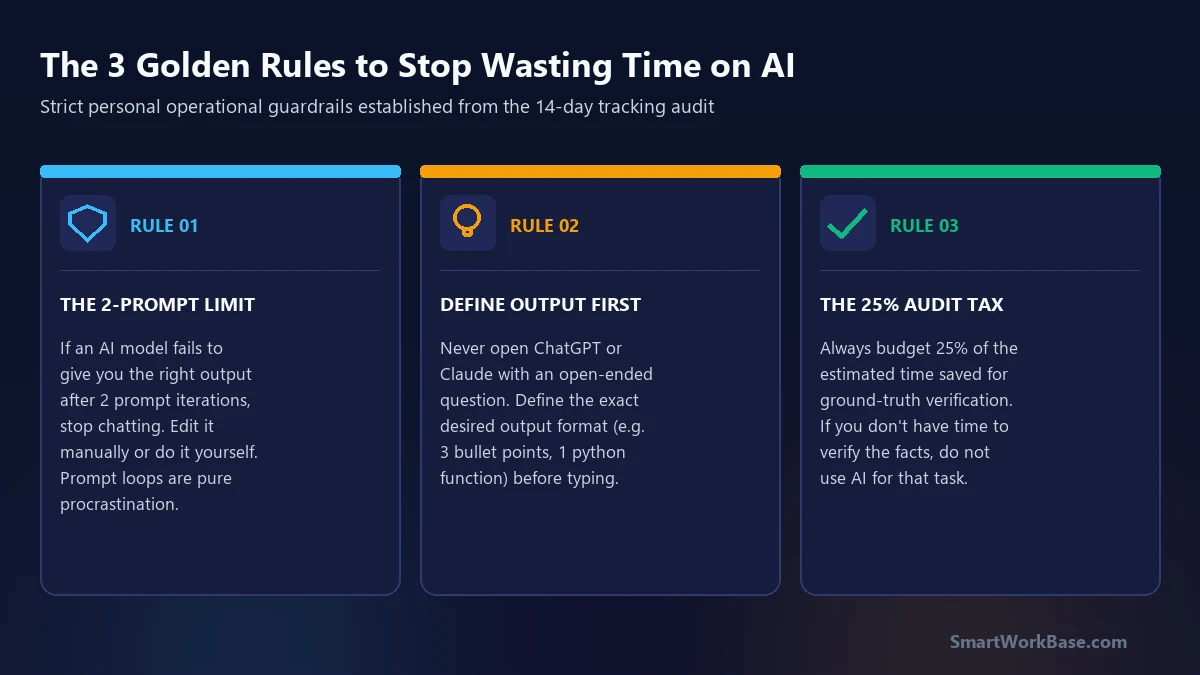
Rule 1: The Two-Prompt Limit
If an AI model does not produce an 80% usable draft within two prompt iterations, I close the chat tab immediately. Continuing to prompt past two rounds almost always degenerates into a frustrating loop where each subsequent answer becomes more convoluted. Take the second draft and finish it by hand.
Rule 2: Define Output Format Before Opening the Tab
Never open ChatGPT or Claude with an ambiguous prompt like “Help me think about this project.” Before touching the keyboard, write down the exact structural requirement: e.g., “A 3-column table comparing vendor delivery dates” or “A 200-word executive summary in 3 bullet points.”
Rule 3: The 25% Verification Tax
Every time AI saves you an hour on a data or analytical task, immediately budget 15 minutes (25%) strictly for cross-referencing sources and verifying numbers. As I learned in writing in English as a second language, blind trust in automated fluency is how critical errors make it into executive presentations.
The practical verdict for knowledge workers
AI tools are not magic productivity wands. They are high-speed drafting engines that demand sharp executive oversight. If you don’t track your usage, you will easily trade 2 hours of writing for 2.5 hours of prompt tweaking.
If you want to streamline your tool stack and pick the right assistant for your specific tasks, use our interactive Which AI Tool Should I Use? decision tree or copy battle-tested workflows from our Free AI Prompt Cheat Sheet.
Frequently Asked Questions (FAQ)
How can I track my own AI usage accurately?
What is the single biggest time-waster when using LLMs?
Does paying for ChatGPT Plus or Claude Pro reduce prompt fiddling?
I Asked ChatGPT, Claude, and Gemini the Same Work Question. Here’s Who I’d Actually Trust →
The head-to-head workplace test: why Claude wins on tone nuance while ChatGPT dominates spreadsheet logic.