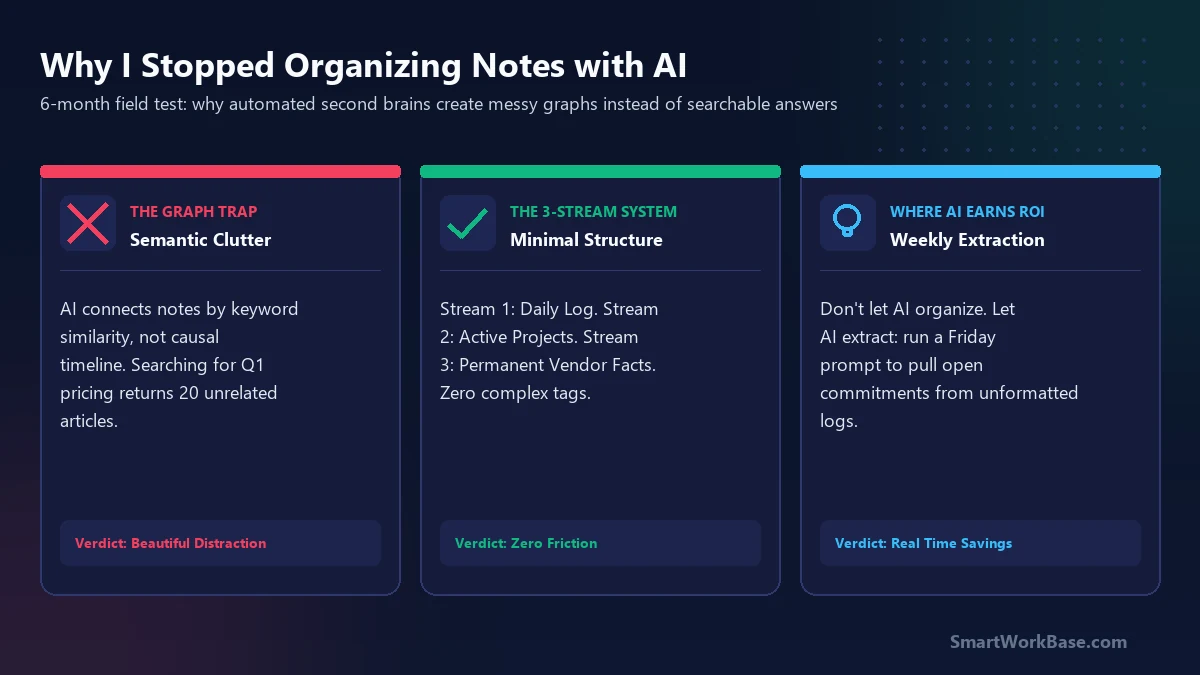
Here is the short answer: an automated knowledge graph is visually stunning, but functionally useless when you need an exact answer under pressure. AI tools link ideas based on conceptual proximity — meaning an article about maritime freight rates gets algorithmically tangled with an old note on shipping box dimensions simply because both mention “containers.” When you’re trying to find an emergency supplier agreement from last October, semantic search surfaces 25 tangentially related articles instead of the one contract you need.
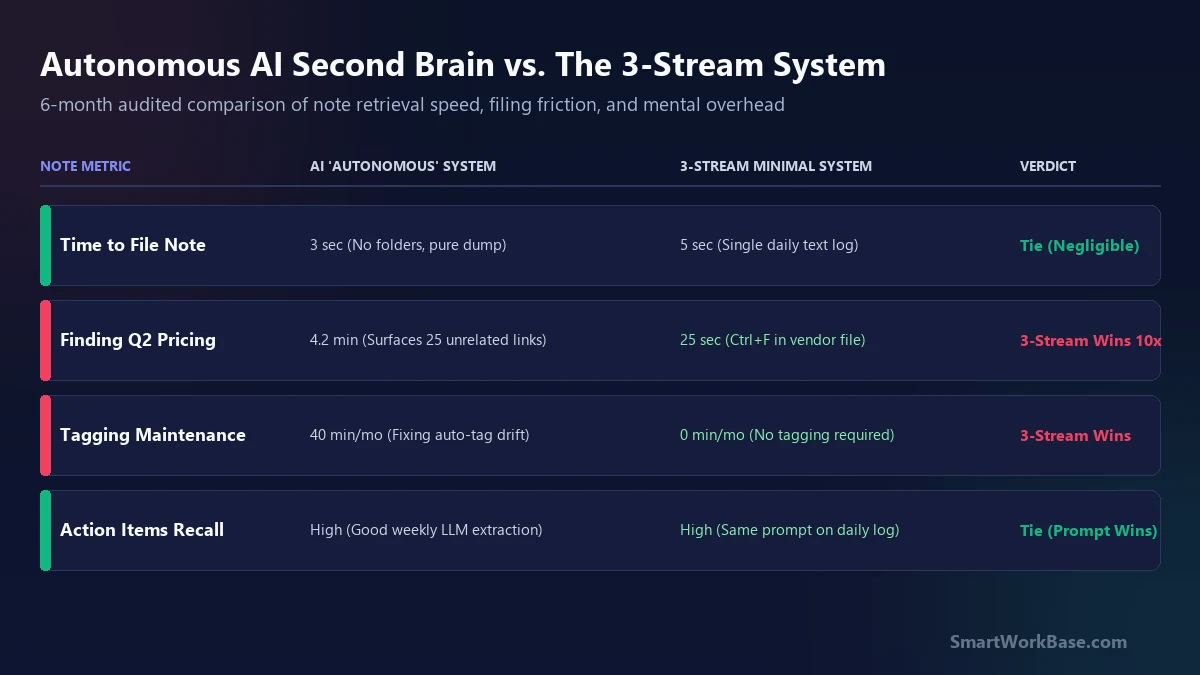
When I wrote our initial architecture guide on building an AI second brain, I genuinely believed automated tagging would replace manual filing. But in real-world supply chain and operations work, organizing notes isn’t a graph theory problem; it’s a retrieval reliability problem. Spending 40 minutes every month fixing auto-tag drift and weeding out false associations is the opposite of productivity. Here is why I stripped down my setup and what I run today.
The contract clause I couldn’t find in my “Second Brain”
The turning point happened during an urgent supplier escalation call. Our logistics director needed the exact wording of a packaging damage indemnification clause we had agreed to during a vendor visit four months earlier.
I opened my AI-powered PKM tool, typed a natural language query into the semantic search bar, and waited. Instead of returning the meeting note from October 14, the model proudly surfaced a 3D knowledge graph containing 34 interconnected nodes: articles on warehouse automation, general packing slip templates, and an irrelevant memo on corrugated cardboard recycling. The AI was connecting everything that felt conceptually similar, completely ignoring the chronological and operational context of my search.
I spent seven agonizing minutes apologizing on a live call while manually digging through calendar invites to find the raw text file. That was the day I realized: I didn’t have a second brain. I had an unindexed digital landfill with a pretty visualizer.
Semantic similarity vs. Operational memory
Knowledge management apps fail when they assume human memory works like vector embeddings. Over six months of auditing my retrieval speeds, the core difference became glaringly obvious:
- How AI Thinks (Vector Space): “This note mentions packaging, and that note mentions shipping pallets. They share 88% cosine similarity, so let’s link them.”
- How Professionals Actually Remember: “I agreed to this term right after our Nashville plant tour in early Q4, right when Dave was complaining about resin shortages.”
- The Retrieval Gap: AI strips away chronology and human causation to build topical clusters. But in business operations, time and accountability are the only indexing dimensions that actually matter.
The 3-Stream Minimal Note Architecture
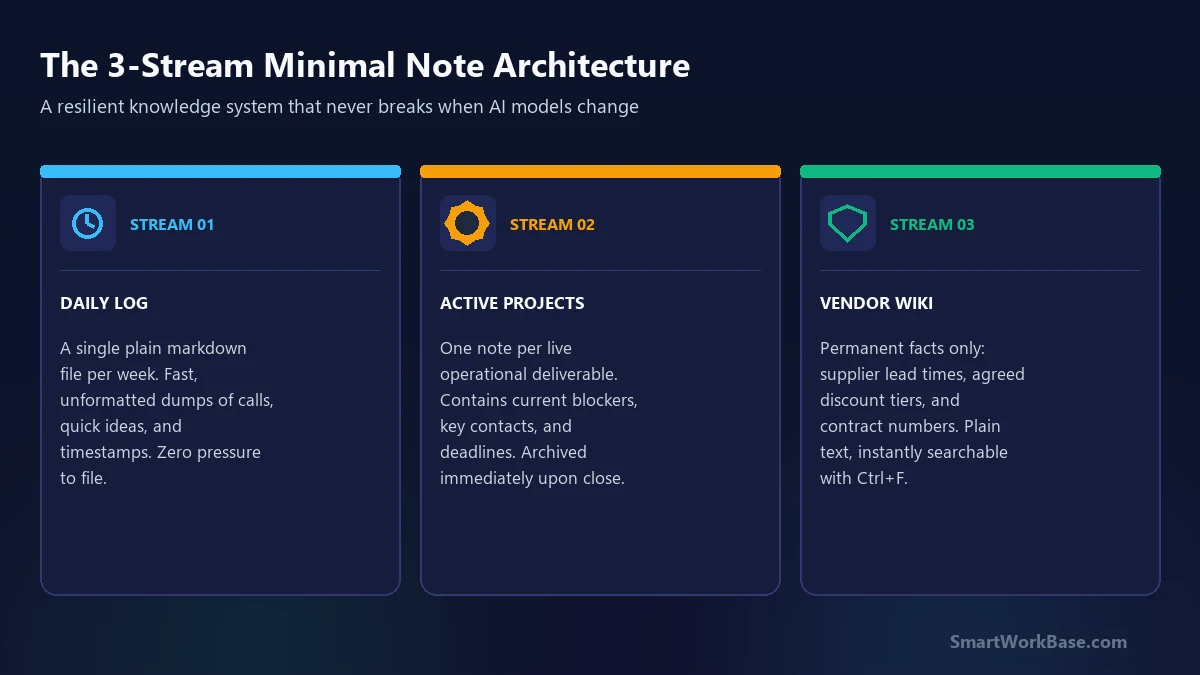
To eliminate filing friction without sacrificing instant searchability, I replaced complex bi-directional links and auto-taggers with the 3-Stream System. It requires zero plugins, runs in any plain text or markdown editor (Obsidian, Apple Notes, VS Code), and never suffers from algorithmic drift:
- Stream 1: The Weekly Log (Temporal Memory): A single plain text file created every Monday morning. All quick phone notes, fleeting thoughts, and unformatted call recaps get dumped here chronologically with simple time stamps. No folders, no tags.
- Stream 2: Active Projects (Accountability Memory): One dedicated note per live deliverable. It contains active milestones, current roadblocks, and primary vendor contacts. When the project launches, the note is moved to an archive folder.
- Stream 3: The Vendor & Systems Wiki (Permanent Facts): Permanent reference material that rarely changes — supplier lead times, agreed discount schedules, and key ERP system parameters. Kept in flat, plain text files searchable via standard Ctrl+F.
Where AI genuinely earns its place in note-taking
I stopped letting AI organize my notes, but I use it every Friday for one high-leverage task: automated extraction. Don’t ask AI to build a filing cabinet; ask it to act as a closing-shift janitor that cleans up your raw weekly log.
Here is the prompt I run every Friday afternoon across my Stream 1 weekly log:
Paste your unformatted weekly log into Claude or ChatGPT with this prompt:
The lesson of the second brain
The ultimate goal of personal knowledge management is not to build a digital museum of everything you have ever read. It is to reduce friction between thought and execution. When your system requires maintenance scripts, AI graph visualizers, and complex taxonomy rules, the system becomes the work.
As I noted in what 4 days without AI tools taught me, convenience that erodes core clarity is a net negative. Keep your notes flat, keep your filing friction at zero, and let AI extract action items rather than manage your memory. Discover more pragmatic setups with our AI Tool Finder and download our Free AI Prompt Cheat Sheet.