Here is the short answer: speaking is fast, but speaking is structurally lazy. When you speak, your brain naturally loops back, adds conversational fillers, and wanders into contextual tangents. When you type, the physical resistance of the keyboard forces you to organize your thoughts before committing them to the screen. Typing is a thinking tool; voice is a capture tool.
When I tested the best AI voice-to-text dictation tools, I was thrilled by the raw transcription accuracy. But raw transcription speed does not equal completed work. In complex supply chain operations and business planning, dumping 1,200 unedited spoken words onto a page just creates a brand new chore: pruning your own stream of consciousness. Here is how I restructured my daily setup to get the speed of voice without the transcript hangover.
The 1,400-word memo that took 35 minutes to fix
Two weeks into my dictation experiment, I decided to dictate a quarterly warehouse space rationalization proposal. Normally, typing this 600-word memo takes me about 20 minutes of deliberate, focused effort.
Wearing noise-canceling headphones, I paced my home office and dictated for seven minutes straight. The AI dictation software transcribed every word flawlessly — zero typos, smart capitalization, and automatic paragraph breaks. The result was a 1,420-word behemoth.
Then the reality hit: the proposal was bloated with meandering explanations, repeated rationale, and conversational cushioning — the exact trap I wrote about when explaining why I stopped letting AI write supplier emails. It took me 28 minutes of aggressive redlining to cut that bloated draft down to the tight 500-word memo my director actually needed. Total time spent: 35 minutes. By trying to save 10 minutes of typing, I lost 15 minutes of deep focus.
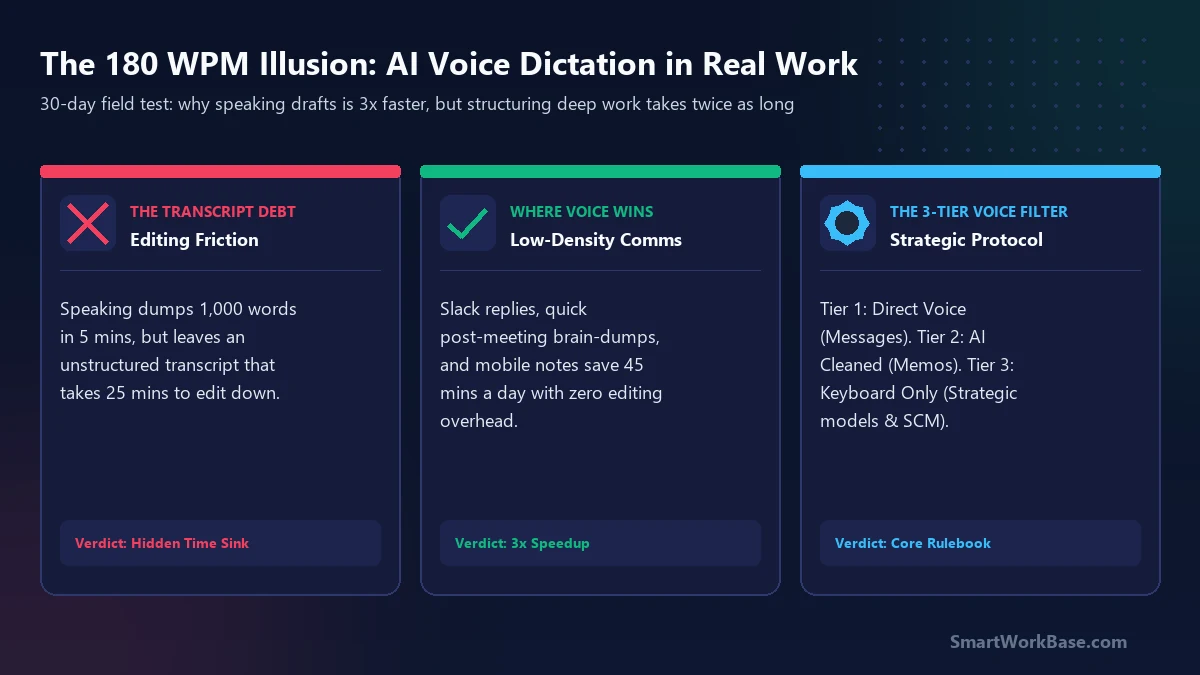
Where voice dictation wins vs. where it bleeds time
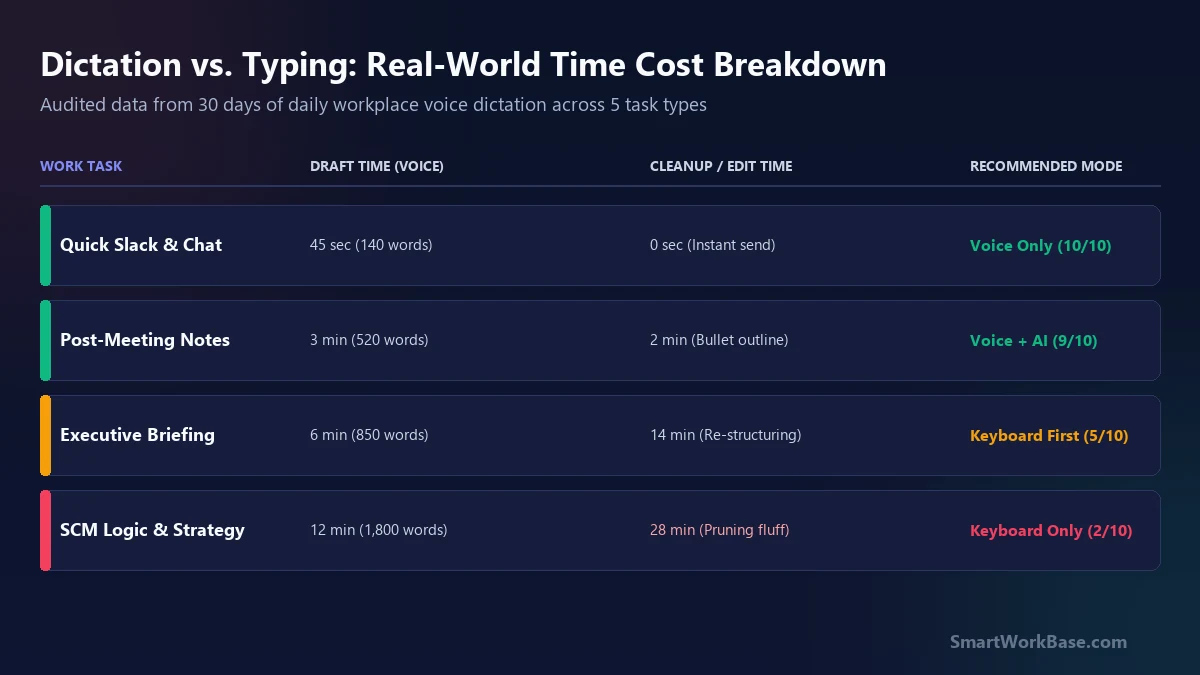
The mistake isn’t using voice dictation; the mistake is using it for the wrong density of thought. Over 30 days of logging every dictated note, a clear pattern emerged between communication tasks and analytical tasks:
- Low-Density Communications (Clear Winner): Quick Slack replies, acknowledgment emails, and initial triage. Speaking a 2-sentence confirmation takes 8 seconds and requires zero follow-up editing.
- Post-Meeting Brain Dumps (Clear Winner): Right after a tense vendor call, dictating everything you remember for 90 seconds captures perishable details that would otherwise evaporate before you open your notes.
- Strategic Proposals & Logic (Definite Loser): Any document where precision matters — contract clauses, KPI calculations, or operational escalation memos. Speaking these creates loose, ambiguous language that demands heavy rewriting.
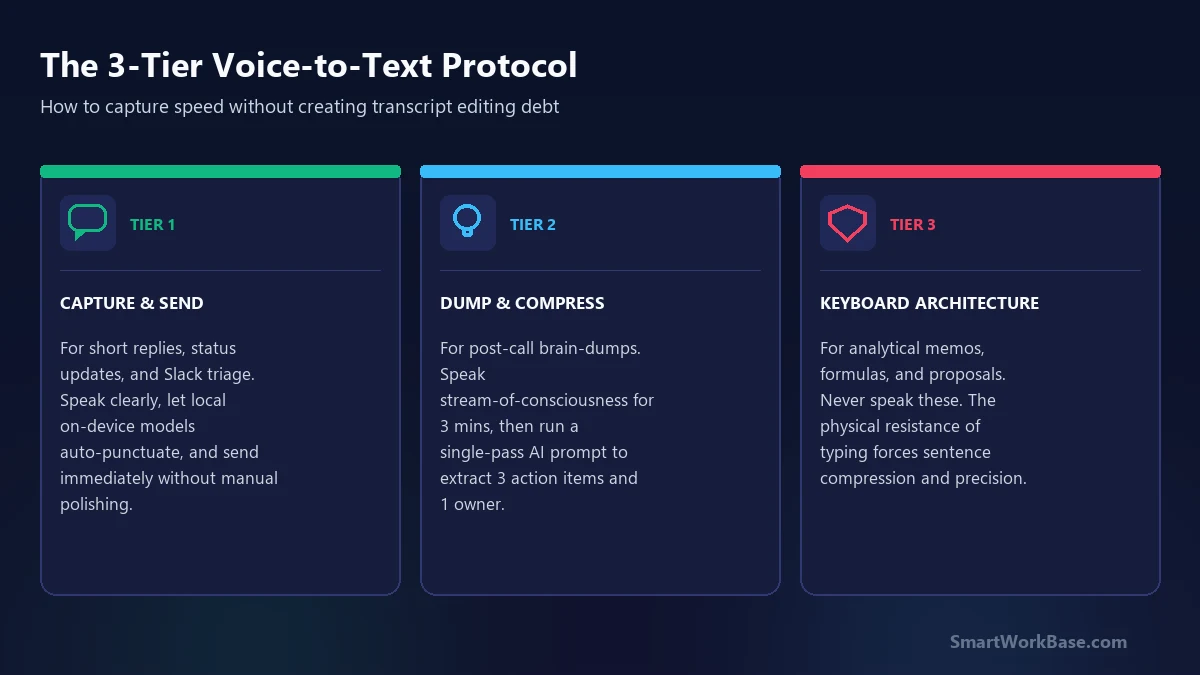
The 3-Tier Voice Filter
To stop creating transcript debt, I established a strict operational filter that dictates when I click the microphone button and when I keep my fingers on the keyboard:
- Tier 1: Capture & Send (Voice Only): For short Slack messages, calendar reminders, and raw mobile notes. If the recipient only needs the gist and speed matters, dictate and send immediately.
- Tier 2: Dump & Compress (Voice + AI Cleanup): For meeting recaps and raw project logs. Dictate stream-of-consciousness for 2 minutes, then immediately run an AI compression prompt to reduce the text by 60% before reading it.
- Tier 3: Architectural Drafting (Keyboard Only): For spreadsheet logic, executive summaries, and vendor agreements. The physical act of typing forces you to choose your words carefully, saving editing time downstream.
The one prompt box that makes voice brain-dumps usable
When you do dictate messy notes after a meeting, never try to edit the raw transcript by hand. Your brain will get bogged down fixing grammatical fragments. Instead, pass the transcript through an aggressive compression filter.
Here is the prompt I keep mapped to a hotkey for all my dictated meeting notes:
Paste your raw, rambly voice transcript into Claude or ChatGPT with this directive:
The verdict after 30 days
Voice dictation is not a replacement for thinking on paper. It is an extraordinary accelerator for capturing perishable thoughts before they slip away, and for burning through low-stakes communications while your hands are tired.
If you’re evaluating tools to streamline your daily workflow, check out our interactive AI Tool Finder and download our Free AI Prompt Cheat Sheet for battle-tested workflow templates. Use voice to capture the spark, but let your keyboard build the structure.